Support our independent tech coverage. Chrome Unboxed is written by real people, for real people—not search algorithms. Join Chrome Unboxed Plus for just $2 a month to get an ad-free experience, access to our private Discord, and more. Learn more about membership here.
START FREE TRIAL (MONTHLY)START FREE TRIAL (ANNUAL)
I told you I’d be back and here I am for round two of today’s early Black Friday deals. Today, we found some serious discounts on our three favorite Google Assistant smart devices from Lenovo. Regardless of your budget or personal needs, there is a device on this list for just about everyone and you can pick up an Assistant smart device for as little as $30 during Lenovo’s pre-Black Friday “Day of Doorbusters” event.
Smart Clock Essential
Lenovo’s latest Google Assistant-enabled device is the reimagined Smart Clock Essential that takes everything we love about the original Smart Clock and hones it down to a sleek, 4-inch LED display and forgoes the touch interface entirely. The Essential features the same 3W speaker as its larger sibling and pumps out audio that falls just below the quality of a Nest Mini. The tiny bedside clock features a nightlight LED on the back of the device that will keep you from tripping over your shoes when you’re headed to the bathroom in the middle of the night and the LED display highlights not only the time but also the current temperature and basic weather conditions.
At its retail price of $49.99, the Smart Clock Essential is a decent purchase but it’s a little high when you consider the fact that the larger, touchscreen version is frequently on offer for around $40. That said, you can pick up the Lenovo Smart Clock Essential today for only $29.99 and that makes it a deal worth considering. You’ll get a good speaker, a great alarm clock, and all the standard home control we’ve come to expect from Assistant-enabled devices. Bonus Tip: You can get cashback when you use Rakuten on Lenovo.com. If you’ve never used Rakuten before, you can sign up through our site and you’ll pick up an extra $40 bonus as soon as you make your first qualifying purchase.
Lenovo Smart Clock
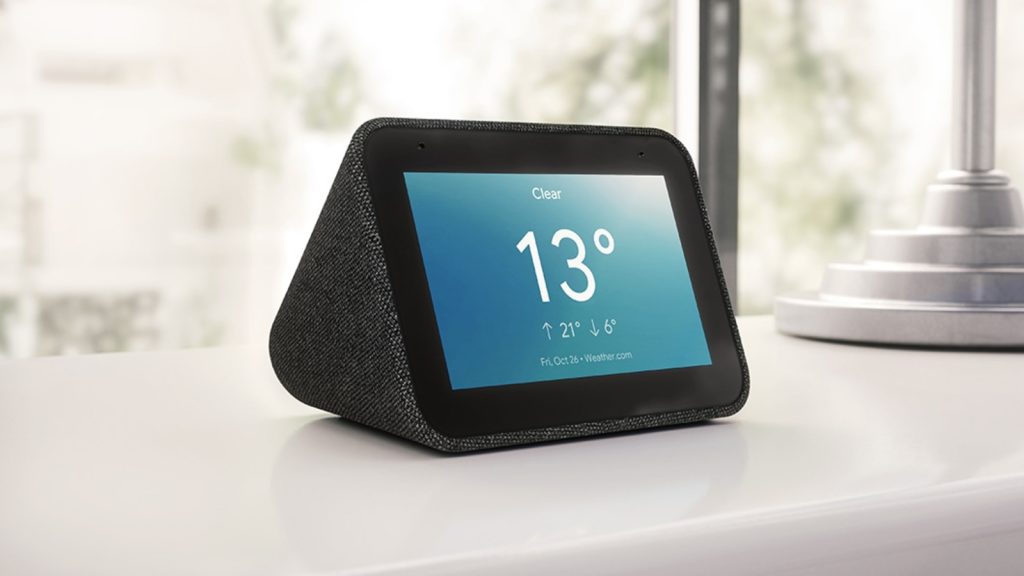
If you prefer the aesthetic of the larger Lenovo Smart Clock or perhaps you’d rather have the touch display, you’re in luck. For only $10 more than the Essential, you can pick up the original Lenovo Smart Clock and have the perfect bedside companion. I love mine and it has become the go-to smart speaker in the bedroom. I use mine not only as a clock and smart speaker but also to charge my TicWatch Pro 3. A recent update to the firmware has also given the smart clock its own nightlight thanks to a customizable display setting that softly illuminates your room without blinding you. You can pick the charcoal Lenovo Smart Clock for only $39.99 which is a savings of $40. That’s a deal worth sharing.
Lenovo 7″ Smart Display
Last but not least, my all-time favorite smart display is currently discounted down to $59.99. The 7″ Lenovo Smart Display features all the functionality of larger devices but its discrete design is perfect for places like a kitchen counter which happens to be where mine lives. The speakers are robust enough to provide some quality jams while I’m cooking and the 7″ touch display is large enough for me to read through a new recipe from the other side of the kitchen.
The Lenovo Smart Display does have a camera so you can use it to make video calls and as with any good Assistant-enabled device, you can control all of your smart things with simple voice commands or the touch screen. This display retails for $99 but you can pick it up for $59.99 and have one of the best smart displays available. One last tip. Whatever you decide to buy from Lenovo, make sure you use the promo code “extrafive” and you’ll grab a 5% discount at checkout on nearly anything from the website.