


Support our independent tech coverage. Chrome Unboxed is written by real people, for real people—not search algorithms. Join Chrome Unboxed Plus for just $2 a month to get an ad-free experience, access to our private Discord, and more. Learn more about membership here.
START FREE TRIAL (MONTHLY)START FREE TRIAL (ANNUAL)
 Much like the dawn of Android apps on Chromebooks, the buzz around container-driven Linux apps is growing day by day. More features keep cropping up and it feels like we might be headed towards some sort of announcement at Google I/O in a couple weeks, even if we don’t hear it in the primary keynote.
We’ve already covered how you can try this new feature on a Pixelbook (with an accompanying video) and even jumped the gun a bit with regard to hopeful features this new era will unveil, but now we have some confirmation on UI elements for the overall user experience for the entire Crostini project.
Put simply, Linux needs a UI to be defined in order for visual elements to know how to render out for the user. Just like Android, Windows, MacOS or Chrome OS, much of this standard UI is driven by the operating system. If an app developer calls on the system font, toolbar, button, etc., those things need to be defined by the underlying system in order to be shown.
Since these Linux apps we’re seeing aren’t running with any sort of desktop environment defined (Gnome, XFCE, Unity, etc.), there needs to be a set of basic rules governing how standard app elements will display.
Enter Adapta
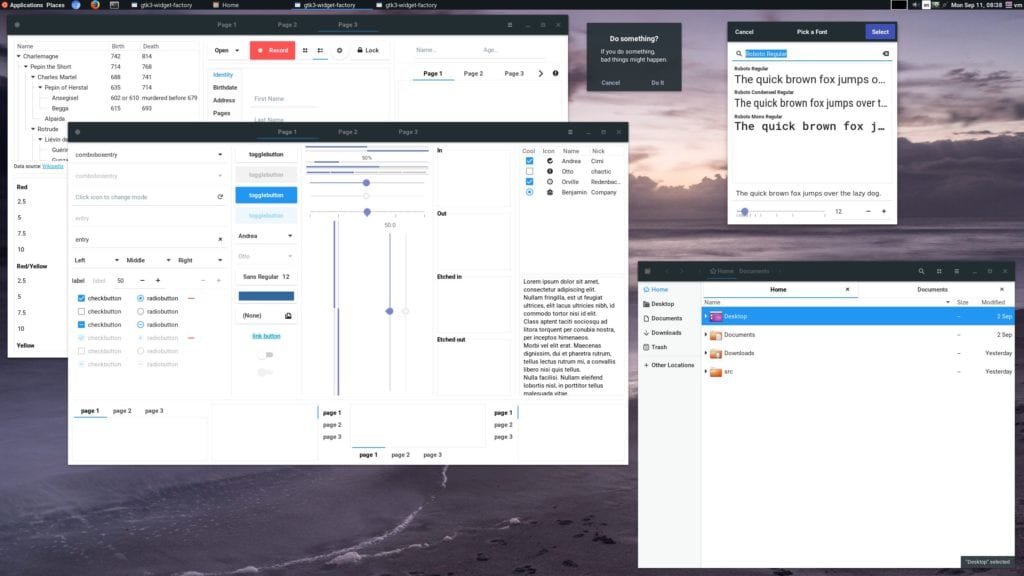
Adapta is a theme that can be used on many Linux distributions and pulls heavily from Google’s own Material Design look and feel. While it isn’t exactly a Google-branded theme, it looks like the developers behind the Crostini project have deemed it good enough to use for the rollout. Granted, this theme could be switched down the road or Google could simply make a custom theme that closely matches Chrome OS, but for now it seems like Adapta is the chosen one. You can check out the commit here if you want, but it is spelled out quite clearly.
Adapta will be the theme loaded when a container gets installed and launched. You can look through a massive list of PNGs that make up the basis of the underlying UI, but the pic below gives a better feel for what Adapta looks like in action.
Over at XDA (where we first saw this story), a great point was also made: since Google is taking the time to package in a theme with all this, it is looking more and more as if this effort will be aimed at consumers alongside developers at this point. After all, people comfortable with Linux and its terminal would feel right at home getting the theme of their choice attached inside a container. They wouldn’t need this help.
The inclusion of a theme out of the box makes me think this could end up being a Chrome OS feature for the masses after all. Keep it locked here as we continue to unravel the Crostini storyline.

