


Support our independent tech coverage. Chrome Unboxed is written by real people, for real people—not search algorithms. Join Chrome Unboxed Plus for just $2 a month to get an ad-free experience, access to our private Discord, and more. Learn more about membership here.
START FREE TRIAL (MONTHLY)START FREE TRIAL (ANNUAL)
Before the release of Google’s latest A-series Pixel smartphone, I shared my thoughts on how and why the Pixel 6a could very well upend the budget smartphone market. In that post, I pointed out that it all really came down to price. We knew that Google’s mid-range Tensor-powered phone would deliver most of what we love about Pixels and that you’d still be getting all the goodness of the AI-powered camera experience.
While I had my fingers crossed that the new Pixel 6a would come in just under $400, I’m not naive and I wasn’t surprised when the latest phone in the Pixel family launched at the very affordable price of $449 ($499 for Verizon and AT&T due to the addition of mmWave). Regardless, the Google Pixel 6a is a solid device with a great price and it’s perfect for those wanting a Google-centric smartphone with a great camera without the flagship price tag. Check out Robby’s hands-on to see why the Pixel 6a is a great phone for those looking for the Google experience on a budget.
Now, buying the Pixel 6a does come with some trade-offs. You only get a 60Hz display, it doesn’t have wireless charging, and….. well, that’s really the big omissions when you pick the Pixel 6a over its more-premium siblings. I’d argue that the average consumer might not even notice the 60Hz display so that’s not a big deal when we’re talking about budget-range devices. Wireless charging is also a nicety that you really only expect when you’re buying a premium device, not a phone that’s well under $500.
All that to say, the Pixel 6a is well worth the MSRP of $449 but guess what? You can throw that price out the window because right now, you pick up Google’s latest budget smartphone for as little as $199 and it doesn’t require trading in another device. To get this deal, you’ll need to head over to BestBuy.com or your local Best Buy store. Don’t worry, this promotion applies to the four major carriers as well as Google Fi. Your price will depend on the carrier you are with and whether or not you’re upgrading or adding a line. Either way, the most you’re going to pay is $299.
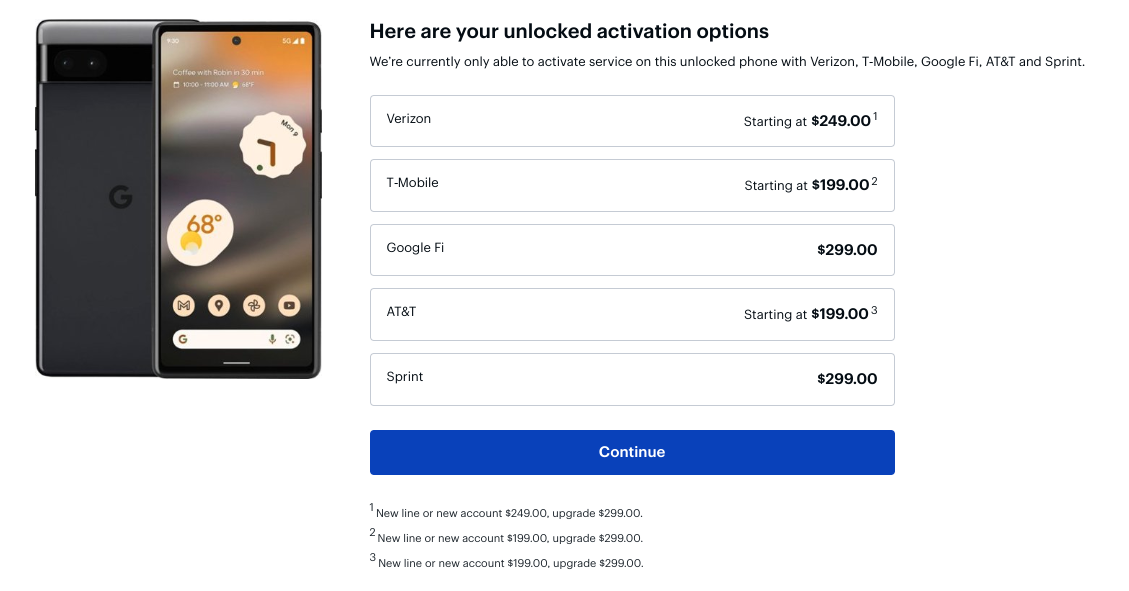
So, what’s the catch here? Really, there’s no catch. You simply have to pay for your new Pixel 6a outright and activate it immediately through your current carrier or activate a new account with one of the available carriers. For example, an existing T-Mobile customer such as myself can add the Pixel 6a to my cart and by adding a new line to my current account, I’ll get the phone for $199. If I wanted to upgrade a current line, the price would be $299. Best Buy will walk you through the process of connecting to your carrier account and boom, you’re on your way to scoring a killer Pixel phone for $300 or less.
If you have been itching to get your hands on a new Pixel device but can’t bring yourself to spend $600+ dollars, this is the deal that you’ve been waiting for. Now, there are still some great deals through most of the carriers that will net you some serious savings on the Pixel 6 or Pixel 6 Pro but this discount on the Pixel 6a is as undeniably good as the phone itself. Check it out over at Best Buy and grab yours before this deal is no more.
SUBSCRIBE TO UPSTREAM
Get Chrome Unboxed delivered straight to your inbox
Upstream is our flagship, curated newsletter with the top stories, most click-worthy deals, giveaways, and trending articles from Chrome Unboxed sent directly to your inbox a few times a week. Join 31,000+ subscribers.

