
• Skip to main content
  • Skip to primary sidebar
  • Deals
  • Features
  • Guides
  • Chromebooks
  • Videos
  • Podcast
  • More +
    • Reviews
    • Unboxing
    • Upcoming Devices
    • Chromebook Plus
    • Chrome
    • ChromeOS
    • Chrome OS Flex
  • Search
  • Sign Up
  • Log In
Chrome Unboxed – The Latest Chrome OS News

Chrome Unboxed - The Latest Chrome OS News

A Space for All Things Chrome, Google, and More!

  • Deals
  • Features
  • Guides
  • Chromebooks
  • Videos
  • Podcast
  • More +
    • Reviews
    • Unboxing
    • Upcoming Devices
    • Chromebook Plus
    • Chrome
    • ChromeOS
    • Chrome OS Flex
  • Search
  • Sign Up
  • Log In

Wyze’s Solar Cam Pan brings 360° coverage and endless power for just $80

October 21, 2025 By Joseph Humphrey View Comments

Support our independent tech coverage. Chrome Unboxed is written by real people, for real people—not search algorithms. Join Chrome Unboxed Plus for just $2 a month to get an ad-free experience, access to our private Discord, and more. Learn more about membership here.
START FREE TRIAL (MONTHLY)START FREE TRIAL (ANNUAL)

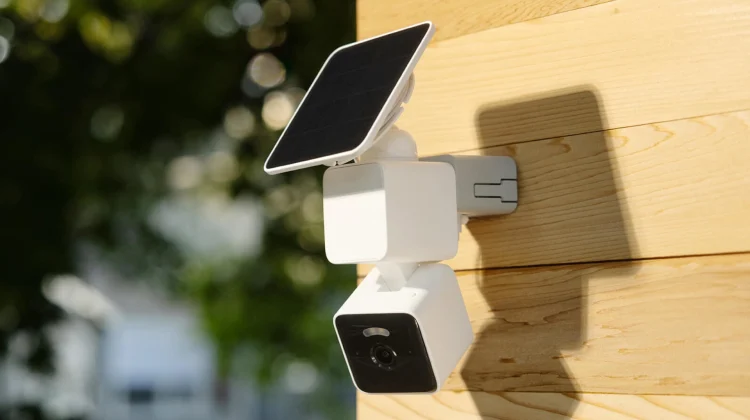
Wyze has a new product that tackles a major pain point for outdoor security that myself and many of you have probably experienced: power. The newly announced Wyze Solar Cam Pan combines a battery-powered design with an integrated solar panel and adds versatile pan-and-tilt capabilities, creating a compelling, set-it-and-forget-it security solution for just $80.

This is Wyze’s first wireless camera with full 360° pan and 70° tilt coverage, allowing you to eliminate blind spots and cover entire areas with a single device. The real game-changer, though, is the integrated solar panel, which needs just one hour of direct sunlight per day for continuous power. For most placements, this means zero maintenance – no more climbing ladders to swap batteries.

Xremove ads

Wyze says the new Solar Cam Pan will record in “crystal-clear” 2K HD resolution with a wide dynamic range that will even out the highs and lows in the image. One of the other notable features that caught my eye is that this new camera has AI-powered person tracking built in that automatically follows detected individuals – no subscription required. It also includes color night vision, a motion-activated spotlight and siren, IP65 weather resistance, two-way audio, Wi-Fi 6, and support for local storage via microSD card (up to 512GB). Integrations with Amazon Alexa, Google Assistant, IFTTT, and Wyze Automations are also standard.

Check out Today’s Best Chomebook Deals

Solving real-world security gaps

This new camera couldn’t have come at a better time for me personally. I’ve been using a Wyze Cam hooked into a lamp socket adapter on the front of my garage. While it works, and I’ve even programmed the lights to turn on and off automatically through the socket adapter, the whole setup looks a bit janky and depends entirely on no one accidentally flipping the light switch inside the garage (which, of course, happens, even with the provided “Do Not Turn Off” sticker).

Featured Videos

Xremove ads

But more importantly, my basic camera lacks pan and tilt. Just recently, a neighbor’s car was broken into, and when I checked my footage, the incident was just barely out of view. The Solar Cam Pan looks like the perfect solution, offering that crucial extra coverage without the hassle of running new wiring or worrying about switches.

Overall, putting a wire-free, solar-powered, pan-and-tilt camera with these features into a package for just $79.98 is pretty impressive. At this current price, it’s also a little cheaper than the Reolink pan/tilt solar camera. So, if you’ve been holding off on outdoor cameras due to wiring or battery hassles, this looks like a fantastic, hassle-free solution. The Wyze Solar Cam Pan is available starting today directly from Wyze.com.

SUBSCRIBE TO UPSTREAM

Get Chrome Unboxed delivered straight to your inbox

Upstream is our flagship, curated newsletter with the top stories, most click-worthy deals, giveaways, and trending articles from Chrome Unboxed sent directly to your inbox a few times a week. Join 31,000+ subscribers.

Xremove ads
SUBSCRIBE HERE!

Filed Under: News

About Joseph Humphrey

Joe has been a part of Chrome Unboxed since 2016 when he started helping Robby produce YouTube videos. Although normally behind the scenes, Joe has spent countless hours editing reviews and unboxings of many, many Chromebooks. Now a Partner in Unboxed Media, Joe is constantly thinking strategically about the Chromebook industry and how Chrome Unboxed can continue to innovate in the space.

Primary Sidebar

Xremove ads

Deals

The best Chromebook deals today

By Robby Payne
March 30, 2026

The Acer Chromebook Plus Spin 714 hits a new all-time low at $270 off

By Robby Payne
March 25, 2026

You can score $40 off Google’s battery-powered Nest Doorbell right now

By Joseph Humphrey
March 20, 2026

The touchscreen Lenovo Chromebook Slim 3 is a steal at under $200

By Robby Payne
March 16, 2026

Google TV Streamer and Remote held in front of a wall-mounted TV

The premium Google TV Streamer 4K is back down to $80

By Joseph Humphrey
March 16, 2026

More Deals

Xremove ads

Reviews

Acer Chromebook Plus Spin 514 Review: Kompanio Ultra power in a convertible

By Robby Payne
December 24, 2025

My review after 6 weeks with the Lenovo Chromebook Plus 14 [VIDEO]

By Robby Payne
August 11, 2025

One week with the best small Android tablet you can buy, and I’m sold

By Robby Payne
May 9, 2025

Best Chromebooks of 2024 [VIDEO]

By Robby Payne
November 28, 2024

Samsung Galaxy Chromebook Plus Review: Samsung is back! [VIDEO]

By Robby Payne
October 28, 2024

More Reviews

Xremove ads

Guides

This Chromebook trackpad shortcut is definitely not new, but is blowing my mind

By Robby Payne
March 11, 2024

How to reduce broadcast delay on YouTube TV to stop live spoilers

By Robby Payne
December 8, 2023

Windows PC keyboard and Chromebook

How to use a Windows keyboard with a Chromebook

By Joseph Humphrey
December 8, 2023

How reset and revert your Chromebook to the previous version of Chrome OS

By Robby Payne
November 29, 2023

My Chromebook Plus features disappeared: here’s how I fixed it

By Robby Payne
November 24, 2023

More Guides

TWITTER · FACEBOOK · INSTAGRAM · YOUTUBE · EMAIL · ABOUT

Copyright © 2026 · Chrome Unboxed · Chrome is a registered trademark of Google Inc.
We are participants in various affiliate advertising programs designed to provide a means for us to earn fees by linking to affiliated sites.

PRIVACY POLICY