

Support our independent tech coverage. Chrome Unboxed is written by real people, for real people—not search algorithms. Join Chrome Unboxed Plus for just $2 a month to get an ad-free experience, access to our private Discord, and more. Learn more about membership here.
START FREE TRIAL (MONTHLY)START FREE TRIAL (ANNUAL)
Last year, the Chromebook world saw a new and slightly unexpected shift towards gaming-centric devices. We now have had three fantastic options (four if you include the first ASUS “gaming” Chromebook that was nowhere near as good as the newer Vibe CX34 Flip) that not only excel in cloud gaming, but also in typical Chromebook use cases, too. One of the standout features with these gaming Chromebooks has been the addition of RGB keyboards that we also find on the HP Dragonfly Pro Chromebook (a high-end device not necessarily targeted towards gamers).
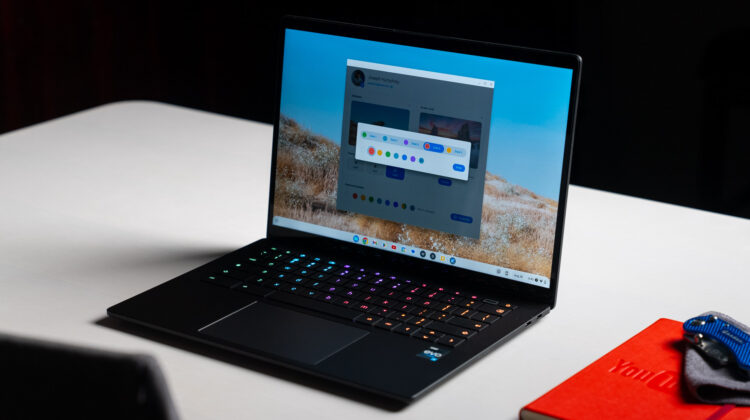
As of the release of ChromeOS 116, we now have integrated RGB keyboard customization as a built-in feature for Chromebooks equipped with these sorts of keyboards. This was initially discovered in late July as a development feature, but it’s now official, making the whole RGB experience far more personalized than before.
Multi-Zone Customization
Most Chromebook RGB keyboards are designed with 4 color zones that can change independently. The only way to see them in action prior to this new feature addition was by selecting the multi-color option in the Wallpaper & Style menu on your Chromebook. This gave you 4 separate colors, but didn’t allow you to change them at all.
The new multi-zone customization feature now allows you to select specific colors for each of these zones, giving you far more control over the multiple colors on your device’s keyboard. When I tested this feature on the HP Dragonfly Pro Chromebook, I found it actually comes with 5 color zones, one more than the typical 4. ChromeOS had no issue recognizing this, and it even added a fifth customizable zone in the settings. From that point, you simply click on the zone and pick the color you’d like to go with for each.

As it was when we originally reported on this feature in ChromeOS 115, a second flag labeled ‘Experimental RGB Keyboard Patterns Support’ is available, but doesn’t yet seem operational. When activated, this could allow users to create customized patterns for the color zones, but we’re still waiting to see if the sizes of these zones will be modifiable and what further pattern support will eventually be offered.
Testing this out, we’re still not seeing support for 3rd-party peripheral keyboards, but I’m hopeful that will come down the road. Most of those RBG-enabled accessories rely on specific drivers, so my bet is those keyboards designated as Works with Chromebook will be the first that get supported. Perhaps down the road, more of the 3rd party types will be included as well.
For now, if you have a Chromebook with an RGB keyboard, you can take this new feature for a spin right now. There are no flags or special settings needed. Simply right-click on the desktop, select Set wallpaper & style, and then select the Customize button at the bottom of that window to get started. It may not be wild amounts of customization just yet, but this could be the start of some truly unique keyboard color combos down the road for supported Chromebooks.
SUBSCRIBE TO UPSTREAM
Get Chrome Unboxed delivered straight to your inbox
Upstream is our flagship, curated newsletter with the top stories, most click-worthy deals, giveaways, and trending articles from Chrome Unboxed sent directly to your inbox a few times a week. Join 31,000+ subscribers.

