

Support our independent tech coverage. Chrome Unboxed is written by real people, for real people—not search algorithms. Join Chrome Unboxed Plus for just $2 a month to get an ad-free experience, access to our private Discord, and more. Learn more about membership here.
START FREE TRIAL (MONTHLY)START FREE TRIAL (ANNUAL)
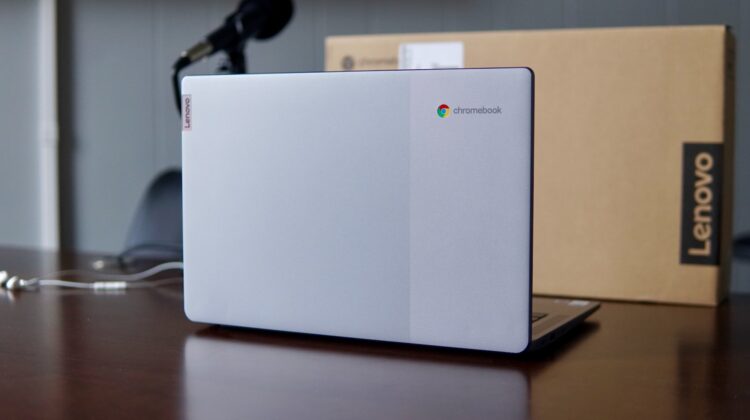
Right off the top, I’m going to go ahead and tell you that there isn’t much in the Lenovo Chromebook 3 that is mind-blowing, ultra-impressive, or eye-catching. Those types of titles aren’t really what this Chromebook is about, after all, but when any Chromebook dives beneath the $200 price point, it turns heads. This particular one usually retails for $269, but we were able to snag one from Best Buy a week or so ago for $159. That’s insane and the price held for long enough that we just had to get one in the office and see what it is you can get from Lenovo for less than $200.
Lenovo Chromebook 3 14″ at Best Buy
Lenovo Chromebook 3 (14-inch) key specs
- MediaTek MT8183
- 4GB RAM
- 64GB eMMC storage
- 14-inch FHD anti-glare @ 220 nits (non-touch or touch)
- 720p webcam
- 18.6mm x 326.6mm x 221mm
- 2.87 lbs
- Bluetooth 4.2
- Wi-Fi 5.0
- 1x USB Type C
- 1x USB Type A
- microSD card slot
- headphone/mic jack
As you can see, there’s nothing amazing going on, here. The MT8183 processor inside is the same that we find in the slightly-aging Lenovo Chromebook Duet, the RAM and storage are nothing to write home about, and the I/O is limited with just a few ports to speak of. With a TN display and no touch input, this Chromebook isn’t winning any versatility awards, either.
But then there’s the price. At the end of the day, low prices fix a lot of things. Sure, this is an all-plastic Chromebook that has no real remarkable features, but at the $159 price we bought it for, it doesn’t really need to. It just needs to do the job and get out of the way. And for that sort of money, this 14-inch Chromebook from Lenovo delivers.
The keyboard feels good, the trackpad is solid, and while it comes with a TN panel, the display isn’t awful. Additionally, the whole package has an aesthetic that punches above its weight class and using this device doesn’t feel like you are working on something so affordable. The addition of a webcam cover is awesome on a Chromebook in this price range and I’d love to see this as a standard feature on all Chromebooks moving forward. Oh, and upward-firing speakers are always a nice addition, even if they sound as thin as the speakers on this affordable Chromebook do.
The MT8183 will be cause for concern for anyone trying to really get a bunch of tasks completed while using this Chromebook, but I don’t think that is the target audience at all. Instead, this Chromebook would be well-suited for elementary school work, basic web browsing, social media and some light Android games. Oh, and just like any other Chromebook out there, cloud gaming works just fine. Fire up Stadia, GeForce NOW, or XBOX Cloud Gaming and you’ll have a great little mobile gaming device.
As we get closer to the Jasper Lake Chromebook takeover, devices like this Lenovo Chromebook 3 need to keep the price in these eye-popping ranges. We’ve seen what these latest small-core Intel devices are capable of, and from a performance standpoint, they completely demolish any affordable Chromebooks that have come before them. The only thing that will keep devices with the MT8183 or older small-core Intel chips inside afloat will be impossible-to-ignore prices. For now, that strategy works and it has never been more evident than it is with this solid little Chromebook and a wildly-low price.
Lenovo Chromebook 3 14″ at Best Buy
SUBSCRIBE TO UPSTREAM
Get Chrome Unboxed delivered straight to your inbox
Upstream is our flagship, curated newsletter with the top stories, most click-worthy deals, giveaways, and trending articles from Chrome Unboxed sent directly to your inbox a few times a week. Join 31,000+ subscribers.

