
• Skip to main content
  • Skip to primary sidebar
  • Deals
  • Features
  • Guides
  • Chromebooks
  • Videos
  • Podcast
  • More +
    • Reviews
    • Unboxing
    • Upcoming Devices
    • Chromebook Plus
    • Chrome
    • ChromeOS
    • Chrome OS Flex
  • Search
  • Sign Up
  • Log In
Chrome Unboxed – The Latest Chrome OS News

Chrome Unboxed - The Latest Chrome OS News

A Space for All Things Chrome, Google, and More!

  • Deals
  • Features
  • Guides
  • Chromebooks
  • Videos
  • Podcast
  • More +
    • Reviews
    • Unboxing
    • Upcoming Devices
    • Chromebook Plus
    • Chrome
    • ChromeOS
    • Chrome OS Flex
  • Search
  • Sign Up
  • Log In

Unboxing the ASUS Chromebox 5 with wireless charging built in [VIDEO]

April 21, 2023 By Robby Payne View Comments

Support our independent tech coverage. Chrome Unboxed is written by real people, for real people—not search algorithms. Join Chrome Unboxed Plus for just $2 a month to get an ad-free experience, access to our private Discord, and more. Learn more about membership here.
START FREE TRIAL (MONTHLY)START FREE TRIAL (ANNUAL)

Around Chrome Unboxed, we don’t do a whole lot of content around Chromeboxes. It’s understandable, right? Chromeboxes are the simplest manifestation of ChromeOS hardware, putting the necessary bits to run the OS in a box and letting the user ultimately choose what peripherals go with it. With no screen, no keyboard, no trackpad, no hinges and no real speakers to deal with, Chromeboxes keep things as simple as possible and – because of this – aren’t that interesting to put on camera right out of the box.

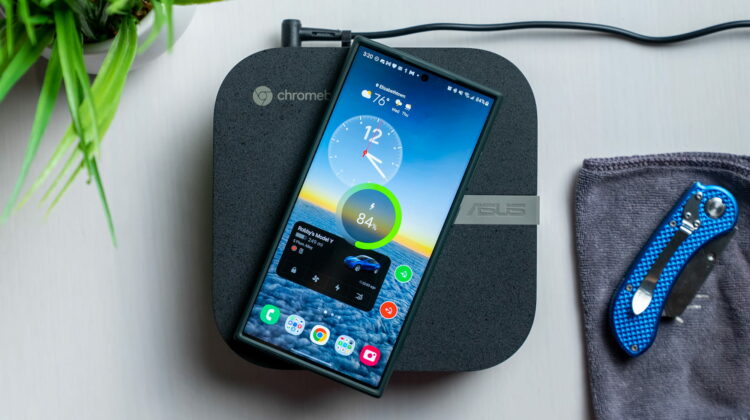
However, with this latest Chromebox from ASUS, there’s a special trick that makes it worth taking a quick look at that we’ve not seen up to this point in the Chromebox world. The trick? Wireless charging built right into the top portion. That’s right, this ASUS Chromebox has a 15W wireless charging pad included right out of the box and of all the things you could add to a Chromebox, this is absolutely my favorite.

Xremove ads

I suppose we should talk about the specs, too. It shipped to us with a 12th-gen Core i5 1240P, 8GB of RAM, 512GB of NVMe storage, and support for four 4K displays (via 2 HDMI ports, a DisplayPort, and a USB Type C port). But those are bound to change depending on where you purchase it from and what your budget is. There will be tons of options and price points, ranging from right under $300 to nearly $1000 when it does arrive. Regardless of those internals, however, you’ll get that sweet wireless charger on top in every configuration.

With a 15W output, it’ll charge any of your Qi-equipped accessories (including your phone) while it sits there and runs your desktop setup. I honestly can’t think of a better place to put one of these charging pads, and I love that ASUS included it here. In most scenarios, a Chromebox is simply sitting on the desk and taking up space, but with this little addition, there is great functionality to this minimal computer box and I’d hope this is an inclusion that every Chromebox maker considers moving forward.

Featured Videos

Xremove ads

SUBSCRIBE TO UPSTREAM

Get Chrome Unboxed delivered straight to your inbox

Upstream is our flagship, curated newsletter with the top stories, most click-worthy deals, giveaways, and trending articles from Chrome Unboxed sent directly to your inbox a few times a week. Join 31,000+ subscribers.

SUBSCRIBE HERE!

Filed Under: Chromebox, Unboxing/First Impressions Tagged With: videos

About Robby Payne

As the founder of Chrome Unboxed, Robby has been reviewing Chromebooks for over a decade. His passion for ChromeOS and the devices it runs on drives his relentless pursuit to find the best Chromebooks, best services, and best tips for those looking to adopt ChromeOS and those who've already made the switch.

Primary Sidebar

Xremove ads

Deals

The touchscreen Lenovo Chromebook Slim 3 is a steal at under $200

By Robby Payne
March 16, 2026

Google TV Streamer and Remote held in front of a wall-mounted TV

The premium Google TV Streamer 4K is back down to $80

By Joseph Humphrey
March 16, 2026

The best Chromebook deals today

By Robby Payne
March 16, 2026

Pixel Buds Pro 2 running

I still love the Pixel Buds Pro 2 and they are $60 off right now

By Joseph Humphrey
March 13, 2026

The Lenovo Chromebook Slim 3 is the one to get, starting at just $139 right now

By Robby Payne
March 6, 2026

More Deals

Xremove ads

Reviews

Acer Chromebook Plus Spin 514 Review: Kompanio Ultra power in a convertible

By Robby Payne
December 24, 2025

My review after 6 weeks with the Lenovo Chromebook Plus 14 [VIDEO]

By Robby Payne
August 11, 2025

One week with the best small Android tablet you can buy, and I’m sold

By Robby Payne
May 9, 2025

Best Chromebooks of 2024 [VIDEO]

By Robby Payne
November 28, 2024

Samsung Galaxy Chromebook Plus Review: Samsung is back! [VIDEO]

By Robby Payne
October 28, 2024

More Reviews

Xremove ads

Guides

This Chromebook trackpad shortcut is definitely not new, but is blowing my mind

By Robby Payne
March 11, 2024

How to reduce broadcast delay on YouTube TV to stop live spoilers

By Robby Payne
December 8, 2023

Windows PC keyboard and Chromebook

How to use a Windows keyboard with a Chromebook

By Joseph Humphrey
December 8, 2023

How reset and revert your Chromebook to the previous version of Chrome OS

By Robby Payne
November 29, 2023

My Chromebook Plus features disappeared: here’s how I fixed it

By Robby Payne
November 24, 2023

More Guides

TWITTER · FACEBOOK · INSTAGRAM · YOUTUBE · EMAIL · ABOUT

Copyright © 2026 · Chrome Unboxed · Chrome is a registered trademark of Google Inc.
We are participants in various affiliate advertising programs designed to provide a means for us to earn fees by linking to affiliated sites.

PRIVACY POLICY