• Skip to main content
  • Skip to primary sidebar
  • Deals
  • Features
  • Guides
  • Chromebooks
  • Videos
  • Podcast
  • More +
    • Reviews
    • Unboxing
    • Upcoming Devices
    • Chromebook Plus
    • Chrome
    • ChromeOS
    • Chrome OS Flex
  • Search
  • Sign Up
  • Log In
Chrome Unboxed – The Latest Chrome OS News

Chrome Unboxed - The Latest Chrome OS News

A Space for All Things Chrome, Google, and More!

  • Deals
  • Features
  • Guides
  • Chromebooks
  • Videos
  • Podcast
  • More +
    • Reviews
    • Unboxing
    • Upcoming Devices
    • Chromebook Plus
    • Chrome
    • ChromeOS
    • Chrome OS Flex
  • Search
  • Sign Up
  • Log In

The Pixel Phone app gets a few useful UI changes in latest update

February 25, 2025 By Robby Payne View Comments

Support our independent tech coverage. Chrome Unboxed is written by real people, for real people—not search algorithms. Join Chrome Unboxed Plus for just $2 a month to get an ad-free experience, access to our private Discord, and more. Learn more about membership here.
START FREE TRIAL (MONTHLY)START FREE TRIAL (ANNUAL)

Google has released a blog post detailing the latest updates to the Pixel Call Assist features, while also confirming the rollout of a redesigned call UI and new filters in the Recents view. These changes are simple but are intended to streamline the call experience and provide users with more efficient tools for managing their calls.

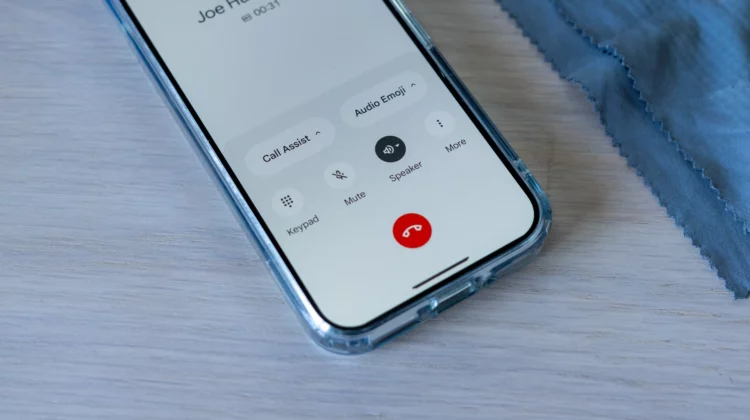
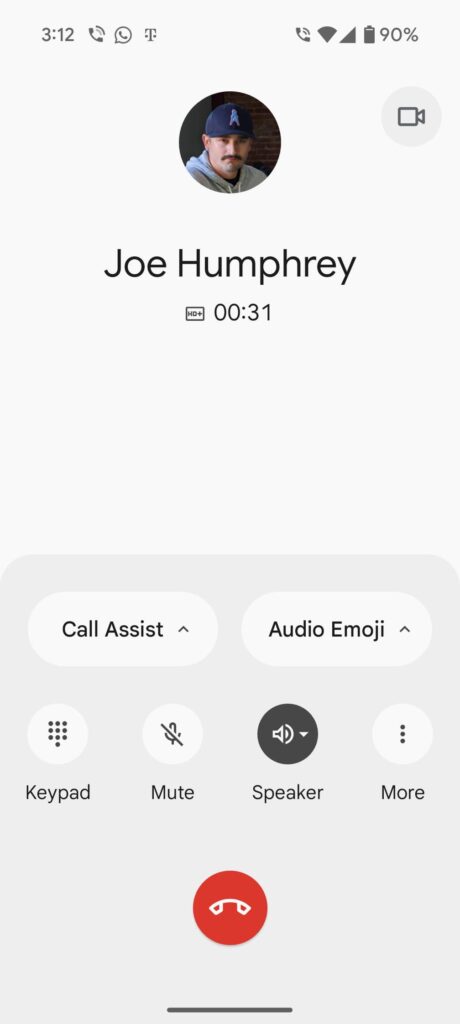
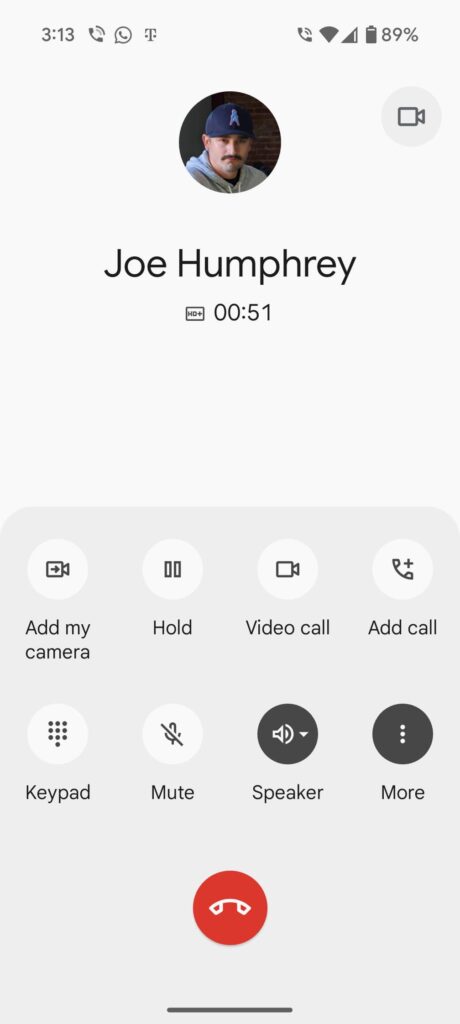
One of the most notable changes that you might notice is the redesigned call interface. Previously, accessing features like Call Notes and Audio Emoji on Pixel phones required navigating through a “More” button. Now, Google has implemented a more intuitive approach, displaying large, easily accessible pills for Call Assist and Audio Emoji directly above the main call control buttons. This simplified layout makes it quicker and easier for users to utilize these features during calls.
Xremove ads

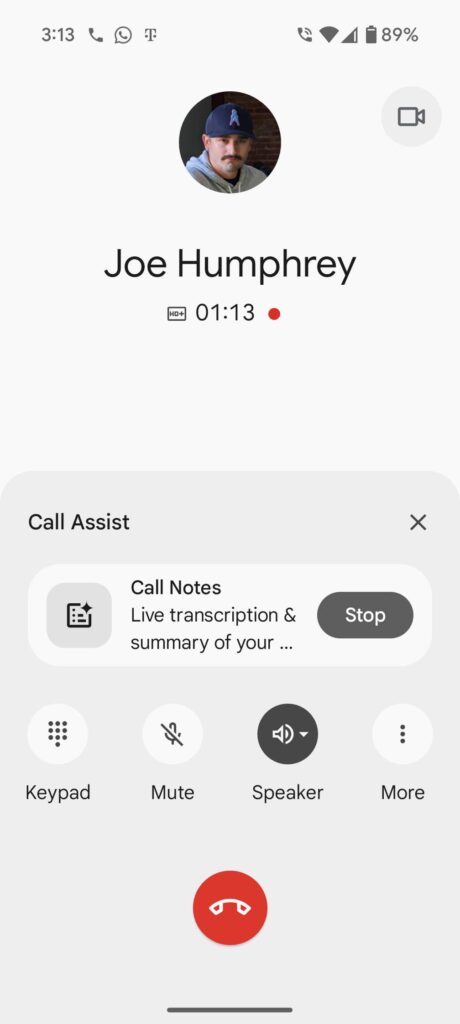
Tapping on the Call Assist pill reveals a sheet with a prominent card for “Call Notes: Live transcripts & summary of your call.” This feature, which began appearing for beta users in January, is now officially rolling out and Google even acknowledged the update in their blog post. As of right now, this updated UI appears to be exclusive to the Pixel 9 series, which are the only devices that support Call Notes.

Check out Today’s Best Chomebook Deals

In addition to the UI refresh, it looks like Google is also working on new filters in the Recents view to help users manage their call logs more effectively. These filters, presented as convenient buttons below the “Seach contacts” bar, allow users to quickly sort their call history by categories such as All, Missed, Contacts, Non-spam, and Spam. This feature, combined with a taller search bar, simplifies the process of finding specific calls and decluttering the call log. These Recents filters have been spotted by 9to5Google on non-Pixel devices running the Phone by Google app, specifically with beta version 162.

Featured Videos

Xremove ads

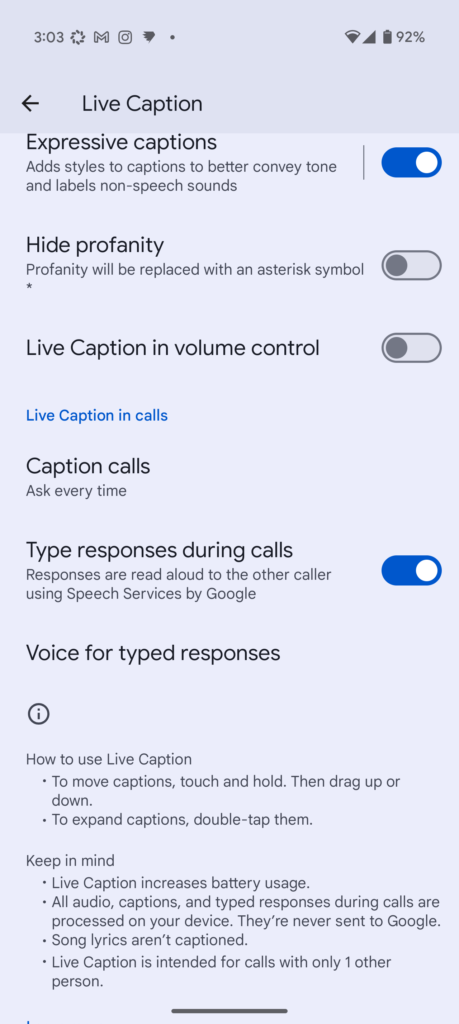
Beyond the UI and filter updates, Google’s blog post also highlighted other Call Assist features, including reverse phone number lookup, Direct My Call, Hold for Me, and Call Screen suggested replies. There’s also a section on using Live Caption to “read” incoming phone calls and respond via text. This accessibility feature allows users to type responses, which are then read aloud to the caller by the app. Users can even customize the voice used for these read-aloud responses in Live Caption settings. To enable this feature, users can navigate to Settings > Accessibility > Live Caption > Live Caption in calls.

SUBSCRIBE TO UPSTREAM

Get Chrome Unboxed delivered straight to your inbox

Upstream is our flagship, curated newsletter with the top stories, most click-worthy deals, giveaways, and trending articles from Chrome Unboxed sent directly to your inbox a few times a week. Join 31,000+ subscribers.

SUBSCRIBE HERE!

Filed Under: News, Pixel

About Robby Payne

As the founder of Chrome Unboxed, Robby has been reviewing Chromebooks for over a decade. His passion for ChromeOS and the devices it runs on drives his relentless pursuit to find the best Chromebooks, best services, and best tips for those looking to adopt ChromeOS and those who've already made the switch.

Primary Sidebar

Xremove ads

Deals

Lenovo Legion Tab Gen 3 drops to $399, ahead of the much pricier Gen 5 release

By Joseph Humphrey
April 18, 2026

How to get 50% off YouTube Premium for a full year with Google One

By Robby Payne
April 16, 2026

The Pixel 10a just dropped to $449, but here’s why you should buy the Pixel 10 instead

By Joseph Humphrey
April 13, 2026

Save up to $200 on the two best Chromebooks on the market

By Robby Payne
April 13, 2026

The best Chromebook deals today

By Robby Payne
April 13, 2026

More Deals

Xremove ads

Reviews

Acer Chromebook Plus Spin 514 Review: Kompanio Ultra power in a convertible

By Robby Payne
December 24, 2025

My review after 6 weeks with the Lenovo Chromebook Plus 14 [VIDEO]

By Robby Payne
August 11, 2025

One week with the best small Android tablet you can buy, and I’m sold

By Robby Payne
May 9, 2025

Best Chromebooks of 2024 [VIDEO]

By Robby Payne
November 28, 2024

Samsung Galaxy Chromebook Plus Review: Samsung is back! [VIDEO]

By Robby Payne
October 28, 2024

More Reviews

Xremove ads

Guides

This Chromebook trackpad shortcut is definitely not new, but is blowing my mind

By Robby Payne
March 11, 2024

How to reduce broadcast delay on YouTube TV to stop live spoilers

By Robby Payne
December 8, 2023

Windows PC keyboard and Chromebook

How to use a Windows keyboard with a Chromebook

By Joseph Humphrey
December 8, 2023

How reset and revert your Chromebook to the previous version of Chrome OS

By Robby Payne
November 29, 2023

My Chromebook Plus features disappeared: here’s how I fixed it

By Robby Payne
November 24, 2023

More Guides

TWITTER · FACEBOOK · INSTAGRAM · YOUTUBE · EMAIL · ABOUT

Copyright © 2026 · Chrome Unboxed · Chrome is a registered trademark of Google Inc.
We are participants in various affiliate advertising programs designed to provide a means for us to earn fees by linking to affiliated sites.

PRIVACY POLICY