

Support our independent tech coverage. Chrome Unboxed is written by real people, for real people—not search algorithms. Join Chrome Unboxed Plus for just $2 a month to get an ad-free experience, access to our private Discord, and more. Learn more about membership here.
START FREE TRIAL (MONTHLY)START FREE TRIAL (ANNUAL)
Just as the official Android 16 release begins its roll-out, Google is sweetening the deal for its own hardware users with the arrival of the June 2025 Pixel Drop. This latest feature drop is packed with a ton of new features and updates designed to make your Pixel phone more helpful, personalized, and accessible. From a brand-new way to stay in touch with your most important contacts to fun AI-powered creative tools, let’s dive into what’s new for Pixel!
Keep your favorite people front and center with Pixel VIPs
This is a fun one, and it’s exclusive to Pixel. A new “Pixel VIPs” widget for your home screen lets you prioritize the people who matter most. After adding contacts to your VIP list, the widget can show you your last call and message with them (including from WhatsApp!), see their shared location, and give you updates for important events like birthdays.
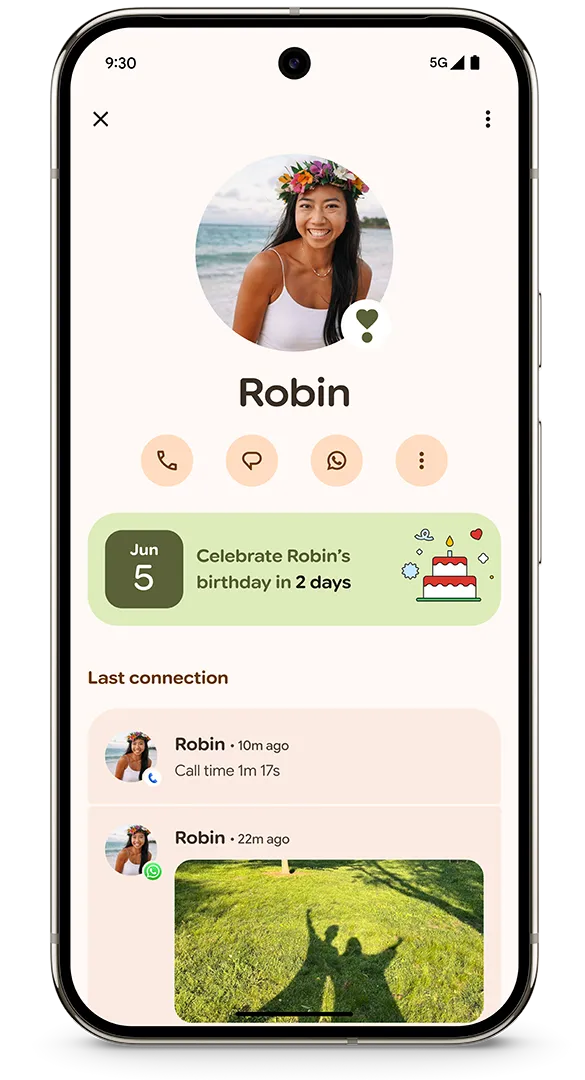
Crucially, you can set your VIPs to bypass Do Not Disturb mode, ensuring you never miss an important call or message from them. Google also notes that sensitive data, like your call log or message content, stays on your device for privacy.
Create custom AI stickers right from your keyboard
Getting more creative in your chats just got a lot easier. With help from a new tool called Pixel Studio, you can now generate custom stickers right inside Gboard using generative AI. Simply type a prompt, choose an emotion, and send your creation without ever leaving your conversation. Google gives fun examples like “an excited jelly avocado” or “a sad starfish wearing sunglasses.”

You can even make stickers from photos in your own camera roll – the feature will automatically remove the background, turning the main subject into a shareable sticker.
Pixel gets even more helpful and accessible
- Live search in Magnifier: You can now use the Magnifier to find text in your real-world surroundings in real-time without needing to snap a picture first. Just type what you’re looking for (like an item on a menu), and Magnifier will highlight matches on the screen as you move your phone.
- Enhanced hearing aid support: Tying into the Android 16 launch, Pixel 9 and newer phones will get improved LE audio features, making it easier to take calls and manage hearing aid presets and volume directly from your phone’s settings.
- More Expressive Captions: The Expressive Captions feature, which aims to capture the nuance and emotion in speech, can now even understand and display elongated words (like “yessss!”). It’s also expanding beyond the U.S. to Canada, the U.K., and Australia.
Camera and Photos get a little smarter
For photography folks, tapping the question mark icon in the Pixel Camera app will now open a new education hub with visual inspiration and helpful instructions to get the most out of each camera mode.
And coming soon to Google Photos is another AI-powered editing update. It will provide smart suggestions to enhance your photos with a single tap, recommend tools based on your edits, and give you easier access to your favorite controls.
More features for more users
Finally, Google is expanding the availability of some key existing features:
- Satellite SOS is now available in Australia.
- The Recorder app can now generate AI summaries in French and German.
- Clear voice in the Recorder app, which removes background noise, is now rolling out to Pixel 8 phones.
This is another solid Pixel Drop that brings a great mix of brand-new features, thoughtful expansions, and important accessibility tools. It’s a great reminder of one of the best parts of owning a Pixel – your phone just keeps getting better. Be sure to check for the update on your own device!
SUBSCRIBE TO UPSTREAM
Get Chrome Unboxed delivered straight to your inbox
Upstream is our flagship, curated newsletter with the top stories, most click-worthy deals, giveaways, and trending articles from Chrome Unboxed sent directly to your inbox a few times a week. Join 31,000+ subscribers.

