

Support our independent tech coverage. Chrome Unboxed is written by real people, for real people—not search algorithms. Join Chrome Unboxed Plus for just $2 a month to get an ad-free experience, access to our private Discord, and more. Learn more about membership here.
START FREE TRIAL (MONTHLY)START FREE TRIAL (ANNUAL)
The dream of a true, native desktop mode for Android has been a long time coming. For years, we’ve seen hints and manufacturer-specific solutions like Samsung DeX, but a cohesive, Google-led effort has remained a bit of a pipe dream. At Google I/O 2025, that dream finally began taking shape with the announcement of enhanced desktop experiences. And today, it becomes a reality you can actually try: a Developer Preview for Android’s new desktop mode is now available in the Android 16 QPR1 Beta 2 release for select Pixel devices.
This is the most serious and promising effort we’ve seen from Google to transform your phone or tablet into a powerful, large-screen productivity tool. And by collaborating with Samsung on this, they’re building on the solid years-old foundation of DeX to bring this experience to the entire Android ecosystem.
What the new Android desktop experience looks like
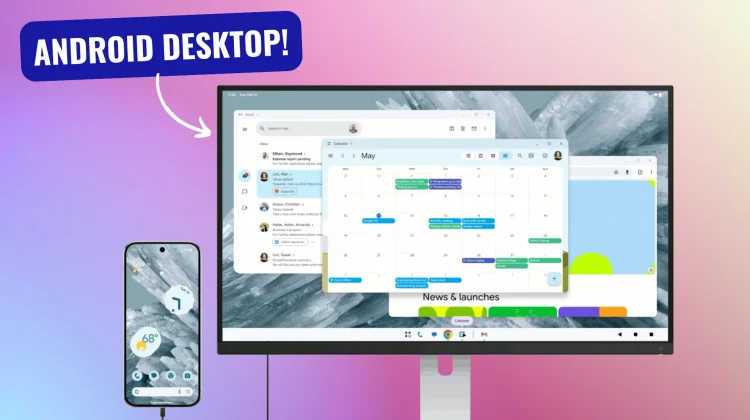
So, what happens when you plug your device into a monitor with this new ability? The experience is impressively robust and differs slightly between phones and tablets in a very smart way.

When you connect a supported Pixel phone to an external display, a new, independent desktop session starts up on the big screen. Your phone’s screen remains its own separate space. The connected display gives you a familiar desktop environment, complete with a taskbar for your running and pinned apps. You can run multiple apps side-by-side and freely resize their windows, just like you would on a Chromebook or a Windows PC.

For tablets, it gets even cooler. When you connect a compatible tablet to an external display, the desktop session is extended across both screens. This creates one massive, continuous workspace, allowing you to drag app windows, content, and your mouse cursor freely between your tablet’s screen and the external monitor.
New desktop-class features
This isn’t just a simple windowing mode, however; Google has baked in several new features to make it a true desktop-class experience. The underlying “desktop windowing” is becoming stable in Android 16, and it brings some key improvements:
- Easier window arrangement: You’ll have more intuitive options for tiling multiple app windows side-by-side, making it simpler to multitask across different applications.
- Multiple virtual desktops: Just like on a desktop OS, you can set up multiple desktop spaces for different workflows (e.g., one for work, one for personal) and switch between them.
- Better app compatibility: New treatments will help older, non-optimized apps look and behave more predictably in a windowed environment by default.
- Easily manage multiple windows of the same app: You’ll be able to manage and switch between multiple instances of the same app (like two Chrome windows) from the taskbar.
- Your workspace remembers its layout: Android will now better maintain your window sizes, positions, and states. When you set up your workspace just how you like it, it can be restored across sessions.
How to try it
This is an early look, but if you’re feeling adventurous, you can test it out now. This new desktop experience is part of the Android 16 QPR1 Beta 2 release. To get started, you’ll need a supported Pixel device (currently the Pixel 8 and Pixel 9 series) enrolled in the Android Beta Program.
It’s important to remember this is a “Developer Preview,” which means it’s still early and primarily intended for developers to begin optimizing their apps. There might be bugs, but it gives us a fantastic glimpse of what’s to come.
This is a massive step forward for Android’s productivity story. The collaboration with Samsung, the thoughtful features, and the release for testing all signal that Google is finally all-in on creating a powerful, native desktop experience for Android. We can’t wait to dive in and test this out ourselves and will be sure to report back on how it all works.
SUBSCRIBE TO UPSTREAM
Get Chrome Unboxed delivered straight to your inbox
Upstream is our flagship, curated newsletter with the top stories, most click-worthy deals, giveaways, and trending articles from Chrome Unboxed sent directly to your inbox a few times a week. Join 31,000+ subscribers.

