


Support our independent tech coverage. Chrome Unboxed is written by real people, for real people—not search algorithms. Join Chrome Unboxed Plus for just $2 a month to get an ad-free experience, access to our private Discord, and more. Learn more about membership here.
START FREE TRIAL (MONTHLY)START FREE TRIAL (ANNUAL)
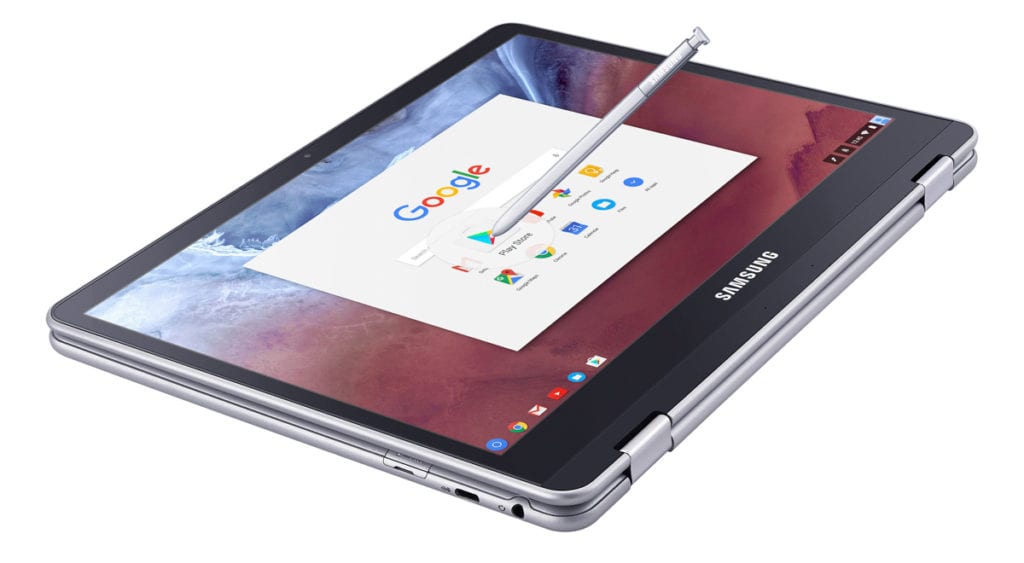 After months of research and waiting, the time is just about on us when the Samsung Chromebook Plus will be fully available to anyone who wants one. With the Samsung Chromebook Pro following a month or two after, which is the best device for you?
The Conundrum
Devices, Chromebooks included, tend to ship with one or two configurations and then add more as time goes on.
What we are seeing isn’t very different in Samsung’s approach. It is simply tighter.
There will be two, basically identical devices by April. Same screens, keyboards, trackpads, styli, battery, RAM, storage, etc. These are the EXACT same device, save one thing: processors.
Yet, they have different names: Chromebook Pro and Chromebook Plus.
Usually, differing names indicate differing machines. This is not the case here. Consider, for a second, the Acer Chromebook 15. It has upwards of 10 configurations with different processors, RAM, screens, storage and colors.
Pre-Order the Samsung Chromebook Plus on Amazon (Affiliate)
Yet, they all are the Acer Chromebook 15. Sure, the pesky model numbers are different, but the main name is the same.
With this naming system Samsung is going with, it could be easy to confuse what exactly is going on.
The Only Difference
There is literally one difference between the two devices. OK, there are more, but they aren’t worth discussing beyond this: with different processors, the internal motherboards are quite different, so lots of internal ways of getting the same jobs done are, in fact, different. But that is all.
While one name with variants makes more sense to us, we do like the fact that Samsung has kept the variations very tight. Sharing basically every spec except the processor makes comparing the two very, very easy.
So, lets do that. From what we’ve seen of the Plus, the screen is amazing, keyboard feels great, the pen is fun and will be fantastic to use as it gets better, the trackpad is smooth and responsive, and 4GB of RAM are plenty for 95% of users.
The Pro has all the EXACT same hardware.
So, the decision comes down to two factors: speed and money.
Core M3 or ARM
From a stats perspective, the one difference is the Plus with an ARM processor (Rockchip RK3399) and the Pro with an Intel Core m3 processor.
Both price and speed reflect the difference.
Pre-Order the Samsung Chromebook Plus on Amazon (Affiliate)
Price, because Intel silicon is more expensive in general. A $100 upcharge for much faster silicon is very fair and expected.
Speed, because a Core m3 chip doubles up performance over the Rockchip ARM processor. Yes, doubles. In Octane scores (Google’s synthetic Javascript benchmark), the ARM chip in the Plus can achieve scores right around 10,000.
The Core m3 regularly scores between 21,000 and 23,000.
Though a synthetic benchmark, Octane tends to be indicative of real world performance.
So $100 more dollars and 1-2 months more waiting can get you a better overall experience. We’ll also throw in the fact that, in general, ARM chips destroy Intel when it comes to battery life. And that makes sense. Less performance usually means less drain on battery.
That will be interesting to test down the road with these two devices.
So, Which One?
That’s the question, right? Which one should you go for?
The Chromebook Plus
If our review of the Acer R13 is any indication, the ARM-equipped Chromebook Plus will be a great device. In that review, we noticed a bit of lag here and there, but nothing disturbing. The combo of the ARM chip and 4GB of RAM will give this Chromebook enough horsepower to get you through most consumption tasks.
Would I recommend it as your one and only machine? Probably not. And at $449, you’ll have to decide if the gorgeous screen, comfy keyboard, smooth (we think it is glass) trackpad, stylus, and Android Apps out of the box are worth the money for a 3rd device. In the land of iPads, I think the price and product hold their own.
We talked about that concept a few weeks ago. If you’ve never thought about what a 3rd device is, you should check out that article.
The Chromebook Pro
Again, if our review of the ASUS Flip C302 is any indication, the Chromebook Pro with the m3 and 4GB or RAM will be a very, very swift machine.
Again, you are getting all the above-mentioned benefits while adding a much more powerful processor. This device will likely be the type of device that could be your only production and consumption machine. I doubt there is much you can throw at it that it won’t handle very well.
Keep in mind, that while you are adding those benefits, you are also likely losing some battery life and $100 out of your pocket.
Oh, and don’t forget that you won’t be joining in the new Samsung Chromebook fun until April.
Just like everything else, there’s no right or wrong answer here. For those looking to buy a Chromebook as a fantastic 3rd device – a machine to take to a quick meeting, do general web-based tasks, watch some Netflix or play a game – the Chromebook Plus will likely be a huge hit and supremely enjoyable.
Pre-Order the Samsung Chromebook Plus on Amazon (Affiliate)
For those looking to replace their work device – dealing with spreadsheets, a bit of graphic design, some coding, etc – or looking for the device that is faster by a considerable margin, but don’t mind to wait just a bit and pay a bit more, I’d suggest waiting on the Pro.
Also, consider what you are coming from. If you are upgrading an existing Chromebook, run a quick Octane score right here. See what you get. Maybe you’re on an older Chromebook that is getting 6-7,000 and the Plus would feel like a pretty major upgrade.
If you are coming from an HP with the Core m3 or m5, for instance, think about that too. It would be a considerable step down to opt for the Plus. Sure, the screen, form factor and pen are enticing, but consider whether or not you would be happy to deal with that drop in performance.
Again, I can’t make the decision for you, but I hope this helps a bit when deciding whether or not to smash that pre-order button.

