Up next in 10



Join Chrome Unboxed Plus for access to our private Discord, an ad-free website experience, ad-free podcast, AMAs, exclusive giveaways, and more! Start your 7-day FREE TRIAL here: https://chromeunboxed.com/join/
👉 Buy the Samsung Galaxy Chromebook Plus at Samsung: https://howl.link/bjfk97g0677vz
👉 Buy the Samsung Galaxy Chromebook Plus at Best Buy: https://howl.link/ic7ly2exnh6kw
👉 Samsung Galaxy Chromebook Plus Hands-on at the Chromebook Event: https://chromeunboxed.com/say-hello-to-the-impossibly-thin-and-light-samsung-galaxy-chromebook-plus-video/
・・・・・・・
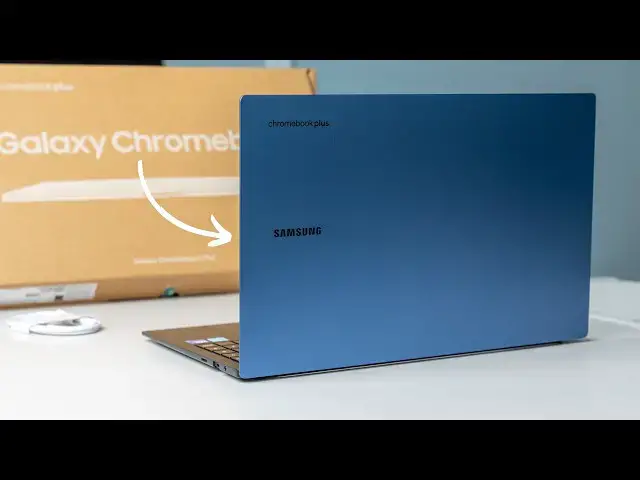
The new Samsung Galaxy Chromebook Plus is in the house and we are so excited to dive into the box to give you all a much deeper hands-on, initial look at this incredible Chromebook. Our time in New York was quite limited with it, but now that we have a review unit around, you can bet I'll be spending a ton of time working from it for the next few weeks.
And, as you all know, that all starts with an unboxing. Again, we saw this device at Google's fall Chromebook Showcase, but those initial thoughts and feelings were completely surface level. We only had a handful of minutes to really use this Chromebook, so the unboxing is a time to test a few of those initial impressions a bit more.
📰 Read more: https://chromeunboxed.com/unboxing-the-new-samsung-galaxy-chromebook-plus-video/
📧 Subscribe to our newsletter: http://bit.ly/2WjCDm7
・・・・・・・
☕ Fueled by Fresh Roasted Coffee! Buy the special edition Chrome Unboxed bag here: https://chromeunboxed.com/coffee
Show More Show Less View Video Transcript
0:00
all right so the day is here and I I
0:02
don't even want to say finally here
0:04
because uh the entire roll out of this
0:06
Chromebook and the the new duet from
0:08
Lenovo have been really quick for
0:11
Chromebook standards but we have the
0:13
Samsung Galaxy Chromebook plus here in
0:16
the office we got to use it for just a
0:18
few minutes here and there uh up in New
0:20
York at the Chromebook showcase but it's
0:22
here in the office uh we're ready to
0:24
unbox it and begin the review process
0:26
I'm super excited uh to to dig in a
0:29
little bit deeper on this Chromebook so
0:30
let's get in the
0:35
box but before we get into all that um I
0:38
wanted to extend a a quick invitation to
0:41
you to our just really awesome and
0:44
quickly growing uh Community it's called
0:46
Chrome unboxed plus and it's a spot
0:49
where other people who love Chromebooks
0:51
and Google products and all that stuff
0:53
can get together and talk about those
0:55
things but also share knowledge on all
0:58
sorts of other things it's it's a
0:59
fantastic community and by signing up
1:01
for it it's it's two bucks a month you
1:04
get access to that Community but you
1:05
also get access to exclusive amas you
1:08
get uh exclusive access to Joe and
1:11
myself um you get ad free access to the
1:14
website and an ad free feed of our
1:16
podcast and so uh it's just a it's a
1:19
great value for two bucks a month and
1:21
and again I can't stress enough it's
1:22
just a community of people uh that are
1:24
really cool to be around so if you're
1:26
interested at all in something like that
1:29
uh head over to ranb box.com
1:31
jooin and you can learn more and get
1:34
started all right so I don't want to
1:36
stand in the way of getting into this
1:38
box at all I will say you know we we
1:40
have a video out uh of our time with
1:43
this thing in New York but at any of
1:45
those shows whether it's CES or any kind
1:47
of Hardware event I don't know it's hard
1:49
to get a a firm grasp on how good a
1:52
device really is when it's I don't know
1:54
at at an event when there's there's just
1:56
a different energy it's hard to explain
1:58
um and so I I've been just eagerly
2:02
anticipating this device getting in here
2:04
and what's funny is for this device
2:06
instead of it just being about usually
2:08
it's just about I I want to use it um
2:10
that's I mean the whole reason we're all
2:12
here and what we're doing at Chrome and
2:13
box is just cuz I I like Chromebooks and
2:15
I like getting my hands on new hardware
2:17
but this one's equally about um being
2:20
able to report like what it is like to
2:22
use this Chromebook cuz we're we're just
2:24
we're really excited about this one um
2:26
for Samsung to kind of be back into this
2:28
it it takes us back to um 2020 preco is
2:32
what this takes us back to uh right
2:34
before Co hit we unboxed the the first
2:37
Samsung Galaxy Chromebook and that video
2:39
has tons of views and a lot of people
2:41
were interested in it for good reason uh
2:43
it was it was something special and ever
2:46
since then it's like Samsung has kind of
2:47
dropped off uh slowly but surely every
2:49
Chromebook they released was a little
2:51
bit more secure a little bit more safe a
2:53
little bit more uh you
2:55
know not pushing boundaries as much as
2:57
they once were and so uh a little more
3:00
reserved and we just all kept waiting
3:02
for them to get back to something like
3:04
this uh and so this is the Samsung
3:08
Galaxy Chromebook plus and so let's
3:11
let's just get in here um again if
3:13
you've watched the video prior it's not
3:14
like you don't know what's in the box
3:16
but um again being able to handle it and
3:18
have it you know outside of that that
3:21
environment is kind of cool so let's see
3:24
got a cool little flap here again I
3:25
appreciate a uh an interesting box so
3:29
there's some different little things
3:30
here uh but you know it still looks very
3:33
recyclable cuz at the end of the day
3:34
you're going to probably not keep the
3:35
Box um so something that recycles easy
3:38
is very good um yeah I remember this so
3:41
the the charger is basically just it
3:44
feels more like a phone charger it's
3:45
kind of a block and a cable so this
3:47
feels very phone esque here doesn't it
3:49
having a little slim thing with your
3:51
your charging cord in it USBC charging
3:53
cable some paperwork uh that's it there
3:57
then here's your charging block
4:01
and
4:02
it
4:04
well um we had an email that said that a
4:08
handful of people apparently we're one
4:10
of them uh got the uh European version
4:12
so yeah if if you're watching this
4:14
you're in the States this isn't what
4:16
they're going to send you if I remember
4:17
correctly seeing it uh in New York I
4:20
feel like the brick was like about that
4:21
big uh but you know just standard USBC
4:24
on the back um but yeah that's uh not
4:27
going to be really usable for us here in
4:29
the states nothing I can really do with
4:31
that but you aren't here to see a box
4:33
anyway or Chargers let's be honest we
4:36
all have USBC Chargers around uh
4:38
hopefully they'll get us a proper one
4:40
just cuz you know I want to be able to
4:41
test the charging ability on this thing
4:44
oh yep just as pretty as I remember it
4:47
um before I move on cuz I don't want to
4:49
not uh come back to that point uh with
4:51
the charger specifically uh this one I
4:54
remember while we were in New York was
4:56
showing like 11 12 13 hours of battery
4:58
on a full charge
5:00
um obviously for the review we're going
5:01
to be checking that kind of stuff out uh
5:04
cuz OLED panels tend to really zap the
5:06
battery and so um knowing how fast it'll
5:09
charge up if the OLED um uh panel does
5:12
eat that battery out pretty quickly
5:14
something we definitely want to know and
5:16
I don't want to be plugging in a random
5:17
charger to it um but yeah this is this
5:20
is the device I remember and under this
5:21
lighting I feel like the blue is even
5:23
different than it was in New York and we
5:24
said that in our original video like
5:26
this is uh such a a very cool top end of
5:31
a Chromebook um like sitting here right
5:33
here it's like this really vibrant blue
5:35
here and it's this perfect gradient down
5:36
to almost like a navy color down here
5:38
but I'm sure from different angles it
5:39
looks different uh black bottom and and
5:42
a black interior uh but you can't get
5:45
away from the fact that this thing is
5:47
just wildly thin I mean it's just so
5:49
thin I did this in our original video
5:52
but this is uh a very slim case uh on
5:55
the pixel 9 XL Pro or pixel 9 Pro XL
6:00
sorry um and and you can see even in the
6:03
back the the feet are there so that's
6:05
not even fair let me let me flip it this
6:06
way that's a better
6:09
representation and I mean you can see
6:11
even at its thickest point I don't think
6:13
it's as thick as this phone or it's
6:14
really close um it's just insane um 11 I
6:18
think around 11 mm uh thick and only 2.6
6:23
lb and man it's been a little bit since
6:26
I've handled it I I'm just blown away um
6:29
by how thin and light and rigid this
6:32
thing feels it it is so well made uh so
6:36
so well made but yeah let's let's crack
6:38
this thing open here all right and if I
6:40
remember from New York yep one finger
6:43
lift again that those are cool
6:45
engineering things um it's always worth
6:47
noting those kind of things because when
6:49
you build a chassis this light there's
6:51
not a lot of weight in that base and so
6:53
uh really making sure that the um hold
6:56
on let me click this before Chrome box
6:58
starts yelling at me it it's really uh
7:00
interesting the the um waiting that has
7:02
to be in place for that one finger lift
7:04
to happen U so effortlessly and so
7:07
smoothly especially in a chassis that's
7:09
just light um so that's very cool um and
7:12
again I mean just this area right here
7:15
is just so rigid I mean I can move it a
7:17
little bit and that's just the nature of
7:20
something this thin I mean just look at
7:23
the thinness and lightness of that thing
7:25
uh speaking with Samsung I mean that was
7:27
clearly the main intention they wanted
7:29
to make the thinnest the lightest uh
7:31
Chromebook Plus available and and so
7:34
you'll see some of the things that are
7:35
in this you know uh work towards that
7:37
goal so there's no touchcreen in here uh
7:40
part of that goal was thinness and
7:41
lightness well touch screens add layers
7:43
onto the screen so you're adding
7:44
thickness it has weight all that kind of
7:47
stuff and so um you know some of those
7:49
decisions at a $6.99 price point were
7:52
made to make sure that this is the
7:53
thinnest lightest Chromebook plus and so
7:56
uh you'll hear me talk about that a lot
7:58
I mean there is just I I can't explain
8:00
it I I hope this thing is in Best Buy um
8:04
for for you all to go just check out
8:06
there's just no reason that something
8:08
this this wafer thin at the end should
8:10
feel this rigid uh I I just love the way
8:13
it feels picking it up is so light um
8:15
closing it there's a little magnetic
8:17
clasp you can hear it there let me me do
8:20
that
8:21
again just just just enough just enough
8:24
magnets so that the lids not flopping
8:26
around um and I just I imagine being
8:29
able to put this in my my backpack and
8:31
probably forgetting it's in there it's
8:33
just so well done uh around the sides
8:36
two USBS over here probably not going to
8:38
be able to pick those up on camera like
8:40
it's hard for my eyes to even see them
8:42
uh but a fullsize HDMI port on something
8:44
this thin it's crazy um like I'm having
8:47
a hard time seeing uh micro SD card slot
8:50
there USB type a headphone microphone
8:53
Jack so nice array of ports again for
8:55
something that's slim had they just put
8:57
USB type-c ports on here I don't think
8:59
anybody body would have been too mad
9:00
about it uh on the bottom we've got a
9:02
big sticker on here cuz this is clearly
9:04
a a reference model um not uh full
9:07
retail unit uh but you have your
9:09
downward firing speakers and then your
9:11
area here for cooling and I
9:14
think yeah we're not going to be able to
9:16
get the light in here I'm almost
9:17
positive I can't see it I'm almost
9:20
positive the the single fan is right
9:22
here in the demo units that we uh got
9:24
hands- on in New York I I picked them up
9:26
and tried to listen and couldn't even
9:28
really hear the fan running there but
9:30
yeah so let's crack this bad boy right
9:32
back open here and we'll talk about all
9:33
the stuff that's on the inside all right
9:36
so went ahead and got signed in and all
9:38
that kind of stuff and and again mixed
9:40
with our time in New York with this
9:42
device uh which was again kind of
9:44
minimal uh and then just a few minutes
9:46
of you know navigating the menus and
9:48
getting signed in just like always I can
9:50
kind of tell a handful of things about a
9:53
device um so let's just uh let's let's
9:57
start with the main things so we've
9:58
talked about about thinness and
10:00
lightness obviously already uh inside
10:02
you've got a core 3 so Intel Core 3 it's
10:04
a raptor like refresh so the core 3 100
10:07
U processor 8 gigs of RAM 256 gigs of
10:10
storage uh which I don't know that we've
10:13
had that configuration in the office but
10:16
it should be very very quick um I'm
10:18
going to hold some of that stuff for the
10:19
review obviously um to be able to run
10:22
some benchmarks and test some things but
10:24
everything so far has moved along uh
10:26
nice and quick um so no no issues with
10:29
with performance or anything like that
10:30
you have an AMOLED screen so 1920 by
10:33
1280 or 1920x 1080 I'm sorry um AMOLED
10:38
screen it's standard 15.6 in 16x9 screen
10:42
but it's AMOLED so the the display just
10:45
looks uh pretty incredible I mean even
10:48
like off this angle right here other
10:49
than the glare we're getting from the
10:51
studio lights uh we have to crank down
10:53
the brightness obviously for the cameras
10:55
like the clarity and the the colors and
10:57
stuff are just so so good um it's not a
11:01
touchscreen like I said and and part of
11:03
that plays into this whole idea it's
11:04
thin it's light that's that's the
11:06
motivating factor here um and so they
11:09
didn't add to that um obviously that
11:10
would add to the cost as well but um the
11:13
overall just look of this display panel
11:15
looks fantastic I think the it's got
11:17
like a 1 millisecond refresh rate on it
11:20
or not not refresh rate but um latency
11:23
uh so the refresh rate is still 60 HZ uh
11:25
they did confirm that to us uh but the
11:28
the response time on this thing is
11:30
really low and so um not that that
11:33
changes necessarily the animations but I
11:36
mean hopefully you can see on the on the
11:38
screen there I mean all the there's no
11:40
like ghosting or anything like that on
11:42
the screen so uh that can be a problem
11:44
like you can get a 60 HZ panel and have
11:46
a bunch of ghosting and it looks I don't
11:48
know look they can look really weird uh
11:50
this one exhibits none of those things
11:53
obviously the contrast ratio is
11:55
ridiculous it just looks incredible it
11:57
gets up to 400 knits so now we've talked
11:59
about screen we've talked about
12:00
internals Tons of Speed gorgeous I mean
12:03
it is just a gorgeous screen it looks so
12:05
nice um and obviously very thin bezels
12:08
very thin Topline here uh but then you
12:10
come down to the keyboard and with a
12:13
device that's super thin obviously a lot
12:15
of times the keyboard can kind of take a
12:17
hit
12:19
and this is a great key frame I mean it
12:22
is low travel there's not a ton of
12:24
travel there but I'm okay with low
12:27
travel as long as the the response like
12:29
The Click under your fingers is very
12:30
sure and the keys are tight so if the
12:32
keys are wobbling around and there's not
12:34
a very specific click you can almost get
12:37
lost you can't tell if you actually hit
12:38
the key or not when there's no travel
12:40
this one takes care of all of that it's
12:43
very quiet it reminds me reminds me a
12:45
ton of the original Galaxy Chromebook of
12:48
the the pixel books the pixel book go
12:49
that kind of keyboard that just feels
12:51
very sure it helps that the frame is
12:53
wildly rigid obviously and so it it just
12:56
feels great and the the backlighting of
12:58
the keyboard board isn't leaking all
13:00
over the place uh it just lights up the
13:02
keys basically and and so um much
13:05
appreciated there love that and then you
13:07
have a nice huge uh All Glass trackpad
13:11
so here's my hand over it I mean it's
13:13
it's a that's a big trackpad and there's
13:15
no obviously no flopping around here
13:18
really
13:20
quiet very good click so zero complaints
13:24
whatsoever there and I've said this in a
13:26
bunch of videos but when it comes down
13:28
to it the majority of things you
13:29
interact with are right here so are
13:32
screen keyboard trackpad if those things
13:34
are really really good you can forgive a
13:37
lot of other things and that's what
13:39
you're going to kind of hear me say
13:40
about about this device in general uh
13:42
the performance isn't a problem
13:43
obviously here but there there are
13:45
devices that maybe don't have the best
13:46
performance in the world but if the
13:48
screen's really good the keyboard's
13:49
really good the trackpads really good
13:50
it's like you kind of forgive some of
13:52
those things cuz these are your primary
13:54
interaction points then you mix that
13:56
with a really nice IO you mix that with
13:58
some really uh decent performance what
14:00
I'm expecting here at least and then you
14:02
put it in a chassis that looks feels
14:04
like this I'm telling you you got a
14:07
winner you got a winner here so um let's
14:10
take a look at a couple other things
14:12
real quick before we wrap this up uh
14:14
we'll take a look at the the speakers
14:17
cuz I have no idea what those sound like
14:18
and we'll take a look at the camera real
14:20
quick I did forget though before we get
14:22
into speakers and Camera the keyboard I
14:24
talked about how good it feels and the
14:25
back lighting and all that stuff that
14:26
stuff's obviously super important but
14:28
there other keys on this keyboard and
14:30
layouts that uh I haven't mentioned in
14:33
this video particularly so let's talk
14:35
about those real quick first up the
14:38
function keys if you'll notice there's a
14:40
bunch of them there's 15 function keys
14:42
up here and there's a numeric keypad um
14:45
I'll say this about the numeric keypad I
14:47
like the fact that they're full size
14:48
I've seen them cram them into 15.6 in
14:51
Chromebooks and they're like narrow keys
14:53
I don't think there's a whole lot of use
14:54
there so you're getting full size uh
14:56
numeric keys but if you've ever used a
14:58
numeric keypad in general a plus and an
15:01
enter or an equals button are on the
15:03
right side that's just the way it works
15:05
on those old calculators and stuff and
15:07
so if you're used to using those for
15:08
inputs uh those keys aren't there um so
15:11
I don't love that and so I'm like if
15:13
you're going to kind of dwarf this this
15:16
feature here this is just me let's take
15:18
that out let's Center the keyboard
15:20
trackpad up and put some upward firing
15:22
speakers here that's just what I think
15:23
should do um or you know maybe next time
15:26
around let's go with a 16 X10 screen and
15:29
put a speaker row up top I I don't love
15:31
downward firing speakers in any device I
15:33
get it it's a tiny thin chassis so again
15:36
certain things have to be kind of
15:37
adjusted to make up for that but um not
15:40
a deal Breer or anything like that but I
15:42
you know maybe a numeric keypad without
15:44
those buttons over here is important for
15:46
some people I don't use them a ton um so
15:49
yeah it's there but more importantly the
15:51
function keys up here we get a couple
15:52
extras uh that we don't have in
15:54
Chromebooks and we even get a couple
15:55
different icons here um hopefully Joe
15:58
can kind of see those so your overview
15:59
button that's a that's a different
16:01
graphic um I would assume that's what
16:03
it's going to start being but you know
16:04
that gives you your kind of overview and
16:06
then the um kind of your recent um links
16:10
and stuff down here at the bottom um so
16:11
the the welcome recap feature that just
16:14
launched uh it has that look so when you
16:16
load into the Chromebook it kind of says
16:18
you want to you know resume all your
16:19
stuff and it has some other stuff down
16:21
here but every time you go in overview
16:22
mode now you get this thing that's the
16:24
overview button now it looks quite a bit
16:26
different used to be like three boxes
16:28
kind of next to each other um obviously
16:30
your screen capture screen brightness
16:32
keyboard brightness I love having
16:33
keyboard brightness uh on the on the
16:36
function keys it's nice just a nice
16:38
touch uh but this one is actually a
16:40
dictation button uh we talked about it
16:42
found commits for that uh so when you
16:44
when you uh click into that it's going
16:46
to ask you if you want to turn on your
16:47
dictation it's nothing new uh it's not
16:49
it's not a different dictation it's just
16:51
same dictation that um has been on
16:53
Chromebooks for a long time there's just
16:54
a button for it so if you turn on
16:55
dictation you can just click that key
16:57
and start talking and everything you
16:59
type or everything you say it just start
17:00
being typed wherever that text field is
17:02
uh and then you have a dedicated
17:03
accessibility key right next to that as
17:05
well so that's actually going to bring
17:07
up your accessibility uh in your quick
17:08
settings again if you turn on
17:11
accessibility in your quick settings you
17:12
can get this on your Chromebook it's not
17:14
like it's doing anything new it's just
17:16
there's a button there for it because
17:17
Google said hey look we found a lot of
17:19
people use Exel accessibility features
17:22
whether uh they need them or not and so
17:25
like I've used dictation quite a bit I
17:27
can type and speak fine I don't have I
17:29
don't have problems there where I need
17:30
those things to work uh but I find them
17:33
useful still and so they're they're
17:35
saying like accessibility features are
17:37
great for people that need accessibility
17:38
features like those are awesome things
17:40
to have uh but there's people that don't
17:42
even really need them that still end up
17:43
using them too so that's why they went
17:45
ahead and put that key up here your play
17:47
pause your volume adjustments all that
17:49
kind of stuff so none of that's uh
17:51
different but adding all those keys in
17:52
now you got 15 uh function keys up top
17:55
um and then you have the two keys that
17:58
change the that uh are rocking my world
18:00
right now cuz I'm trying to get used to
18:02
it because Google says this is what the
18:03
future is going to look like for
18:04
Chromebook keyboards you now have the
18:06
quick insert key that is also a caps I
18:09
guess if you alt let's see oh I bet it's
18:12
function I forget there's a function key
18:13
on here there it is there's a function
18:15
key on here as well so it's a lot to get
18:17
used to if you're a Chromebook person
18:18
that's been on Chromebooks for a long
18:20
time like
18:21
myself the launcher key moving down here
18:23
it's a g key now it's still just your
18:25
launcher key um but there's a a g key
18:28
and they've even changed the logo down
18:30
here so that's a pretty significant
18:32
change not a functional change but just
18:34
a significant change because that
18:35
button's now down in that area where the
18:38
ALT key would normally be uh and then
18:41
your quick insert button which if you're
18:43
on a regular Chromebook and you want to
18:44
try this if you're on Chrome OS 130 uh
18:47
it's actually the launcher F now it'll
18:49
bring up this quick insert uh which has
18:51
all kinds of just different stuff that
18:53
you can you drop stuff in from drive you
18:55
can search your files I mean you search
18:57
Google drive from here um your latest
18:59
links your clipboard all that kind of
19:01
stuff's always there and it's available
19:03
across the OS I think it's going to be a
19:05
gamechanging kind of thing I think
19:06
eventually once I get used to using it
19:08
it's going to be amazing but I've got 10
19:10
years of that launcher Search Everything
19:12
key being right there at my pinky I've
19:15
been at it a week I changed it on my
19:16
other keyboard so I just start getting
19:18
my mind around it it's not going well so
19:20
far I still mess it up pretty often uh
19:23
but I think eventually it's going to be
19:25
a big deal but that's a big change like
19:27
some extra features up here in the top
19:29
and the functions no big deal that's a
19:31
big change um and it's going to be
19:33
interesting to see how people kind of
19:34
adapt uh to that difference but yeah
19:37
quick insert is here with a specific key
19:39
launcher is now down here on this
19:41
Chromebook and apparently other
19:43
Chromebooks moving forward all right so
19:45
finally let me bring up a YouTube video
19:47
let's see let's see what these speakers
19:48
sound like cuz again I didn't uh I
19:50
didn't get to listen to these at the
19:52
event because I mean at an event it's
19:54
loud there's tons of people talking like
19:56
trying to listen to laptop speakers in
19:57
that environment it's just not really a
20:00
thing let me actually bring this up
20:02
they're downward firing and this is a
20:03
thin chassis side I don't um I don't
20:07
have huge hopes here but you never know
20:10
let's just see so we are back in the
20:12
studio after returning from New York at
20:14
Google's latest Chromebook uh showcase
20:17
and so excited to be able to unbox
20:20
decently loud but I can talk right over
20:22
this duet there's noic sounds No
20:25
versions nothing it's just the new
20:27
Lenovo Chromebook duet it's got some
20:29
really cool very excited to be unboxing
20:31
this here on the camera with you too so
20:33
we can uh see what this thing's all
20:38
about so
20:40
yeah they're not super loud um but they
20:44
have a decent dynamic range to them um
20:46
they don't sound amazing by any by any
20:48
stretch of the imagination again I go
20:50
back to this idea of thin light
20:52
Chromebook plus was the goal fitting in
20:56
great speakers probably wasn't high on
20:57
the priority list um clearly it's not
21:00
something they focused big on um if
21:02
you're expecting something like the the
21:04
pixelbook go or you know HP dragonfly
21:07
Chromebook uh don't don't expect that
21:10
that's not what this is so let's do
21:13
let's pull up the camera here see I just
21:16
about just then just about hit that
21:17
quick insert key it's going to take some
21:19
getting used to here it's going to take
21:21
some getting used to so it's a 108p
21:22
camera uh they're just meeting that
21:24
Chromebook plus
21:25
spec um yeah the colors look good um but
21:28
it definitely looks you know a tad
21:31
grainy um yeah I mean it's not bad not
21:34
bad at all pointed over at
21:36
Joe yeah you can see you know we've got
21:39
a we've kind of got a big light up here
21:41
but it's doing a pretty decent job
21:42
exposing that stuff and ultimately these
21:45
these um Chromebooks uh you know I what
21:49
I really want out of them is to get get
21:51
a decent color like like balance the
21:54
colors pretty well if it's a little
21:55
grainy it's a little grainy it's not
21:56
that big of a deal but as long as we
21:58
don't have like wild blown out highs and
22:00
like Shadows that are crushed all over
22:02
the place you know it's getting the job
22:04
done but what this tells me is don't buy
22:07
this Chromebook cuz it's got the best
22:08
camera you've ever seen in it I'll just
22:10
tell you the the duet the new duet 11in
22:13
uh has got better cameras in this uh
22:15
don't buy this because it's going to be
22:16
like just this Sonic powerhouse it's
22:19
it's definitely not I can tell you that
22:20
right now but all the rest of the pieces
22:23
that make a great Chromebook experience
22:24
and to me speakers and a camera aren't
22:27
high on that list I mean they're they're
22:29
functional pieces a great screen a great
22:32
keyboard a great trackpad and good
22:34
performance all in a really solid
22:36
chassis that you like to look at and
22:38
feel those are the bigger pillars for me
22:40
and so far I can tell you this thing
22:42
just knocks them out of the park not
22:44
it's it's not like it just accomplishes
22:46
those thing like hey you got over the
22:48
Finish Line good job you finished the
22:49
race like they've built something really
22:51
incredible here um there there's just
22:54
something about it like even closing it
22:56
up I'm just like holy crap I can't
22:58
believe that all that Chromebook resides
23:01
in this little bitty frame um it's
23:03
impressive for sure what I hope o I
23:06
forgot to look at this what I really
23:07
hope is that we don't get to the uh the
23:09
review process and have to say anything
23:11
like we did I messed my pen up
23:13
apparently I'm might have to put my
23:14
password in um I hope we don't get to
23:16
the end of this and end up having
23:19
to um with the original Galaxy
23:22
Chromebook I had to be like look it's
23:23
all great this thing's gravy it's
23:25
awesome the battery life is so bad it's
23:27
a deal breaker for a lot of people um I
23:30
hope that's not the case um I should
23:32
have shown this to you earlier I clicked
23:33
in it and I didn't show it to you it's
23:36
up to 7 earlier uh the battery life was
23:39
at like 98% and it showed I think it's
23:41
like 14 hours or something it's going to
23:43
fluctuate when you're messing around
23:45
with stuff uh we obviously have to hold
23:47
that stuff out for the review but uh
23:49
Google and Samsung claim I think 13
23:51
hours of use for this and so you're
23:53
probably going to be about 50%
23:54
brightness uh on your screen to get
23:56
those kind of numbers but they're going
23:57
to fluctuate I was hoping to to open it
23:59
up and show that to you uh but I'm
24:02
expecting really good battery life out
24:03
of this thing too and I mean the fan
24:07
is I think it's on that's how quiet it
24:10
is I could kick up another notch I don't
24:12
know we got a lot of stuff to cover in
24:14
the review obviously for this thing but
24:16
so far so good this thing is impressive
24:18
um it picking it up and just looking at
24:21
it on the table is just so impressive
24:22
I'm so excited about this device it's
24:24
going to be the perfect device for every
24:26
single person out there no I mean if you
24:28
have to have a pen input or you have to
24:30
have a touchcreen or you have to have a
24:31
convertible obviously this isn't going
24:33
to be the Chromebook for you but for
24:35
those people that are like man I just
24:36
need a good clamshell Chromebook and I
24:37
need something that isn't bulky and
24:39
taking up a lot of space in my backpack
24:42
I this thing is just going to be such a
24:44
knockout for so many people I think they
24:46
did their homework on what people want
24:48
in the Chromebook and it feels like
24:50
they've really knocked it out of the
24:51
park but we got to get to our full
24:53
review on this and that means that we
24:55
have to end this video so if you liked
24:57
it give us thumbs up head down there hit
24:59
that subscribe button be sure to ring
25:01
the notification icon as well if You'
25:02
like to be alerted when we make future
25:04
videos like this one until next time
25:07
we'll see you
25:13
[Music]
#Online Media
#Computer Hardware
#Laptops & Notebooks
#Consumer Electronics
#Mobile Apps & Add-Ons
#Gadgets & Portable Electronics