0:00
We are back for, you guessed it, another Chromebook Plus review
0:03
It's a lot, I know, and you'd be forgiven for just taking the whole idea of Chromebook
0:07
Plus at face value and realizing now that all these devices that were launched last
0:11
fall do the main Chromebook stuff pretty well. Get a Chromebook Plus, get a great overall experience
0:16
That's 100% true, but if you'll hang with me for just a few minutes, I'd love to take
0:20
a little bit of your time to explain why this particular Chromebook Plus is my favorite
0:24
of the bunch. But before we get into that, today's video is brought to you by NordVPN
0:33
Look, if you have a Chromebook, you're likely out and about. I mean, you're at home sometimes, but you're in an office, you might be in a coffee shop
0:40
and you need to keep your stuff protected. Well, NordVPN is a way that you can do that
0:44
It's trusted by millions of people. It works really well on a Chromebook, and it's something that we would recommend if
0:50
you're ever going to do anything out and about that needs to be safe and secure and
0:55
kept under wraps. If you'd like to learn more about them and how to use that on your Chromebook, just head
0:59
over to chromeunbox.com forward slash NordVPN where you can learn more and get started today
1:04
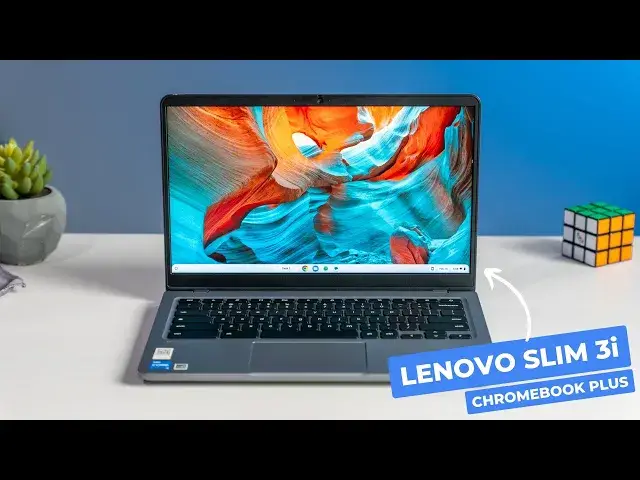
Of course, we're talking today about the Lenovo Slim 3i Chromebook Plus, and looking
1:09
at it on a desk or seeing it in photos just does this Chromebook absolutely zero justice
1:14
Its looks and lack of flair are not its primary selling points, and after you use it for a
1:19
bit, you just start to get it. The Slim 3i is an understated masterpiece, highlighting what I feel is the best of Chromebook
1:27
Plus in all the right ways. It all starts with the chassis. The unassuming gray shell is mostly plastic, a little aluminum, and something you'd easily
1:35
pass by on a store shelf. But pick it up, and you'll immediately notice something a bit different about this one
1:41
Though the bottom half is all plastic, it's incredibly rigid, and right off the bat you
1:45
know there's something a bit higher quality happening with this device. Though it's not the thinnest or lightest 14-inch Chromebook, coming in at 19mm thick
1:53
and 3.3 pounds, it's not too thick or too heavy to make me care about either of those
1:58
things, and the confidence you get when holding it open or closed is second to none
2:03
I'll say it again, plastic doesn't have to feel cheap, and Lenovo has nailed this part
2:09
And that understated solid frame holds all the things you need for a superior Chromebook experience
2:13
It starts with a 1080p camera up top that gets all the bells and whistles Chromebook
2:17
Plus offers, like temporal noise reduction, background blurring, and lighting enhancements. And then under that camera is a standard 16x9 full HD IPS touchscreen that is one of my
2:27
absolute favorites. It's punchy, it looks great in most lighting situations, and it generally excels at all
2:33
the stuff you want in a sharp, bright screen on a Chromebook. And then there's the excellent backlit keyboard
2:39
The travel is fantastic, the click feedback is what I love to see on a Chromebook, and
2:43
it makes for one of my favorite typing experiences, period. The trackpad underneath that isn't glass, but it's really well seated, it's built
2:50
nicely, it's not floppy, and it stays really smooth. Look, I don't care if you skip glass in a trackpad as long as the surface stays smooth
2:56
and the click is solid, and both of those things are true with this trackpad. And on the inside you have the Intel Core i3 N305 8GB of RAM, 128GB of storage, standard
3:06
for Chromebook Plus, and like all the others, this Chromebook is fast and smooth for anything
3:11
I put it through. With the N305 processor, I'm seeing plenty of battery life too, like 8-10 hours easily
3:17
on a charge. So I'm sure by now you can see pretty quickly why this device is just so likable
3:22
It does nothing to get in its own way. I love the chassis, the build quality, the screen, the keyboard
3:26
I mean the trackpad's fine, the internals are all I really need, and even the speakers
3:30
are pretty good. Unless you need a convertible, or would rather have one of those 16x10 screens, there's
3:35
really nothing this Chromebook misses on, and you feel that every time you pick it up
3:39
and use it. I made a video before Chromebook Plus was really launched and wondered if this non-Chromebook
3:46
Plus branded version of this device was a sign of things to come. Of course, we were right in saying this model would get a branded Chromebook Plus sibling
3:54
but I didn't realize at that time just how right the Slim 3 got the whole Chromebook
3:59
Plus equation. If you're looking for a Plus model that isn't just good, but seriously great, this
4:05
is the one you want. But guys, that's it for this one. If you enjoyed this video, give us a thumbs up, head down there, hit that subscribe button
4:10
and be sure to ring the notification bell as well if you'd like to be alerted when
4:14
we make future videos just like this one. Until next time, we'll see ya