0:00
so we are here at the fall uh Chromebook
0:02
Showcase Event that Google put on uh and
0:05
the timing of this is a little strange
0:06
because there's a week long embargo so
0:09
as you're seeing this video uh we'll
0:11
actually have our unboxing videos out of
0:13
the new hardware that was shown off here
0:14
but we wanted to make these videos to uh
0:17
basically to just kind of give you a
0:18
Hands-On like real time reaction to two
0:21
new Chromebooks that were announced that
0:22
are uh both pretty unique and uh pretty
0:25
cool and pretty exciting and so uh for
0:27
this video we want to talk a little bit
0:29
more about the brand new Lenovo
0:36
in all right so this is the new Lenovo
0:39
Chromebook duet 11in technically is in
0:42
the title uh but it's kind of the
0:44
spiritual successor to the original
0:46
Lenovo Chromebook duet now we had the
0:47
three and the five that came after and
0:49
this one honestly feels a lot more like
0:51
the duet 3 uh than anything but uh
0:54
there's some nice additions here across
0:56
the board including a much faster
0:57
processor uh this keyboard that feels a
1:00
lot like the doit 3s I mean the action
1:01
here is actually really nice um I don't
1:04
think yeah there's no back lighting here
1:05
on the keyboard but yeah the the
1:07
keyboard itself feels really good we
1:09
don't have a trackpad wiggling all
1:10
around which is nice um you know it
1:13
feels like a keyboard cover um but it is
1:16
Spill resistant this time around so if
1:18
you were to tip your coffee over on it
1:19
or something uh you can handle that
1:21
without uh completely flaking out but
1:23
let's look around the outside real quick
1:26
um you're going to notice obviously a
1:28
pin here uh there's a spot in the casing
1:30
on the outside that kind of almost looks
1:32
like it was there to like pinch the pin
1:35
uh not the case I think it's just there
1:36
to add a little extra support it's
1:38
magnetic drops in there this is the
1:40
Lenovo USI uh 2.0 pin uh it does not
1:43
come with it so you'd have to purchase
1:45
this I want to say it's like I don't
1:46
want to hang myself on that I'm not sure
1:49
but I'm pretty sure it's under 100 bucks
1:50
I want to say like 70 80 bucks but I
1:52
could be wrong on that off the top of my
1:54
head um but obviously the back just like
1:56
every other duet comes right off so
1:59
let's go a and take the keyboard off so
2:01
we can kind of see this device and if
2:02
you've you know seen a duet in the last
2:05
couple iterations this should all look
2:08
very familiar to you you got pretty big
2:09
speaker grills here uh we're not in a
2:11
spot to this is all in demo mode so
2:13
software wise I'm not going to really
2:15
mess with anything but uh headphone
2:17
microphone Jack USB type-c there's a USB
2:20
type-c up top too we'll get to that here
2:22
in just a second volume rocker you do
2:24
have a privacy shade here for the camera
2:26
which is nice I'm probably blowing the
2:28
screen out so see if I can crank that
2:31
down um so you can see that privacy
2:34
shutter um it's a manual one so it's not
2:36
like a software button it actually
2:38
covers it up uh then your speaker grills
2:40
and your magnetic stuff down at the
2:42
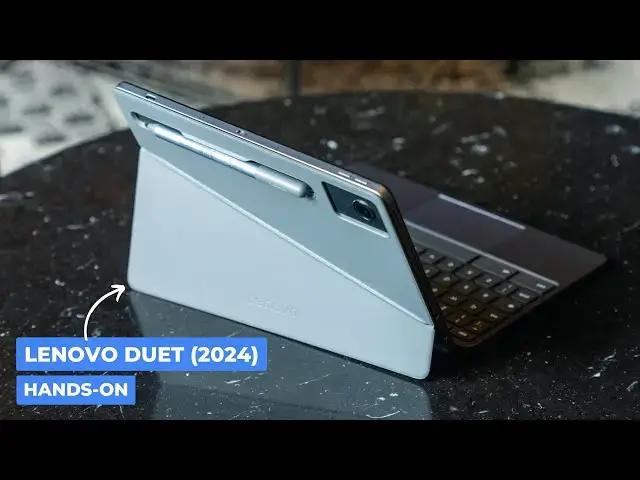
bottom so another thing with the back
2:44
casing here that's pretty interesting if
2:46
I can get the thing picked
2:48
up you can see it's a diagonal cut here
2:51
on the hinge this breaks my brain I this
2:55
seems like it should wobble which tells
2:58
me I'm not good at geomet
3:00
um it does not wobble obviously uh but
3:03
what this allows for is a much wider
3:05
base on one side which allows you to do
3:07
that with it um so if you wanted a
3:09
vertical second screen you're going to
3:11
hook it up to a monitor or something or
3:13
you're showing off something I don't
3:14
know there's a handful of use cases
3:16
where this would be cool and that's
3:17
where that other USB type-c comes in so
3:19
if you're using this say at a desktop
3:21
setup next to your big monitor you could
3:23
run your USB type-c out uh it has it
3:26
supports this chip I know at least the
3:28
it's the compano um 838 inside here uh
3:32
supports up to uh two 4K displays uh 4K
3:36
60 so it will be able to push I think
3:39
most monitors um you got the the the
3:42
camera module there on the back it's
3:43
actually an 8 megapixel camera 5
3:45
megapixel on the front um we'll
3:47
obviously be testing that out to see how
3:49
well that goes but you know if you've
3:51
handled a duet before this just feels
3:53
like a new refined version kind of a
3:54
rubberized texture on the outside it's
3:57
compact it's going to go where you
3:58
needed to go it's got an ated processor
4:00
again compano 838 I'm super hopeful that
4:03
that adds some uh additional performance
4:06
but until we get our hands on the you
4:08
know our our full review units um I'm
4:10
going to hold off any comments about
4:12
that but it's an exciting new Chromebook
4:13
from Lenovo uh we're excited to see it
4:16
but guys that's it for this one if you
4:17
like this video give us a thumbs up head
4:18
down there hit that subscribe button be
4:19
sure to ring the notification icon as
4:21
well if you'd like to be alerted when we
4:23
make future videos just like this one
4:25
and make sure that you get subscribed
4:26
for sure to see the Hands-On unboxing
4:29
video of this and the Samsung Galaxy