Up next in 10



👉 Join Chrome Unboxed Plus for access to our private Discord, an ad-free website experience, ad-free podcast, AMAs, exclusive giveaways, and more! Start your 7-day FREE TRIAL here: https://chromeunboxed.com/join/
👉 Buy the Lenovo Chromebook Duet 11-Inch: https://howl.link/j07cfz3sgrbq7
👉 Hands-on at the Chromebook Event: https://youtu.be/5IIL1EcBPyo
・・・・・・・
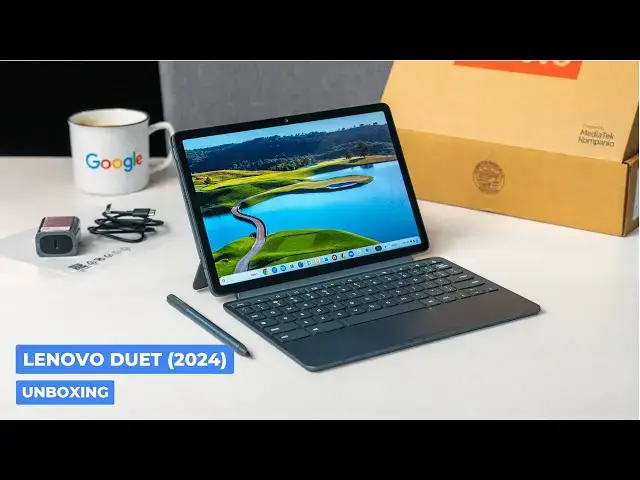
While our time with the Duet 11" at Google's latest Chromebook event was pretty surface level, our unboxing gets to dive a bit deeper on this device to check out the performance, screen, speakers, camera, and more. A review is in the works, of course, but we wanted to do a proper unboxing in the meantime to show off a bit more about this impressive, compact Chromebook tablet.
📰 Read more: https://chromeunboxed.com/unboxing-the-new-lenovo-chromebook-duet-11-video/
📧 Subscribe to our newsletter: http://bit.ly/2WjCDm7
・・・・・・・
☕ Fueled by Fresh Roasted Coffee! Buy the special edition Chrome Unboxed bag here: https://chromeunboxed.com/coffee
Subscribe to the channel: http://bit.ly/2xFuj6L
Show More Show Less View Video Transcript
0:00
so we are back in the studio after
0:01
returning from New York at Google's
0:03
latest Chromebook uh showcase and so
0:07
excited to be able to unbox this new
0:10
Lenovo Chromebook duet there's no
0:12
numbers on it no versions nothing it's
0:15
just the new Lenovo Chromebook duet it's
0:17
got some really cool things uh going on
0:20
with it we didn't get to spend a ton of
0:21
time with it in New York so I'm very
0:23
excited to be unboxing this here on the
0:25
camera with you so we can uh see what
0:27
this thing's all about
0:29
[Music]
0:33
all right so hopefully you've already
0:34
seen our Hands-On uh at the event but
0:36
you know they were running demo um
0:39
software and stuff on it at that point
0:41
and I was super impressed with uh with
0:44
this device just you know with the the
0:46
brief Hands-On we had at it at the event
0:48
and honestly I didn't have a lot of time
0:50
in New York to actually sit down and use
0:52
this thing and we knew we were going to
0:53
do an unboxing as soon as we got home
0:55
anyway so you're kind of getting my I I
0:58
I looked in here to make sure all the
0:59
stuff was in here uh but you're going to
1:01
get my
1:03
um off the cuff reaction to this thing
1:05
so um in the Box obviously that's the
1:08
the tablet and stuff but uh in the Box
1:11
uh I want to point this out very
1:12
specifically there are a couple little
1:14
containers in here this this one is
1:17
labeled like it's maybe got a get it
1:19
closed again like it's got like a maybe
1:21
a dongle like an HDMI dongle that would
1:23
be awesome by the way if they would
1:25
include that uh but when I opened that
1:27
up to see what it was uh there there's
1:29
just an empty hole there so maybe some
1:31
SKS will ship with a dongle other than
1:33
that it's got a 30 W uh USB type-c
1:36
charger uh pretty standard for a device
1:39
this size um and in this one we should
1:41
have a
1:42
cable yep USB type-c cable and then um
1:47
another interesting thing that we did
1:49
not expect is a slot with this pin in it
1:52
and
1:57
so yeah there we go the uh newest USI
2:01
2.0 pin by Lenovo I have seen um that
2:05
this is not um at least for right now at
2:07
least in the Skuse that we've seen is
2:09
not going to be coming with the device
2:10
so I didn't want that to confuse anybody
2:13
um I think they just wanted us to have
2:14
it for review purposes but the fact that
2:16
it's built there's a spot for it like
2:17
built into the box makes me think maybe
2:19
they'll ship SKS with it maybe with a
2:21
dongle or maybe it'll be Enterprise or
2:22
education I don't know uh there is an
2:24
education model of this that's the exact
2:26
same device this time around instead of
2:28
being a completely different device
2:29
price and it just comes with a much more
2:32
rugged casing that goes around it so
2:34
other than that they're the same
2:35
Chromebook so who knows starting price
2:37
for this one's 349.99 uh there are a
2:40
couple SKS um one is the um uh the both
2:44
of them have the compano 838 inside but
2:47
one has 4 gigs of RAM 64 gigs of storage
2:49
the other has 8 gigs of RAM and uh 128
2:52
gigs of storage uh starting at 349 my
2:55
guess is that's the 464 uh we don't have
2:58
confirmation on that just yet but
3:00
um obviously it'll start showing up in
3:02
Best Buy stores soon and at that point
3:05
we'll know exactly which one we're
3:06
dealing with um but yeah here's the
3:08
here's the device I'm going to set the
3:09
pen over here so it doesn't keep rolling
3:11
into the shot and as we've seen in the
3:14
leaks you've got your uh diagonal
3:18
kickstand here we'll get into all that
3:19
here in a second you got your spot
3:21
clearly for the pin and we saw at the
3:23
event the pen is actually magnetic this
3:25
time around so just drops right in there
3:27
it doesn't really need the case kind of
3:28
helps this helps it but that's not like
3:30
holding it in place or anything um so
3:32
you can see if we take this off the pen
3:35
still holds on U very strong so um so
3:39
it's nice to see like instead of having
3:41
that weird um I don't know what they've
3:44
done in the past like a weird piece that
3:45
went underneath that and held the pin
3:47
like it's magnetic uh it doesn't charge
3:49
this is this is powered by a quad a
3:52
battery it shows on here um so you can
3:55
you can see if you spin this off that's
3:58
a Quad HD battery or Quad HD quad a
4:01
battery golly I talk about Chromebooks
4:03
too much um so yeah um that's the story
4:06
with the pen but it is USI 2.0 it's
4:08
lenovo's own in-house pin but because
4:10
it's USI any USI 2.0 will work um the
4:14
width and everything of this device
4:16
feels a lot like um the duet 3 um
4:19
thinner than the original duet but maybe
4:21
a little thicker than the duet 3 but
4:23
it's all like this rubberized feel and I
4:25
like it a whole lot
4:27
um you can see it's not really picking
4:29
up fingerprints like at all which is
4:31
very cool um almost feels like a phone
4:34
case and I like that like there's an
4:35
absolute grip to this thing so if you're
4:37
carrying it around you're not going to
4:38
drop it um I really like that let's open
4:42
oh got some stuff in
4:45
here Lenovo service type stuff and it's
4:49
booting up and things but okay we'll
4:52
boot it up again here in a second uh I
4:54
have to get logged in and all that stuff
4:55
but um we did get again a little bit of
4:58
time with this in New York and I did
5:00
feel yeah so there's a lot of key travel
5:03
if you can get that on camera the the
5:05
casing is a little thicker this one is
5:07
Spill resistant this time around which
5:08
is awesome it's a nice addition uh
5:10
especially since people are going to be
5:11
taking this like coffee shops and that
5:13
kind of thing that you're just prone to
5:14
spill stuff on on devices when you're
5:16
taking it places where there's food um
5:19
definitely a plastic trackpad good
5:22
travel no
5:24
floppiness so that's good nice and
5:26
smooth surface you know uh for me if I
5:29
take these things I'm going to work at
5:30
any length of time I usually have like
5:32
my little Logitech Pebble Mouse I carry
5:34
with me uh for longer work sessions but
5:36
for quick stuff uh that trackpad will be
5:38
perfectly serviceable yeah these Keys
5:41
feel really really
5:43
good that's a really really great key
5:45
frame for a for a uh tablet device so
5:49
let's look at real
5:50
quick this thing so this is an
5:53
interesting uh an interesting addition
5:56
what they've done this year so it's it's
5:57
nice and thin again uh but instead of of
5:59
having a horizontal hinge uh it's this
6:03
diagonal one and it really broke my
6:05
brain when I saw it um online when it
6:08
leaked it broke my brain when I saw it
6:10
in person and it still kind of breaks my
6:11
brain a little bit um that this thing
6:14
goes
6:15
out diagonally it still works like I'm
6:20
just apparently not good at geometry at
6:22
all cuz that I feel like it would fall
6:25
to the side or something I don't know
6:27
but the benefit here is that if you pop
6:28
that thing out you can then go into uh
6:31
portrait mode and they thought about
6:33
this so much so that yep there's a USB
6:35
type-c over here on this side which
6:37
you're holding it this way it's on the
6:39
top but if you're holding it this way
6:40
it's on the side so if you want it this
6:41
way next to a bigger monitor you've got
6:43
a nice hookup for a USBC dock over here
6:47
down at the bottom because if not you'd
6:49
have to hook it up on this one at the
6:50
top and that would look really weird and
6:52
probably pull the tablet over let's go a
6:55
and talk about the rest of what's on the
6:56
outside here before I get logged in
6:58
we've got uh speaker ports yeah speaker
7:01
ports on both
7:02
sides um again we got the single USB
7:05
type-c over here headphone microphone
7:07
slot power button volume rocker up top
7:10
that other USB type-c that is meant for
7:12
uh when we flip it up on its top we've
7:14
actually got a camera privacy shutter
7:16
here and it's a physical one so um
7:18
whenever you flip it there's actually a
7:20
shade that is going over your camera
7:21
it's not just a digital um version of
7:24
that and then you just kind of got your
7:25
Poco pins and stuff that hooked to your
7:26
keyboard along the bottom but if you
7:28
picked up a duet in the past especially
7:30
the duet 3 like you you know what you're
7:32
dealing with here it's metal glass it
7:34
feels fantastic it's super light easy to
7:37
hold in one hand even actually this way
7:39
if you were to hold it uh in one hand
7:41
and you're doing some note taking and
7:42
stuff I have larger hands so I mean it
7:44
it is fitting that way but even if you
7:46
held it one hand it does have some small
7:48
bezels so there's some spots to hold on
7:49
to stuff um 5 megapixel camera in the
7:52
front 8 megapixel camera in the back and
7:54
that camera module looks like it's like
7:56
ready to do business and we talked about
7:58
it on the website that
8:00
um there's a lot of commits that have
8:01
happened a lot of work that has gone
8:03
into this 8 megapixel camera so very
8:05
interested to see how well it performs
8:07
so we'll at least get a quick Hands-On
8:09
with that hear these speakers uh see
8:12
this screen should be a 400n um 1920 x
8:15
1200 16 X10 full HD screen um you know
8:18
the drill there it's kind of the same
8:20
screen they've had in the the duet
8:21
series for a little bit so um yeah I'm
8:24
excited to get this thing powered on get
8:25
logged in real quick and show you guys a
8:27
couple more things all right got
8:29
everything logged in set up and ready to
8:31
go and as always with that process I can
8:33
just tell a lot from a Chromebook from
8:36
the way the login screens go to um how
8:38
smooth animations are as I'm setting
8:40
things up and and signing into a couple
8:42
Services uh and so yeah I've got some
8:44
stuff to share with you real quick about
8:46
some of that but first I wanted to tell
8:48
you if you haven't heard about it up
8:49
until now about our uh Chrome unboxed
8:52
plus Community it's this place where a
8:55
bunch of people like hundreds of people
8:57
come uh and discuss Chromebooks and
8:59
promos s and Google products and uh a
9:02
bunch of like-minded people that um just
9:04
just like to stick to that those topics
9:06
and and enjoy one another's company it's
9:08
an awesome place to hang out I'm telling
9:09
you uh we're in there all the time with
9:12
these folks and for two bucks a month
9:14
you're getting all sorts of cool things
9:15
so you get an adree uh experience on our
9:18
website at chrom inbox.com you get an
9:20
adree version of the podcast uh you get
9:22
exclusive access to amas exclusive
9:25
access to Joe and myself exclusive
9:27
access to the uh the Chromo team that
9:30
that comes and visits and does some AMA
9:32
stuff with us and so uh it's an awesome
9:34
community and for two bucks a month you
9:36
really can't beat it so if any of that
9:37
sounds interesting to you head over to
9:39
chrom inbox.com
9:41
jooin uh and you can get all the details
9:43
and get signed up okay so back to the
9:46
Chromebook um we were trying to figure
9:49
out when we were off camera like okay so
9:50
when this thing bends up maybe it bends
9:52
out that way still a little confused but
9:55
it works really well the only thing you
9:56
have to remember as as you set it up you
9:59
want to grab from the right side like if
10:00
you try to open this thing from the left
10:02
it is pretty difficult so you'll
10:04
hopefully get in the habit if you pick
10:06
this thing up of grabbing it from the
10:07
right very easy uh and it obviously goes
10:09
into multiple um multiple degrees of of
10:12
Bend there so you're good to go so the
10:15
first thing uh I want to show you is let
10:17
me turn that down 10 how we looking
10:19
there okay um the screen is very
10:23
reminiscent of the doet 3 which is to
10:25
say it's excellent uh it's IPS it's
10:27
colorful it pops really nice 400 NS of
10:30
brightness it feels very bright it looks
10:32
great looks great off angle no
10:34
complaints this thing looks looks uh uh
10:36
very very good the second thing that I
10:38
pulled up while we were off camera is uh
10:41
a video so that you could hear the
10:42
speakers and they are we couldn't hear
10:44
them at the event so I had no idea you
10:46
know and we didn't want to try like
10:48
there was other music playing people
10:49
talking it was just like yeah we'll
10:51
we'll do this when we get in the studio
10:52
listen to how loud these things are uh
10:55
we'll kind of cover as we're unboxing a
10:57
little bit
11:00
they are very loud very very loud before
11:03
we get in the Box uh a quick word about
11:05
our growing and just and they just sound
11:08
good um you know they're I I would say
11:11
let me put them down to like a real
11:13
listening level frankly really awesome
11:15
Chrome unbox plus especially for V uh
11:18
for for vocal stuff and so that's very
11:20
important obviously with Chromebooks you
11:22
want to be very good at video calls if
11:24
you're going to build a Chromebook it
11:25
needs to be good at video calling uh and
11:27
so that means vocals need to be really
11:28
clear this thing is definitely tuned for
11:30
vocals the music sounds pretty good uh
11:33
it's not the richest bass you're ever
11:34
going to hear anything but man are they
11:35
loud and because they fire out both
11:37
sides it's got a really nice Wide Stereo
11:39
separation so uh a big step up from the
11:42
other Lenovo duet Chromebooks in the
11:44
past so since we're talking about video
11:45
calling let's look at the camera real
11:47
quick um let me get into that let's do
11:50
the rear facing so this is an 8
11:52
megapixel camera um I'm going to attempt
11:55
to point this at
11:57
myself am I right roughly pointed at
11:59
myself okay hopefully you can see that
12:01
on Joe's camera there uh the the dynamic
12:05
range and stuff on it is is pretty good
12:07
like I I've noticed like I just kind of
12:08
was pointing it around the studio here
12:11
and just looking at you know the
12:12
lighting in here is weird because we've
12:14
got studio lights and then the
12:15
background's got some light but it's
12:17
darker and then there's one other lamp
12:18
over there and it's just handling that
12:20
stuff really well um let me get actually
12:24
let's get a picture of this box
12:26
here I'm going pull that up here
12:31
and you can see I mean that there's a
12:33
considerable amount of detail I mean I
12:35
usually on Chromebooks I take a picture
12:37
even in decent lighting I'm like um yeah
12:39
I guess it's okay it's passable you
12:42
could snag some photos with this thing
12:43
and actually use it so that's pretty
12:45
encouraging uh to start with and let's
12:49
look at the front facer here get that
12:52
closed up flip this
12:54
around cuz again video calling is just a
12:58
big deal on books and man the the front
13:00
facer looks really good here too point
13:02
that at Joe and see what we get over
13:05
there so again really really complex
13:07
lighting uh Shadows here a lamp back
13:10
there in the corner and it's still able
13:12
to pick up uh details on Joe and stuff
13:14
so yeah um this this thing looks really
13:16
good uh you're going to look good in
13:18
your in your video calls for sure uh and
13:21
use the back camera if you want to to
13:22
actually C capture like some video and
13:24
some photos uh your phone's still going
13:26
to be better uh but from you know first
13:29
blush like looking at this just now this
13:31
is probably going to be the best back
13:33
camera like rear camera on a Chromebook
13:35
that we've seen so far and the last
13:37
thing I want to show you really quickly
13:39
is an application with the pen um so I'm
13:42
going to pull up cursive here oops I
13:44
closed it with my my my fat finger my
13:47
big fat thumb there so we'll open that
13:49
up do a new note and you'll see here
13:53
like pin input lag is really good like
13:57
that is that's excellent
13:59
that's really really excellent and you
14:01
know this isn't a software um uh video
14:04
this is talking about the hardware here
14:07
uh we'll have another video soon we've
14:10
the timing of all this stuff is a little
14:11
weird um and so we'll we'll do a whole
14:14
video about some of the new features
14:15
that that were announced uh there's a
14:17
post up by this time as you're watching
14:19
this on chrom inbox.com uh we'll link
14:22
that in the description but um there's
14:25
some cool stuff that that was announced
14:27
with the pen so good notes is uh an app
14:30
uh that's been around for a little bit
14:31
but they've made a pwa version that's
14:33
specifically good for Chromebooks we
14:35
haven't got to test that out uh as I've
14:37
making this video cuz timelines we're
14:39
making this video before that in Bargo
14:40
LIF so um we actually don't have access
14:43
to that app just yet but um cursive is a
14:46
pretty good indicator cuz cursive isn't
14:48
like the best writing experience ever on
14:50
Chromebooks and if cursive works really
14:52
well that means pen input's working
14:54
really well in this and Google did tell
14:56
us that they've got some onboard stuff
14:58
going on with like Palm rejection and
15:00
all that stuff to to make the writing
15:02
experience excellent on this and so part
15:04
of that is that partnership with
15:05
goodnotes to kind of bring I think maybe
15:07
a more full-fledged notes experience to
15:10
uh Chromebooks and specifically to this
15:12
Chromebook uh the Lenovo Chromebook duet
15:15
so the last thing I want to point out
15:16
here again the the keyboard and
15:17
everything throughout this process has
15:19
felt great cameras feel great screen
15:20
good uh performance has felt really good
15:23
and really Snappy um I save that stuff
15:25
for the review normally and I need to
15:27
spend more time with it obviously before
15:29
I can really tell you that this compano
15:30
838 in this thing uh is is really great
15:34
obviously we're going to hook it up to
15:35
other like external monitors and and and
15:37
that stuff from from what we've seen
15:39
from mediatech this thing can handle
15:40
like dual 4K displays at 4K 60 so I'm
15:44
hoping it can handle my Quad HD I'm
15:45
hoping it can do it at 120 htz but uh
15:48
we'll see on all that kind of stuff but
15:50
one other thing I wanted to point out to
15:51
you is you know I've been doing some
15:53
stuff we did the setup which takes a
15:54
little bit of extra processing power and
15:56
all that stuff and I've been opening a
15:58
bunch of stuff just kind of testing
15:59
before as we were off camera and as of
16:02
right now uh we're showing 11 hours uh
16:05
and and 16 minutes left at 96% battery
16:09
so I mean once I calm down the you know
16:12
craziness of usage I think regular usage
16:14
you're probably going to see 12 13 hours
16:15
of use out of this thing so uh as long
16:18
as the performance hangs on that kind of
16:20
battery life with this kind of screen
16:22
pin input you know obviously easy
16:24
detachable form factor it's nice it's
16:27
small it's light can fit in the back bag
16:29
pen holds on nicely like I think I think
16:33
we're in the spot where we're going to
16:34
have a pretty formidable small
16:36
Chromebook tablet on the market uh at
16:39
this point and so that's a that's a very
16:41
exciting thing I know a lot of people uh
16:43
have wanted to use the duets for a lot
16:44
of different things over the years and
16:47
um sometimes that performance gets in
16:48
the way and and and sometimes when we
16:50
get a little bit more performance we
16:51
lose battery and it feels like we might
16:53
be at a spot where we're going to get
16:54
some pretty solid performance here good
16:56
camera screen great keyboard uh nice
16:59
durability all that kind of stuff all in
17:01
one package and starting at 349 is
17:03
pretty sweet so I think lenovo's put
17:05
together a pretty cool thing here
17:06
obviously going to be reviewing this one
17:08
uh along with the other uh new
17:10
Chromebook that was announced at uh at
17:12
the event with the Samsung Galaxy
17:15
Chromebook plus so make sure that you
17:17
are subscribed so that you don't miss
17:18
those reviews other unboxings other
17:20
things we're going to talk about from
17:21
the event all that stuff make sure you
17:23
don't miss it but guys that's it for
17:25
this one if you liked it give us a
17:26
thumbs up head down there hit that
17:28
subscribe button and be sure to ring the
17:29
notification icon as well if you'd like
17:31
to be alerted when we make future videos
17:33
just like this one until next time we'll
17:35
see you
17:40
[Music]
#Computer Hardware
#Laptops & Notebooks
#Consumer Electronics
#Consumer Electronics
#Gadgets & Portable Electronics