Up next in 10

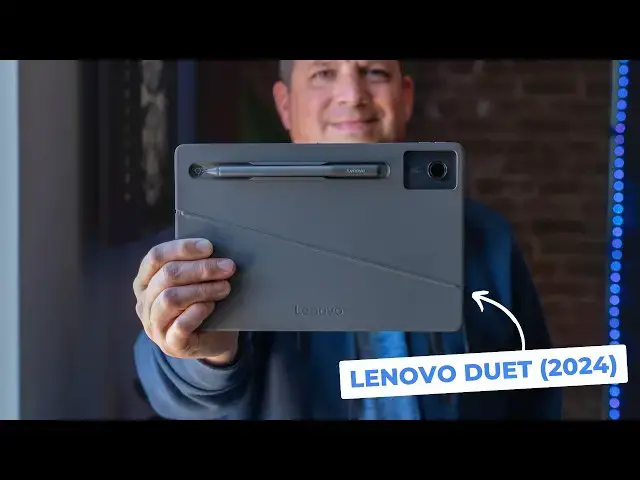
Lenovo Chromebook Duet 11" (2024) Review
Dec 6, 2024


👉 Join Chrome Unboxed Plus for access to our private Discord, an ad-free website experience, ad-free podcast, AMAs, exclusive giveaways, and more! Start your 7-day FREE TRIAL here: https://chromeunboxed.com/join/
👉 Buy the Lenovo Chromebook Duet 11-Inch (8 GB RAM): https://howl.link/j07cfz3sgrbq7
👉 Lenovo Chromebook Duet 11-Inch Unboxing: https://youtu.be/fpF1ZjWiY6Q
・・・・・・・
The new Lenovo Chromebook Duet is here, and much like its predecessor - the Duet 3 - this device upgrades a few things that were absolutely needed, but keeps much of the already-working formula in place. So lets take a look at what's changed and why this latest Duet is without question the best overall Chromebook tablet yet.
📰 Read more: https://chromeunboxed.com/lenovo-chromebook-duet-11-review-video/
📧 Subscribe to our newsletter: http://bit.ly/2WjCDm7
・・・・・・・
☕ Fueled by Fresh Roasted Coffee! Buy the special edition Chrome Unboxed bag here: https://chromeunboxed.com/coffee
Subscribe to the channel: http://bit.ly/2xFuj6L
Show More Show Less View Video Transcript
0:00
the new Lenovo Chromebook duet is here
0:02
and much like its predecessor the duet 3
0:04
this device upgrades a few things that
0:06
were absolutely needed but keeps much of
0:09
the already working formula in place so
0:12
let's take a look at what's changed and
0:14
why this latest duet is without question
0:16
the best overall Chromebook tablet
0:22
yet before we get into the review though
0:24
I wanted to extend a quick invitation to
0:26
our awesome and quickly growing Chrome
0:28
unbox plus community
0:30
it's a place where a bunch of Google and
0:32
Chromebook fans hang out discuss all
0:34
sorts of things and generally have a
0:36
really good time together in there you
0:38
get access to the Community Access to
0:40
Joe and myself and exclusive amas with
0:42
the chromeos team we had one recently
0:45
with Stella Shannon and one upcoming
0:46
with John molas there are exclusive
0:48
giveaways and you get adree experience
0:51
both on chrom inbox.com and on our
0:53
podcast too it's a really great value at
0:55
just two bucks a month and we'd really
0:57
love to see you in there so after you
0:58
watch the video head over to chrom
1:00
inbox.com jooin to learn more about this
1:03
and get signed up now I've said it
1:05
before and I'll keep saying it I love
1:08
the idea of a Chromebook tablet way more
1:10
than the actual thing itself now that's
1:12
not a knock to this form factor but more
1:14
of a critique of my ability to wrap my
1:17
head around what I would actually use a
1:18
tablet for in the first place the latest
1:20
duet does little to change this for
1:22
someone like myself but that shouldn't
1:24
bother any of you who already like
1:25
tablets use tablets and would enjoy one
1:28
that can actually be used used at the
1:30
desk to get some serious work done the
1:32
new duet is 100% that device and the
1:35
upgrades Lenovo packed into this latest
1:37
model easily make it the best Chromebook
1:39
tablet I've ever used first let's
1:41
quickly cover what is basically the same
1:43
the form factor the screen the general
1:46
utility on offer hasn't really changed
1:48
much you're looking at an 11-in screen
1:50
that's 1920 x 1200 16 X10 IPS and nice
1:55
and bright at 400 nits it's gorgeous
1:57
much like the two smaller prior Duets
1:59
that came before and if you've handled
2:00
the duet 3 specifically you know what
2:02
we're talking about here they feel quite
2:04
similar in the hand and that's a good
2:05
thing I loved the bezels the chassis the
2:08
overall build quality of the duet 3 and
2:10
all that stuff stays for this new duet
2:12
you can hold it in one hand really
2:13
easily thanks to the 1.12 lb weight and
2:16
the All Glass all metal body makes it
2:19
feel secure and confident and just like
2:21
last time the keyboard and kickstand
2:23
case come in the box they're wellmade
2:24
and they securely snap into place with
2:26
magnets all around the device both of
2:28
them can be easily removed when you just
2:30
want to kick back with only the tablet
2:33
and this whole Hardware equation simply
2:35
works there's no real need to change it
2:37
up the new duet also comes with USI pen
2:39
support that once again makes a ton of
2:41
sense on a device that's this portable I
2:43
can see lots of people using it to jot
2:45
down notes or sign PDFs or any number of
2:47
things with the pen that's even included
2:49
in certain SK again this was true of the
2:52
last duet and having pen support at the
2:55
core of this device just makes a lot of
2:57
sense now let's talk about the upgrades
2:59
while the duet 3 move the needle a lot
3:01
versus the very first duet this new
3:03
model feels a little bit more iterative
3:05
but it's in all the right ways first up
3:08
the kickstand has been completely
3:09
rethought and it's kind of genius with
3:11
the angle of this hinge the tablet can
3:14
be stood up in either landscape or
3:15
portrait orientations and it just looks
3:17
cool to go along with that new kickstand
3:19
setup Lenovo thoughtfully added a USBC
3:22
port to both the side and the top of the
3:25
tablet so either way you position it you
3:27
have a port sitting down low to connect
3:29
peripherals too it's a nice touch the
3:31
keyboard feels just as good if not a bit
3:33
better than before but now comes with
3:35
some spill resistance so as a device
3:38
that's likely to find itself on coffee
3:40
tables and coffee shops with pretty good
3:42
regularity this is a thoughtful addition
3:44
from Lenovo for sure and coming back
3:46
around to the pin Lenovo not only
3:48
provides a new updated USI 2.0 pin in
3:50
certain SKS of this device but also a
3:52
much better mechanism for keeping up
3:54
with it while the magnet back won't
3:55
charge the pen it keeps it incredibly
3:57
secure and not once did it fall off off
4:00
when putting the duet in and out of my
4:02
backpack multiple times the quad a
4:04
battery should last about a year so I'm
4:06
totally fine with having a convenient
4:07
place to Stow the pen without constantly
4:10
worrying whether or not it's being
4:11
charged while it's there it's a big
4:13
upgrade from the last few duet pen
4:15
holders that's for sure and right near
4:17
that pen spot are the cameras 5 megap up
4:19
front 8 megapix around the back and
4:22
they're both really good the front
4:23
camera makes you look fantastic for
4:25
video calls and comes with a physical
4:27
privacy shutter while the back camera at
4:29
8 me megapixels is the first Chromebook
4:31
camera I'd feel comfortable taking
4:33
photos or videos with while still not
4:36
like on the level of a modern smartphone
4:38
this camera is absolutely serviceable
4:40
and again a huge upgrade over any that
4:43
have come before it and finally on both
4:45
sides of this tablet are some notable
4:47
speaker grills that have some really
4:49
loud speakers now they don't have a lot
4:51
of deep tones but they do project a lot
4:53
of volume that's great for video calls
4:55
or watching like YouTube videos I
4:57
wouldn't rely on them for longer like
4:58
more involved movies or shows but they
5:01
work just fine for the simpler stuff but
5:03
all of those upgrades would be useless
5:05
if this thing was sluggish right
5:07
thankfully the new mediatech compano 838
5:10
inside does a great job of juggling
5:12
battery life and speed giving me a tiny
5:15
tablet that I can actually use at my
5:16
desk to do everything a bigger
5:18
Chromebook would do keeping multiple
5:20
desks open and pushing my QHD monitor to
5:22
120 HZ this tiny tablet barely broke a
5:25
sweat now out and about I never had to
5:27
worry about whether or not it would keep
5:28
up with any anything that I threw at it
5:30
either and I'd happily work all day with
5:33
this device and like a USBC monitor like
5:35
15.6 in monitor in my bag with all day
5:38
battery life easily getting me 10 plus
5:40
hours of use on a single charge this is
5:42
an on thee-o Warrior that you can throw
5:45
just about anything at and then throw it
5:47
in any bag that you so choose our review
5:49
model is the skew with 8 gigs of RAM and
5:51
128 gigs of storage for $399 and it's
5:55
the one I would nudge you towards if
5:57
you're thinking of picking one of these
5:58
up with updates and until June of
6:00
2034 you're going to appreciate that
6:02
extra 4 gigs of RAM you get for that $40
6:05
upcharge and I promise you won't miss
6:07
that money in a few months but I
6:09
guarantee you'll miss the extra Ram in a
6:11
few years and that folks is the new
6:13
Lenovo Chromebook duet in a nutshell
6:15
it's improved in a bunch of small yet
6:17
significant ways and I can say without
6:19
question that this is the best
6:21
Chromebook tablet you can buy right now
6:22
for those of you that love using tablets
6:24
but still want that tablet to be usable
6:27
for some pretty serious productivity
6:29
tasks or if you're just looking for a
6:31
small portable Chromebook with a great
6:33
screen solid performance and great
6:35
battery life this duet is going to be an
6:37
absolute home run for you but that's it
6:40
for this one if you enjoyed this video
6:41
give us a thumbs up head down there hit
6:43
that subscribe button and be sure to
6:45
ring the notification icon as well if
6:47
you'd like to be alerted when we make
6:48
future videos just like this one until
6:50
next time we'll see you
6:56
[Music]
7:00
m
#Computer Hardware
#Laptops & Notebooks
#Consumer Electronics