Up next in 10



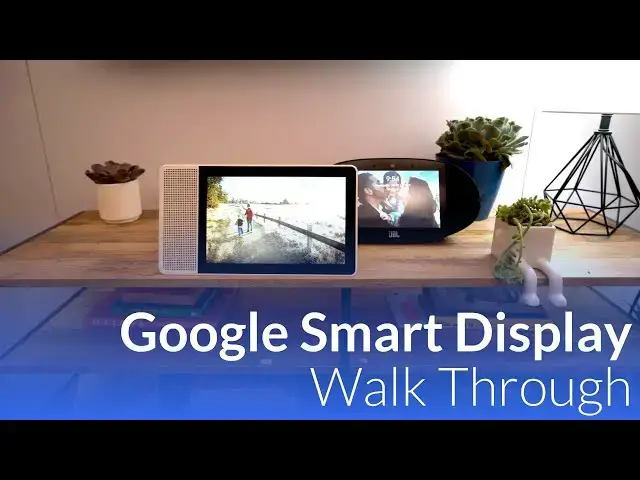
At CES 2018, Google was kind enough to give us a walkthrough of their newest Assistant-powered effort, the Lenovo Smart Display. It is worth noting the JBL and LG smart displays were on display as well, but our time was spent looking at the Lenovo model.
Google is positioning these smart display devices in a way that they shouldn't be compared with a standard computing device like a tablet or laptop. Sure, there's a touchscreen, but these devices aren't meant to take the place of productivity machines: they are made to supplement them.
Show More Show Less View Video Transcript
0:00
[Music]
0:08
hey folks Robbie Payne with chrome
0:10
unboxed and we just got done going
0:12
through Google's a big huge set up here
0:14
at CES 2018 they're calling it the
0:16
playground there's all kinds of stuff on
0:18
display from all of their Google
0:21
assistant partnerships that they have
0:23
and it's just kind of stunning to see
0:25
there's been a lot of people asking why
0:26
exactly is Google here if they're not in
0:28
veiling a bunch of new products and it's
0:30
really they're here to raise awareness
0:31
of Google assistant in the fact that it
0:33
is spreading just about everywhere but
0:36
today we get to spend some time with a
0:37
couple of Google employees that actually
0:39
gave us a guided tour of two of the
0:41
smart displays the one from Lenovo and
0:44
the one from JPL we spent most of our
0:45
time on the 10 inch a Lenovo model and
0:48
they actually went through some rain up
0:50
scenarios that you would actually
0:51
encounter with this device we get to see
0:53
it in action
0:54
and so we want to show that to you guys
0:55
so Google is positioning these smart
0:57
display devices in a way that they
0:59
really don't want you to compare them
1:00
with standard computing devices like
1:03
tablets or laptops I'm sure there's a
1:05
touchscreen but really these devices are
1:07
meant to take place of productivity
1:08
machines they're made to supplement them
1:10
and thinking through the use cases for
1:12
Google assistant in your home it becomes
1:14
pretty clear that there are a handful of
1:16
use cases that would greatly benefit
1:18
from having a display think about
1:20
whether recipe instructions video calls
1:23
basic knowledge questions Maps the list
1:25
just goes on and that's really google's
1:27
thinking here deliver devices that help
1:29
users get the most out of Google
1:30
assistant as possible so let's talk
1:32
about some of the things that these
1:33
things can do first up is ambient
1:35
display this is the display that's
1:37
always on when you're not interacting
1:39
with any of the smart display devices
1:41
and it can act as a photo frame for
1:43
leveraging Google photos give you the
1:44
date time and current weather just at a
1:47
glance now once you touch it you get to
1:49
the home screen and you'll see
1:50
appointments home integrations weather
1:52
etc it's just all based on your day your
1:55
schedule your stuff now Google will be
1:57
rolling out routines later in this month
1:59
in January which will allow a roll up of
2:02
a bunch of daily tasks that you can get
2:04
to quickly by setting a simple keyword
2:05
for the demo they use the words good
2:08
morning and when they said this the
2:10
assistant turned on the light it gave an
2:12
agenda
2:13
traffic update and then turned on
2:15
YouTube for top news next up is finding
2:18
businesses so similar to what you would
2:20
do on a phone or smart speaker you can
2:22
ask about nearby businesses with a smart
2:25
display however you'll get some visual
2:26
data along with your query so think
2:29
about asking just a speaker you get the
2:31
best result and you have to ask for more
2:33
options with a screen available you can
2:36
simply scroll through with a touch of
2:38
the other options as well clicking on
2:40
any of them will bring up something
2:41
similar to what you'd see in Google Maps
2:43
listing with ours picks reviews
2:45
directions all that kind of stuff
2:47
next up is camera controls for now this
2:50
is only working with nest cameras but
2:51
we'll likely see more roll up into this
2:53
and with nest cameras in your home you
2:56
can ask Google assistant to see you're
2:57
connected cameras and pull up live feeds
2:59
right there on the smart display so if
3:02
you need to see what the kids are doing
3:03
making all that noise in their room you
3:04
just tell Google assistant you want to
3:06
see it and boom it's right there on the
3:07
display moving on cooking smart
3:10
assistants are actually really great at
3:12
helping you cook if you've never done it
3:14
before I highly recommend it you can ask
3:16
for a recipe and Google assistant will
3:18
guide you step by step through the
3:19
recipe with a visual display you can
3:22
actually see each step one at a time
3:24
right in front of you and see where you
3:25
are in the recipe additionally if
3:28
there's a step that you don't even know
3:29
how to do you can just ask Google to
3:31
show you how to do that particular
3:33
maneuver a video pops up you see it and
3:35
then boom you're back into your recipe
3:37
and so to be able to see those visuals
3:39
to get through a recipe to learn a few
3:40
new skills all at the same time and
3:42
never touch a device that's actually
3:44
really really helpful moving on we have
3:47
some basic trivia so and I'm not just
3:49
talking about games I'm talking about
3:50
asking Google about facts and how to
3:52
make things work not only can Google
3:54
answer you the assistant can now bring
3:56
up relative cards and other information
3:58
to visually help you with the answer
4:00
another benefit is Google photos the use
4:02
case is pretty obvious here with Google
4:05
photos all you have to do is call up hey
4:07
I want to see pictures of vacation last
4:09
year I want to see pictures of my
4:10
daughter I want to see pictures of us at
4:12
the beach or I want to see pictures of
4:13
us at Disneyworld
4:14
Google photos knows how to find all
4:16
those and understand that language and
4:18
turn that into data that they can use to
4:20
go find those pictures and deliver them
4:21
up to you right there and so instead of
4:23
having to now pull those things up and
4:25
show someone on your phone or pull them
4:26
up and now find us
4:27
- Kass - you've got a nice 10 inch
4:29
display that can vividly show those
4:31
images to people around you if you have
4:32
people over for dinner if you just want
4:34
to look back and be nostalgic about your
4:37
photos another thing that the smart
4:39
displays can do really well video
4:40
calling for the moment duo is at the
4:42
center of these video calls over time
4:44
Google says that they will allow in
4:46
other video platforms but for right now
4:48
it's all duo and it works quite well
4:51
just as you'd expect another thing to
4:53
think through games now we're not
4:55
talking about 3d shooters or platformers
4:58
we're talking about the games you would
4:59
play on a smart speaker so things like
5:01
trivia and one of the most popular games
5:03
that Google says that they have right
5:04
now is I'm feeling lucky which is a
5:06
basic trivia game and it works really
5:08
well with a smart speaker but guess what
5:10
it works even better when you have a
5:12
device that's a smart speaker and a
5:14
smart display because now they can add
5:16
some graphic elements to these things
5:18
that really heighten the game and help
5:21
you kind of see and visually interact
5:23
with the device they showed us and let
5:25
us play a couple rounds of lucky trivia
5:27
and it was it was really cool it's
5:28
really fun experience and I would expect
5:31
to see many many more developers
5:32
leveraging smart displays in this way so
5:35
that's about all Google showed us during
5:36
this demo but you get the feeling and
5:38
you get the sense that the sky is kind
5:40
of a limit for this technology we're
5:43
already seeing all kinds of things from
5:45
Google assistant and smart speakers in
5:47
general that we wouldn't have thought
5:48
about even six months ago so I can't
5:50
imagine how much different the landscape
5:52
will be now that we've added displays to
5:54
this mix in about 6 months or a year
5:56
from now as developers get their hands
5:58
on these things and they start hitting
6:00
retail channels and people start using
6:01
them as I said before the sky's kind of
6:04
a limit here all kinds of new
6:06
experiences and rich media are probably
6:09
coming our way on these devices and I
6:11
look forward to it I think it's going to
6:13
be a cool new segment and a cool new
6:15
thing where we see tech evolve guys if
6:17
you like this video hit the thumbs up
6:19
subscribe down below and until next time
6:21
we'll see you
6:24
[Music]