Up next in 10



Join our Patreon community for exclusive extras, an ad-free website experience, access to our private Discord server, and more: https://www.patreon.com/chromeunboxed
・・・・・・・
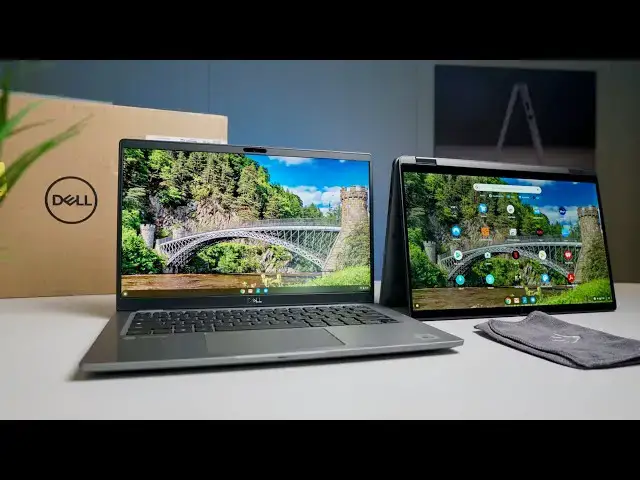
In it's follow-up to the Dell Latitude 5400 Chromebook Enterprise, Dell has released the Latitude 7410 Chromebook Enterprise and the improvements are numerous when compared with the first version. From an upgrade to the newest 10th-gen Intel Core i5, 8GB or 16GB of RAM and between 128GB and 512GB of NVMe SSD storage to better screens, bigger batteries, and many more configuration options, these new Latitude Chromebooks are solid, high-end Chromebooks ready for the workforce.
Read more: https://chromeunboxed.com/unboxing-dell-latitude-7410-chromebook-enterprise-video/
Join our newsletter: http://bit.ly/2WjCDm7
・・・・・・・
Shop Chromebooks on CHROME SHOP: https://chrmshop.com/
Subscribe to the channel: http://bit.ly/2xFuj6L
The Music We Use - PERFECT for YouTube: http://bit.ly/31W6PYP
Follow us: https://www.instagram.com/chromeunboxed
https://twitter.com/chromeunboxed
Show More Show Less View Video Transcript
0:00
in the house today we have not one but
0:02
two versions of dell's new chromebook
0:04
enterprise it's the latitude 7410
0:07
and while these chromebooks are pricey
0:09
they bring a lot of cool stuff to the
0:11
table and a ton
0:12
of configurations so we want to dive
0:14
right into the two that were sent over
0:16
to us because
0:17
we're not even completely sure exactly
0:18
what all they have in them
0:20
and we're excited to have them here and
0:22
to show you guys these on camera
0:24
[Music]
0:28
today's video is brought to you by our
0:30
awesome and growing patreon community
0:32
if you'd like to learn more about how
0:33
you can get access to behind the scenes
0:35
footage
0:36
early access content and ad free
0:38
experience over on our website and
0:40
access to our private discord channel
0:42
head over to patreon.com forward slash
0:44
chrome unbox and you can learn more and
0:46
get started today
0:47
okay so we're going to start with what
0:49
looks like the
0:50
we'll start with the full hd one the
0:52
reason we're doing both of these
0:53
chromebooks and why we requested more
0:55
than one
0:56
is because this is honestly being rolled
0:58
out the way that i would like to see
1:00
most chromebooks rolled out
1:02
one model one device and the option to
1:05
have it in a clamshell or convertible
1:07
is just another option so you can choose
1:09
screens and dell has gone
1:11
way out of the way to make this thing
1:13
highly customizable so i mean
1:14
there are multiple sizes of hard drives
1:17
multiple ram configurations
1:19
there are multiple screen resolutions
1:21
there are multiple screen types so
1:23
anti-glare non-anti-glare touch
1:25
non-touch they're all a 14-inch
1:27
chromebook though
1:28
they're all the latitude 7410 so it's
1:31
all
1:31
one device and so one of those choices
1:33
you have in there is
1:35
convertible or non-convertible now that
1:37
doesn't mean that every single option is
1:38
available on both of them they're
1:40
limited you know as you go down and
1:41
choose configurations but
1:43
the minute you head over to the site
1:45
where all of these are
1:46
you're going to realize real quick that
1:48
there are tons of configurations for
1:50
this
1:51
but it's just one chromebook this year
1:52
so instead of them having multiple
1:54
enterprise devices
1:56
some clamshells i'm not it's the 7410
1:58
latitude
1:59
that's the chromebook and you just
2:00
choose whether you want you know full hd
2:03
4k clamshell that kind of stuff they
2:05
even have different batteries
2:07
across some of these things so the
2:09
retail starts on this thing
2:11
at uh 1300 so 12.99 so this is not for
2:15
the faint of heart
2:16
by any stretch of the imagination these
2:18
are expensive chromebooks
2:20
these are aimed at the enterprise and
2:21
just like i would have said last year
2:23
when
2:23
when dell had their uh their initial
2:26
enterprise chromebooks these really
2:29
aren't for consumers necessarily it
2:31
doesn't mean you can't go buy one if you
2:32
want to and
2:33
you know that's kind of how we'll treat
2:34
our review we'll look at it and say you
2:36
know is this
2:36
is this a 1300 chromebook for general
2:38
consumers
2:40
without even touching the thing i can
2:41
already tell you
2:43
probably not you know like businesses
2:45
are going to go buy these in bulk and
2:47
they have some some things that you know
2:49
large-scale enterprise
2:50
companies are going to be after dell has
2:52
awesome you know
2:53
virtual machine stuff and vmware and all
2:56
those kind of tools at their disposal
2:58
that that work really well on these
2:59
chromebooks
3:00
so whether it's for just general
3:02
consumers and we'll we'll wait and see
3:04
on that
3:05
um let's see charger
3:09
nothing out of the ordinary here so
3:11
we're just doing a usb type c
3:13
uh standard kind of plug going on here
3:15
so nothing surprising there
3:17
i'll set that to the side because this
3:19
is really what we're after
3:22
these are review units so these have
3:24
been these have been opened prior to
3:26
this
3:27
so i'm sure they checked them make sure
3:29
that they didn't send us over some kind
3:30
of duds
3:31
but i can tell you right off the jump
3:33
this thing looks
3:35
premium and it should it's thirteen
3:37
hundred dollars at least to start it
3:38
just goes up from there so
3:40
uh it looks very premium nice brushed
3:43
aluminum
3:43
i don't think either of the ones yeah
3:45
this is aluminum on it too so we got the
3:46
aluminum
3:47
versions there are some of them that
3:49
come in carbon fiber and
3:50
i'd like to get those but uh apparently
3:53
those were not available for review
3:55
but those would look really sweet if
3:56
you've ever seen dell's xps devices with
3:58
carbon fiber
3:59
they're pretty awesome around the back
4:02
here we've got some
4:03
some fan ports some fan stuff here these
4:06
are 10th gen
4:07
devices so these are all those hatch
4:10
based type chromebooks so
4:11
you're getting core i5s across the board
4:14
here so 10th gen core i5 as we all know
4:17
super fast it comes with cool stuff like
4:18
wi-fi 6
4:20
bluetooth 5 all the benefits of extended
4:23
connectivity here
4:25
and obviously fast processing nvme
4:27
storage across the board as well so it's
4:28
very fast hard drives
4:30
starts at 128 gigs goes up all the way
4:33
to 512 gigs depending again on your
4:36
configuration so there's no one spec
4:38
sheet we can say this is what the 7410
4:40
comes with
4:41
it comes with all sorts of different
4:42
specs there are just a crazy amount of
4:44
options that dell has put on the table
4:46
here for
4:47
all the enterprise folks but let's look
4:49
around the sides here we've got a full
4:51
size hdmi slot which if you recall
4:53
on my review of the acer chromebook spin
4:56
713
4:57
the full-size hdmi slot made a return
5:00
and it's actually been really nice to
5:02
have that thing back
5:03
for a little while it was like yeah
5:04
usb-c can take care of it and
5:06
it can it can do that just fine but it's
5:08
just nice to have that there
5:10
especially for enterprise uh chromebooks
5:12
because these devices
5:14
are ones that you're going to be taking
5:15
to meeting rooms and that kind of stuff
5:16
and to be able to just
5:17
pop an hdmi cord in there and have it
5:19
out to a display
5:21
it's just nice not to have to fuzz
5:22
around with a dongle of any sort
5:24
but speaking of dongles we got usb type
5:26
c we've got
5:27
sd card support again if you get one of
5:29
those five 12 gig models
5:31
probably don't need that too much but
5:32
hey it's there and then two usb
5:34
type a's and a lock port which a lot of
5:37
times i kind of make fun of lockports on
5:38
cheap chromebooks
5:39
this is not a cheap chromebook so if
5:41
this gets set up in a college situation
5:43
or
5:44
i don't know some sort of place where
5:46
you have shared chromebooks for a
5:48
workspace
5:49
obviously that would be a good thing to
5:51
have because this is an all aluminum
5:53
solidly built i mean there is no flex in
5:55
this thing whatsoever
5:56
this is just a beautiful well-crafted
5:59
device there's nothing about this that
6:00
feels cheap
6:02
or not thought out because this is the
6:04
same latitude that would have windows on
6:06
it it's it's the exact same device
6:08
so we're not getting kind of a a halfway
6:11
version here and on the convertible one
6:13
finger lift
6:14
pretty much it wiggled there just a
6:16
little bit uh but again
6:18
just a nice solid hinge uh
6:21
get a little bit of a lift there as we
6:24
open it all the way up
6:26
and let's feel the converting
6:29
a nice snap there a little bit of a
6:31
magnetic hold
6:33
just a little bit not much dell says
6:35
that this will work with their
6:36
turn it off dell says this will work
6:38
with their active pin
6:40
uh which is kind of cool unfortunately
6:42
is not usi stylus compatible at this
6:45
point
6:45
we know that usi compatibility is kind
6:47
of a thing moving forward
6:49
but this device has been in development
6:50
for quite some time so i don't think
6:51
it's succumbed to that particular
6:53
standard
6:55
which is a little unfortunate i wish usi
6:56
compiled compatibility worked on this
6:59
but it's not that huge of a deal since
7:01
dell has their own pen technology
7:03
and you can buy their pen right now from
7:05
their website and it will work with this
7:06
so let's close this one down for right
7:08
now and go ahead and get this guy out of
7:10
the box now i'm going to spend a whole
7:11
lot of time
7:13
with this one this is the 4k model
7:16
again same chromebook here so i'm not
7:20
going to get all the charger and all
7:21
that kind of stuff
7:22
out and yeah from the outside
7:26
it looks like the exact same device
7:28
slightly different hinge obviously so
7:30
if i hold these two up you can see if i
7:34
can hold these balls up
7:35
there's just a very similar look between
7:37
the two of them but you can see the
7:39
convertible hinge here
7:40
but other than that we kind of see them
7:42
side by side
7:44
this is the same chromebook and that's
7:46
kind of what dell was going for here is
7:48
this idea of having one device uh with
7:50
multiple configurations so this one is
7:52
obviously not going to be convertible
7:54
uh this one doesn't even have a
7:55
touchscreen from what i understand from
7:57
the box but we're getting a 4k
7:59
display here anti-glare so this is the
8:01
first one i opened up was a glossy
8:03
display
8:04
4k anti-glare display non-touch
8:08
critical update so we'll leave that
8:10
alone while it's doing its thing and
8:11
i'll talk a little bit about just
8:13
the aesthetic here on the inside of
8:15
these devices now
8:16
um across the board again this thing is
8:19
all aluminum there's no like hey this is
8:21
mostly aluminum with a plastic base or
8:23
whatever
8:24
this thing is fully aluminum brushed
8:25
aluminum it's very high class
8:28
it looks very good it feels great like
8:30
picking it up by a corner there's just
8:32
no flex whatsoever in this thing and
8:34
again that's what you would expect you
8:35
know when when you're talking about a
8:37
1300
8:38
chromebook you don't expect for it to
8:40
show up and feel creaky
8:42
or wobbly or anything like that and it's
8:44
a shame when
8:45
expensive chromebooks have plastic bits
8:47
in them that make them feel
8:48
you know less premium that's not the
8:50
case here at all
8:52
and i can tell you already the viewing
8:53
angles on this screen
8:55
look really awesome let me get logged in
8:59
and let's yeah so
9:02
the 4k model 400 net screen all the
9:05
other
9:06
full hds are 300 nits awesome for dell
9:08
to basically bottom out at 300 nits
9:10
because
9:11
we've seen enterprise chromebooks
9:13
recently actually that have 250 net
9:15
screens on them and i'm just like
9:17
for a device that's going to get used
9:18
out in the field a lot of times or
9:19
people are taking with them and
9:21
traveling and
9:22
you don't know what the lighting
9:22
conditions are going to be day to day
9:24
you need a bright screen
9:25
well this one is super bright this will
9:27
blow out the shot i guarantee you but
9:29
i'm just trying to show you
9:30
it's bright so 400 nits 4k
9:33
anti-glare so anti-glare screens
9:35
actually help you see a lot better and i
9:37
can tell you from
9:38
right off angle over here screen still
9:40
looks good i can see all the colors
9:42
everything looks great on it but
9:43
no touch response here there is i think
9:46
a 4k version with touch again
9:49
this is dell basically saying hey we're
9:51
going to throw all the options out there
9:52
for you
9:53
you kind of customize the chromebook you
9:55
want and we've not really seen that
9:57
you know we see these chromebooks launch
9:59
and you get like three options
10:01
this thing has just a myriad of options
10:04
and i can tell you too
10:06
keyboard feels fantastic i mean lots of
10:09
lots of travel great click this is going
10:12
to be a fun one to type on
10:14
and the trackpad feels that that may be
10:16
the smoothest trackpad i've ever felt
10:18
that's crazy smooth like it's almost
10:20
like they went glass trackpad
10:22
and then put some oil on top of it or
10:24
something i don't know what's going on
10:26
there that thing feels
10:27
crazy smooth assuming
10:30
yeah so both of them exact same track
10:33
pad not surprising
10:34
backlit keys going on here too but we've
10:36
also got some extra function keys up top
10:39
and so
10:39
i'm trying to set this here so that
10:40
those can be caught on camera a little
10:42
bit
10:43
um you know the top row does what most
10:45
chromebooks do
10:46
it gets a the newer layout similar to
10:49
what we see on like a pixel book or
10:51
something like that
10:52
so it gets rid of the forward key but
10:54
you don't have the play pause key so
10:56
that's kind of weird
10:57
and then we've got another i don't know
10:58
what this key is here
11:00
on the far right but you've got to
11:02
remember a lot of people are going to be
11:03
using vmware with dell
11:05
chromebooks so they're going to be you
11:06
know giving windows devices or windows
11:09
applications delivered in a virtual
11:11
machine type
11:11
situation so they need to have all those
11:13
function keys up there to
11:15
interact with those windows programs so
11:17
you've got kind of a
11:19
i don't know what they would call this
11:20
key down here it's where the assistant
11:21
key would be but you have to
11:23
also have a function key down here so
11:25
there's quite a few different keys on
11:26
these dell chromebooks it's the same
11:27
thing we saw on the 5400 latitude line
11:30
so this is nothing new
11:32
and one of these keys up here on certain
11:34
models
11:35
the two models we have don't have it
11:37
actually have the privacy screens
11:38
there's a
11:39
one of these models i don't think it's
11:41
the 4k model one of the full hd models
11:43
you can get that actually has the
11:44
digital privacy screen
11:46
unfortunately they didn't have one of
11:47
those available for us to review
11:49
but the idea being you would hit one
11:51
button and you get this
11:52
virtualized privacy screen that you
11:54
can't see off angle so if you're sitting
11:56
on a plane and you're dealing with
11:57
documents that are private and need to
11:58
be kept
11:59
out of the eyes of people that are next
12:01
to you you hit that key
12:02
and basically the screen is dark for
12:04
everybody that's not sitting right in
12:06
front and
12:06
while i really wish we would have had
12:08
one of those to review because we've not
12:09
yet
12:10
seen a chromebook with that particular
12:12
feature there's just not one available
12:13
right now
12:14
and we know hp has got some so hopefully
12:16
eventually we'll have one in our hands
12:18
we can test it and see how good that
12:19
works but
12:20
you know some extra function keys up
12:22
there give this the ability
12:24
and the flexibility so that when you're
12:25
running windows applications
12:27
both with dell's vmware and possibly
12:30
upcoming with the parallels
12:32
windows applications that are coming to
12:34
chromebooks this fall you know
12:36
those extra function keys can go a long
12:37
way for windows applications that look
12:39
for those extra f10 f11 f12
12:41
function keys up there but right now i
12:43
can tell you just looking at these
12:45
i don't know that they're worth for
12:47
consumers 1300
12:49
and up but i can tell you they're well
12:51
built they look fantastic on the desk
12:53
they
12:54
feel amazing in the hand the keyboards
12:55
feel great the trackpads feel great
12:57
the screens look great thank god we're
12:59
not getting 1300
13:01
chromebooks with subpar screens so you
13:03
know the i o is awesome on these
13:05
i just think for a lot of enterprise
13:08
customers
13:09
these are going to be great chromebooks
13:10
these are going to be fantastic devices
13:13
14 inch screens so plenty of real estate
13:14
to work with it's going to be great
13:16
devices for a lot
13:18
a lot of businesses to say you know what
13:20
this is the line we're gonna go with
13:21
we're going chrome os for remote work
13:24
this is gonna be a good fit for a lot of
13:25
them but guys that's been it for this
13:26
one if you like it
13:28
give it a thumbs up go down there and
13:29
hit that subscribe button and don't
13:30
forget to hit the notification bell as
13:32
well if you'd like to be alerted when we
13:34
make future videos
13:35
just like this one like the review of
13:37
these particular chromebooks
13:39
until next time we'll see you
#Business & Industrial
#Consumer Electronics
#Enterprise Technology