Up next in 10



Sponsored by NordVPN. Try it out and get 75% off a three-year plan for a limited time! Click here: https://chromeunboxed.com/nordvpn
・・・・・・・
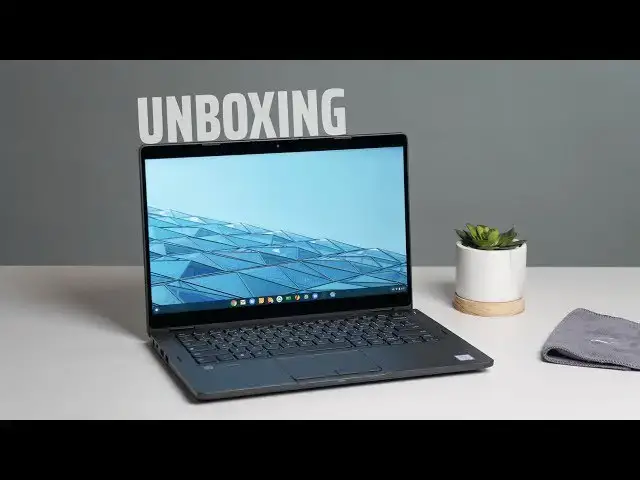
Just today, FEDEX stopped by to drop off the newly-released Dell Latitude Chromebook Enterprise 5300 on our doorstep. If you recall, this Chromebook is the first in a new line of devices dubbed Chromebook Enterprise and these new Chromebooks come with all sorts of enterprise-ready features like Dell's own VMWare capabilities built right in alongside the Chrome Enterprise license right out of the box.
Their price tags are high and their build quality is premium, but are they a good choice for general consumers? After all, with a clear and focused aim at the workplace, do these new Chromebooks from Dell offer anything to the standard consumer that a Chromebook for much less can deliver? We obviously have to spend some time with this device to determine that answer, but my guess is that if you are here reading this, you are either in the market for devices for your business or you are a consumer who is thinking about plunking down some serious money for the best Chromebook money can buy.
Read more: https://chromeunboxed.com/dell-chromebook-enterprise-latitude-5300-unboxing-first-impressions/
Join our newsletter: http://bit.ly/2WjCDm7
・・・・・・・
Shop Chromebooks on Amazon: http://bit.ly/chrmbooks
Subscribe to the channel: http://bit.ly/2xFuj6L
The Music We Use - PERFECT for YouTube: http://bit.ly/31W6PYP
Show More Show Less View Video Transcript
0:00
so this morning FedEx stopped by and
0:02
delivered this this is the latitude
0:03
Chromebook Enterprise 5300 it's the
0:07
two-in-one so the convertible
0:09
form-factor
0:09
high-end Chromebook from Dell I believe
0:12
we're working with a core i5 16 gigs of
0:15
ram 128 gigs of internal storage but
0:17
just in general even though these
0:19
enterprise driven Chromebooks are a bit
0:21
outside of our wheelhouse and probably
0:23
for a lot of our viewers it's outside of
0:24
your wheelhouse - I know there's some of
0:26
you that are looking at the premium
0:27
price tags on these and the premium
0:30
build qualities and maybe you're
0:31
interested in knowing whether or not you
0:33
should drop that kind of coin on a
0:34
Chromebook so this is our first step and
0:36
taking a look to see if this is worth
0:38
the money but before we hop in the box
0:47
this video is brought to you by Nord VP
0:49
and they are the VPN of choice for
0:51
millions of users including chromebook
0:52
users because they're awesome at what
0:54
they do and that is securing your
0:56
browsing while you're at home or on the
0:58
go if you'd like to learn more about
0:59
them go over to chroma and box.com
1:01
forward slash Nord VPN and you can get
1:03
started today
1:04
alright so let's hop in the box and see
1:06
what we got first blush I kind of would
1:08
have expected a little bit better
1:10
packaging for a device that cost this
1:12
much I believe this one at its
1:14
discounted price is somewhere around
1:16
fourteen to fifteen hundred dollars so I
1:19
was expecting a little more I'm being
1:22
honest but it's a Chromebook so not that
1:25
surprised and inside yeah it's pretty
1:28
standard Chromebook fair here first up
1:32
we've got a two piece charger it looks
1:34
like and this is a review unit so like
1:37
yeah this isn't packaged up but you know
1:38
a pretty standard fare here two pieces
1:41
for the charger when it's a barrel
1:43
charger that's uh that's kind of a shame
1:47
I'm not sure what the motivation is
1:48
there cuz I'm pretty sure these have USB
1:50
C with the power delivery so I don't I'm
1:53
not really sure unless that can somehow
1:54
charge crazy-fast or something
1:57
which we all know until we get it and
1:58
review it additionally again these are
2:03
meant for enterprise customers warranty
2:06
safety stuff and our booklet
2:09
yeah that's your booklet there you go
2:13
open it up turn it on there's the camera
2:16
and there's the ports yeah pretty
2:18
standard Chromebook fair here so I'm
2:20
actually kind of interested to know
2:21
whether or not I'm gonna be able to even
2:23
sign into this thing a long time ago
2:25
before Chromebook Enterprises the thing
2:26
at HP Chromebook 13 I got off eBay I
2:30
think it was and it was one of those
2:32
ones that was like designated for
2:34
enterprise use and I couldn't sign into
2:36
the thing I end up having to return it
2:38
nobody could figure it out I couldn't
2:39
get past it wanting me to sign in with a
2:42
G suite account that had specific setups
2:44
and stuff on it so hopefully that's not
2:46
the case here again this this thing is
2:49
geared for the enterprise user it's
2:51
geared for the IT professional it's
2:53
geared for especially with these these
2:55
have Dells vmware stuff built in there
2:57
they have signed management stuff i mean
2:59
things that honestly are just outside of
3:01
my wheelhouse outside of my full
3:03
understanding I am NOT an IT guy I've
3:04
never worked in a enterprise scenario
3:08
where I would have a computer that would
3:10
be this controlled by an IT professional
3:11
so a lot of this stuff I don't I don't
3:13
even fully understand and I don't expect
3:15
that a lot of you watching this will
3:17
understand either
3:17
hopefully you're probably here to know
3:19
is this thing works the kind of price
3:20
tag because the general consumers can
3:22
buy this and again I'm assuming I'm
3:24
gonna be able to log in pinch feels nice
3:29
build materials not surprisingly feel
3:31
great if you felt any of the newer
3:33
high-end Dell Chromebooks are not
3:35
Chromebooks I'm sorry Windows PCs just
3:38
that nice I don't know what kind of
3:40
texture they've got on there aluminum
3:41
but it just doesn't pick up a lot of
3:42
fingerprints it doesn't look like but it
3:44
this thing feels solid it's a little
3:46
chunky a little thick we've got some
3:49
ports around the side the USB see like I
3:50
said a power delivery we've got that
3:52
barrel charger full size HDMI port super
3:55
speed USB a their USB a here Kensington
3:58
lock
3:59
SD card micro SD card slot headphone
4:01
microphone jacks so interestingly enough
4:02
we only have one USB type-c on here so
4:05
maybe that's why they opted for the
4:06
barrel charger I don't know why you
4:08
wouldn't just do another USB type-c but
4:10
I'm not sure it looks like we have a SIM
4:12
tray here as well so these are whiskey
4:13
Lake processors variant of the 8th gen
4:16
core I series so Core i5 again in this
4:19
one and those chips have support for LTE
4:21
so this device technically if I got a
4:24
data SIM I would assume I could pop it
4:26
in mic for the review I might try
4:27
popping my own phone sim and then just
4:29
see what happens but let's open it up
4:31
again on the outside - we have fan ports
4:34
you'd expect those these are you series
4:36
processors these things are workhorses
4:37
and they are meant to be fast and
4:41
efficient and so we have you series fan
4:44
processors on the inside so yeah upon
4:46
just opening this thing up hinge feels
4:48
great build materials just feel solid
4:50
and you would expect that I mean this is
4:52
an expensive Chromebook and again I know
4:54
I'm keep saying we're we're gearing this
4:57
thing towards enterprise and you know
4:59
large companies just buy these things in
5:01
bulk and maybe don't think about price
5:02
tags as much again you as a consumer
5:05
might be thinking hey this is a great
5:07
different OEMs making a high-end
5:10
Chromebook this might be something for
5:11
me and so we want to kind of review it
5:13
as such so I can tell you right from the
5:15
onset just the feel of the keys trackpad
5:18
feels nice and smooth everything just
5:20
feels premium it looks really good you
5:22
know again if you're going for that just
5:23
straight up laptop look I mean it it
5:27
doesn't look clunky like some of the
5:28
other enterprise devices we've seen
5:30
around backlighting on the keys there's
5:32
this odd button selection it's got on
5:36
the trackpad I don't know exactly why
5:38
they included it I for one really like
5:40
trackpads that click and you know that
5:42
that kind of you know - finger click I'm
5:44
very used to that now Mac users are used
5:46
to it Windows users are now getting used
5:48
to it so I'm not really sure why they
5:49
included the two buttons but it has to
5:51
be something that passes through or
5:53
works with with Dells VM solutions and
5:55
Windows you know existing on servers and
5:58
and you can even see it the keyboard
6:00
here the keyboard layout is different
6:02
than most Chromebooks there's some extra
6:03
keys and all the buttons up top instead
6:06
of just being the regular chrome OS
6:08
buttons are function buttons and you
6:09
have the Chrome OS shortcuts so this
6:11
feels a little more Windows esque and in
6:13
the way that it looks and kind of just
6:15
presents itself in general
6:18
[Music]
6:25
so now I've actually gotten logged in
6:28
and that little break and got my normal
6:30
stuff set up so I can't confirm you can
6:32
log in I logged in with my personal
6:34
gmail account this is not we have a G
6:36
suite account that's connected to Chrome
6:37
and box
6:38
I didn't log in with that logged in with
6:39
my standard Gmail account and went ahead
6:41
and tried to log in my other accounts as
6:43
well that I normally keep on my
6:44
Chromebook I went through my normal
6:45
quick setup that I would normally do
6:47
everything looks fine everything's
6:49
functioning fine my two-factor
6:51
authentication came up on my phone all
6:52
of those things work exactly like I
6:54
would expect them to so what that tells
6:56
me is even though this is geared towards
6:59
enterprise I mean it looks like it it
7:02
says it on the box I mean they're making
7:04
no bones about that
7:05
consumers can buy this you could buy it
7:07
and use it as your personal laptop and
7:09
you don't have to be working for some
7:10
corporation but in general the screen
7:12
I think Dell said that it was shipping
7:14
with 255 nits of brightness screen looks
7:17
good colors look nice and accurate very
7:19
punchy 13.3 inches with a full HD
7:22
measure here so it's 16 by 9 1920 by
7:25
1080 nothing fancy going on there but
7:28
the screen looks really really nice
7:29
colors look great and what's really cool
7:32
at a 13.3 inch measure with this kind of
7:34
pixel density I don't I don't see pixels
7:37
on the screen from here if I lean all
7:40
the way in with my nose about 6 inches
7:41
from the screen I can start to make out
7:43
pixels and that's actually really great
7:45
because that's less pixels for you to
7:46
have to push around with the processor
7:48
and it's still going to give you a nice
7:49
sharp image and it's not going to
7:52
degrade performance in any way shape or
7:54
form so I think this is a great choice
7:55
of resolution on this particular device
7:57
and you know the bezels on the left and
7:59
right are nice and thin the top and
8:00
bottom bezels aren't too bad you get a
8:02
nice little lift just a little bit kind
8:04
of a lot of the ACC 434 whenever you
8:07
open the hinge all the way up and you
8:09
know it's a convertible so it'll flip
8:11
into a tablet mode now granted is
8:13
anybody gonna use a tablet that's this
8:14
thick probably not but in general like
8:17
if you want to go into display mode
8:19
something like this are going to a tent
8:21
mode like that you know it's useful for
8:23
those types of things maybe on a plane
8:24
or something like that but in general I
8:27
can tell you right now the thing feels
8:29
obviously insanely snappy really quick
8:32
everything's moving around on the screen
8:33
super fast but jumping into tablet and
8:36
laptop mode
8:37
with no issues whatsoever but we've got
8:40
to run it through all our normal tests
8:41
we got to figure out how good the
8:42
battery life is we got to figure out how
8:44
good performance is even though I'm not
8:46
concerned whatsoever with 16 gigs of ram
8:48
and the this latest Core i5 it's like I
8:51
said it's an eighth gen but this thing's
8:53
gonna be a beast it's gonna be a monster
8:55
from a performance standpoint I don't
8:56
think that's any concern whatsoever
8:58
especially not with this 1080p screen
9:00
but overall I tell you it just it feels
9:02
great it looks really good feels nice in
9:05
the hand everything feels sturdy I mean
9:06
this thinks milspec rate is I mean it's
9:08
gonna stand up to a lot of drops and all
9:10
that kind of stuff so if you're looking
9:12
to buy a high-end Chromebook and you
9:14
want something that can really take the
9:15
rigors of the road I don't know maybe
9:17
this is something worth thinking about
9:19
and in general for me I'm gonna have to
9:21
spend some real time with this device to
9:23
get this review put together because
9:25
ultimately we're talking about a really
9:27
high-end Chromebook with a really
9:29
high-end price tag and I just don't know
9:31
that that's gonna be a right fit for
9:32
very many people but you might be the
9:35
person that's a good fit for so with all
9:36
that being said if you are interested in
9:39
this device and want to know more about
9:40
it you're gonna want to subscribe to the
9:41
channel right down below and you're
9:43
gonna want to hit that notification bell
9:44
so you can be alerted when we put the
9:46
review out and other you know Chromebook
9:48
videos just like this one
9:49
and also while you're down there hit
9:51
that like button if this videos helped
9:53
you out whatsoever but guys that's it
9:55
for this one until next time we'll see
9:57
you
9:58
[Music]
#Business & Industrial
#Consumer Electronics
#Enterprise Technology