Up next in 10

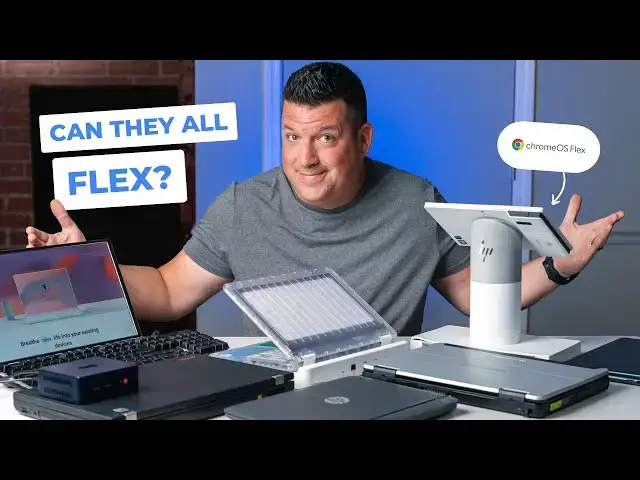
Can They All Flex? Running ChromeOS Flex On All Sorts Of Hardware
Sep 12, 2024


Sponsored by ChromeOS Flex. Refresh the devices you already own at no cost with a modern, cloud-based operating system that's secure and easy to manage: https://goo.gle/CrOSFlex
・・・・・・・
ChromeOS Flex - the version of ChromeOS that can run on all sorts of old or new laptops - is a wildly useful, incredibly flexible OS that serves all sorts of purposes from reviving old hardware to saving huge companies from massive ransomware attacks. And though we talked about quite a bit around here when it first arrived, there's a good chance you've never really had a look at just how malleable this operating system can be. Today, we're going to show you.
👉 How To Run Chrome OS Flex: https://www.youtube.com/watch?v=SmTd_olvvGw
📰 Read more: https://chromeunboxed.com/running-chromeos-flex-on-all-sorts-of-odd-old-and-new-hardware/
📧 Subscribe to our newsletter: http://bit.ly/2WjCDm7
・・・・・・・
☕ Fueled by Fresh Roasted Coffee! Buy the special edition Chrome Unboxed bag here: https://chromeunboxed.com/coffee
Subscribe to the channel: http://bit.ly/2xFuj6L
Follow us: https://x.com/chromeunboxed
Show More Show Less View Video Transcript
0:00
ChromeOS Flex, the version of ChromeOS that can run on all sorts of old and new laptops
0:05
is a wildly useful, incredibly flexible OS that serves all sorts of purposes from reviving old hardware
0:12
to saving huge companies from massive ransomware attacks. And though we talked about it quite a bit when it first arrived
0:19
there's a good chance that you've never really had a look at just how malleable this operating system can be
0:25
So today, we're going to show you. Now, before we get into all the devices on the table, I want to quickly cover what Chrome OS Flex is and why it's so valuable
0:38
A few years back when Google acquired Neverwhere, we weren't sure what would come of that purchase
0:43
A few years later, ChromeOS Flex was introduced and we had our answer
0:47
It's an OS just like what we have on Chromebooks, but it's easily installable on a massive array of old and new laptops, PCs, and Macbooks
0:55
It's updated right alongside with ChromeOS like we have on Chromebooks, and it can be able to
0:59
comes with all the same features and abilities, too, well, minus the Android apps. Simply put
1:04
ChromeOS flex is the same flexible, agile, cloud-based OS we love on Chromebooks, but available to
1:11
install on lots of legacy hardware. And this all comes with some big benefits for educational
1:16
institutions and businesses looking to streamline workflows, save some money, and increase their
1:21
security. We all know ChromeOS has never had a single successful ransomware attack, and that security
1:27
extends to ChromeOS Flex as well. In fact, a sizable hotel chain was actually able to update
1:32
thousands of insecure, compromised devices in just 48 hours to ChromeOS Flex to quickly recover
1:38
from a company-wide ransomware attack. With ChromeOS Flex running well on so many older laptops
1:44
savings and reduced e-waste are pretty huge benefits too. Not only will laptops updated to ChromeOS
1:50
Flex be faster and more secure than they were, they'll also be able to stay in use far longer and
1:55
stay out of the landfill while doing so. And then you have the ease of management to consider as well
2:01
ChromeOS, by its nature, is easy to manage and maintain, putting far less stress on IT crews to keep
2:07
things secure, safe, updated, and running smoothly. In any setting where there are fleets of devices being
2:12
used by an organization, ChromeOS, and ChromeOS flex by extension, just makes way more sense than something
2:19
like Windows. So with all that being said, we wanted to take a look at a bunch of hardware running
2:24
ChromeOS flex. It's one thing to tell you it runs well on all sorts of stuff. It's a whole different
2:29
thing to show you. But before we get into that, this video is sponsored by Google ChromeOS. We
2:35
partnered up with the ChromeOS flex team and put together a collection of old, new, and slightly
2:40
strange hardware that we could use to showcase just how flexible ChromeOS flex really is. It's been
2:45
a pleasure getting to work a bit more closely with them on this project and we're grateful for
2:50
the partnership to showcase how awesome ChromeOS Flex really is. If you're organizing
2:54
is interested in learning more about getting started with Chrome OS Flex, just hit the link in the
2:59
description. One last note before we take a look at all this hardware. All but one of the devices on the
3:05
table are what the ChromeOS Flex team refers to as certified. And that means they've been
3:10
tested to be sure things like audio, video, networking, trackpad, keyboard, USB, webcam, all that stuff
3:17
works. So that you can go and reference the certified list and decide if the move to ChromeOS Flex is right for
3:23
you are not. And when you do so, you'll know for sure that the devices that you have have been
3:28
tested to work well. However, even if they aren't on that list, you can easily test ChromeOS
3:33
Flex on a bootable USB stick so you can run your own trials beforehand. We have a video linked
3:38
in the description that will take you through all of that if you're interested in trying that out
3:43
for yourself. It's free, simple, so why not give it a shot, right? All right, so let's get into this
3:50
hardware. Before we start, I'm going to clear out a space to work with. And we're going to kind of
3:56
cover these in kind of chunks. So I want to start with the weird stuff, the stuff that's a little
4:01
bit different, not just a standard issue laptop. And from the beginning, maybe you've been
4:06
looking at this thing. This is the Justice Tech Securebook 6. And if you can notice something
4:13
it's clear. It's all see-through. This is an institutional Chromebooks for use in jails, prisons
4:19
that kind of thing. And so for obvious reasons, keeping it clear to make sure nothing's being snuck into
4:25
any kind of organization is a big deal. But what's really cool is this is a very purpose-built device
4:34
So this is obviously made for institutional settings, and everything just works still on it
4:42
So, I mean, obviously there's probably some unique stuff going on here with track pads and
4:46
the keyboard and everything, and yet everything still works. adjust brightness um i'll go up and down there your mute and volume and all that kind of stuff is
4:54
working so if the keys are mapped the way they need to be uh your track pad uh adjusters works so two
5:00
finger scroll all that kind of stuff and again it's a purpose built device um and this device is
5:06
meant to be uh secure and and able to be locked down and dropped onto the the dock kind of station
5:13
here and and all that stuff just works and that's the power of chrome os flex all right so on to
5:19
probably the oddest of all the stuff that we have. This is the HP Engage Go10
5:25
Now this is a retail-specific device. Obviously, it looks like a point-of-sale system
5:31
And it's got some really unique things on it. So, for one, you can flip this around, you know
5:36
if you want to, like, take a signature or whatever. And again, this is all going to be dependent on what app you're running
5:42
for your point-of-sale system and all that kind of stuff. But then there's this button that unlocks the tablet
5:47
And you hear it kind of click. And then it's this thing. I can kind of take around and maybe take orders with or something like that
5:53
And there even a scanner here And you can see it you know it looking for you know it an infrared you know barcode scanner And so if you have again I have the right software on here
6:05
You could be scanning stuff on the go. But as you can tell, I mean, it's running ChromeOS and all your settings are here just
6:14
like you would expect. The interesting part, there's no tablet mode here because ChromeOS flex doesn't really
6:20
focus on tablet mode. So when you use a device like this, you're just a good. going to kind of get the desktop version of the OS, but it's nice and quick. I think this thing's
6:28
got like a core I5 in it or something, 11th gen. And so it's nice and quick. And it's just a weird
6:36
weird piece of hardware that, you know, ChromeOS flex is not just running on, but is running
6:41
certified on. So if your company had these for their point of sales, you could use ChromeOS flex too
6:47
So let me get this thing, pop back on here, you'll hear it click. It's really cool. It's a fun
6:52
it's a fun device and again how they crammed a core i5 in there is shocking to me but i want to
6:59
move on to some more standard laptops but ones that are again pretty purpose built so this one is
7:05
the panasonic tough book and this thing feels like an absolute tank um it really does it feels like
7:12
one of those ones you could just throw in the back of a pickup and literally not worry it's got a handle
7:16
built into it up here um what other fun stuff we got going on we got like full ability to
7:22
just slide the batteries out of this thing. It's kind of compartmentalized
7:26
There's a, we'll check this stylus over here. There's a stylus hiding over here
7:32
So we'll see if that works. I'll just leave that out. Yeah, you've got all kinds of ports and all that kind of stuff
7:37
And then the whole thing just kind of clamps closed. And it's just made of metal and just rugged as all get out
7:44
Now it's thick. It's heavy. It's all that kind of stuff. But again, these are the types of devices where people are going to spend tons of money
7:51
to deploy a flip. of these things because they are not cheap
7:55
And, you know, at some point, if you want to update it and Windows won't update anymore
7:59
Windows isn't doing what you want it to do, you need another answer without having to
8:03
replace all these devices and all this hardware. And ChromeOS Flex is a great fit for that
8:08
All right, so we've got this thing all fired up. And as I was kind of working through just the basic setup process here, this device is in great condition
8:16
It is an 8th-gen core I-5 in here, so it's not like it's a new version of this tough book
8:22
obviously is many years old, but it's in really good condition, which this is a perfect example
8:27
of a device that perhaps, you know, there was a ransomware attack or there was some sort of issue
8:31
that, you know, they couldn't resolve quickly with Windows and maybe this company made the move
8:35
over to ChromeOS Flex in order to, you know, keep using this expensive hardware
8:41
But I wanted to try this little stylus out. I don't know if it's U.S.I. or EMR. I don't know
8:46
I don't know what it is. It's just in here. And this is a perfect example to me of here's this device
8:51
that has all this random stuff that obviously you'd have a bunch of drivers and windows to work
8:56
and you'd install chromeOS flex and here we go let's see um yeah there's a screenshot and it's actually
9:02
really really responsive like that feels great so i mean you even get to still use the stylus that's
9:08
built into this thing which is which is pretty awesome but again this is this is an example of a device
9:13
that you just wouldn't want to replace this thing if you were running a business and you had
9:17
a hundred of these things out in the field they're very expensive and they're very well built and
9:22
built to last for a long time. Well, when Windows is failing you
9:26
ChromeOS Flex is here to fix it. Let me show you just a couple more things on this one
9:30
So let me bring this up. Again, I'm going to say this stuff over and over again
9:36
Speakers work, keyboard shortcuts work, all that kind of stuff works. But, you know, with different ones
9:41
I want to show you different things. So, for instance, speakers obviously would be a big deal
9:44
if they didn't work. These speakers don't sound good. But you can see the speakers working just fine
9:51
and then let me bring up the camera. Because again, these are technical things
9:57
that with Windows, you've got to have a bunch of drivers and all that kind of stuff to make it work. And as you can see, there's Joe in the picture there
10:05
Camera works. Actually, camera looks really good on here. So the camera works fine too
10:09
And so being able to see all these tiny things, the volume rocker, the screen brightness
10:18
your keyboard shortcuts, all those things work from device to device. it's just really cool to see
10:24
And the reason that ChromeOS Flex is just a really cool thing to talk about
10:29
because it'd be easy for this stuff to just not work. Windows requires tons of drivers to make these things work
10:35
and to see ChromeOS Flex work on hundreds and hundreds and hundreds of pieces of hardware
10:39
that it just has no business running on a lot of times. It's just a really, really cool thing
10:44
So on to another kind of work-style device. We've got another Lenovo here
10:49
It's a Lenovo ThinkPad. and this one is a real chunker. I'm pretty sure if I remember correctly
10:55
this one has inside, I think it's Core I5, but it's a third-gen core I-5
10:59
which takes us way back to like original Chromebook pixel days, which means terrible battery life
11:05
So we're going to have to get this thing plugged in and start it back up. But, I mean, this thing's old enough
11:09
Like you can see on here, that's a VGA connector. So some of you watching this don't even know what that is
11:15
But that's for older monitors before HDMI was a thing. it's actually an optical drive over here on it as well
11:23
yes I mean this thing is clearly a kind of a tough
11:27
rugged not quite as rugged as the tough book over there but that kind of you know work style device
11:32
this is a thing that the company that had it probably spent a ton of money getting deployed out to a bunch of people
11:38
and so obviously if you can bring this thing back from the dead that's pretty impressive all right got her powered on
11:44
this one's actually got like a release hinge over here to open it up
11:49
Wow Yep This one is definitely old Hopefully Joe can get from the side over there I mean you got letters worn off the keys I mean I feel like they worn almost a hole in that track pad Luckily this one actually has the nub on it
12:04
So like the Lenovo nub. And guess what? Works just fine. So you can actually use these buttons here if you want to use the nub along with that
12:14
We've talked about this before with a couple of Chromebooks that had the nub and how at first I was like
12:19
what would you use this for? But, you know, people have to wear gloves and stuff like that. out in the field. A nub's much easier to use than taking your gloves off and using a track pad
12:27
Though whoever had this before definitely got their use out of that trackpad
12:31
Once again, you see Kromos Flex working here. We've tested a bunch of the shortcuts. Everything
12:36
works. But what's really interesting about this particular one is that up top here, it's actually
12:41
got like some custom volume rocker buttons up here. And, you know, they've made sure that those
12:46
work too. So you can see my volume turning up and down and muting, which is kind of cool
12:51
you don't I don't know I just don't expect that kind of stuff to work but again seeing the nub
12:56
kind of working here and again this is a very very old device the nub working the keyboard shortcuts
13:02
and the volume shortcuts up here working pretty cool stuff and you know even though this trackpad
13:09
feels pretty terrible let me get to something I can actually scroll let's see yeah oh it does
13:16
I'll be darned I figured this was around before Windows would even do two finger scrolling and
13:20
somehow scrolling's working. I pinch zoom, probably not. No. Yeah, I'm actually kind of shocked that this trackpad even supports multi-finger gestures at all
13:32
And one last thing that's fun about this one, because there's actually an optical drive over here on the side
13:38
We were going to test this, but I don't have CDs anymore or DVDs
13:42
I won't open unless I've got this thing open. But let me just open it so you can see it
13:50
Click that. There you go. And I would think, I would think that if we had like a DVD or something with some data on it
14:00
it really wants to stay open, that it would actually work and be able to read
14:04
I don't know that for sure. But again, we don't have any of that kind of data around here
14:08
But this is a perfect example of a device that is well past its prime and well overdue for replacement
14:15
Still being a functional laptop, if this is what you had around and this is what you got to work with
14:19
ChromeOS flex will make this thing work. So from work-based devices, again, I said in the open, you know, a lot of this is going to come down to people who have fleets of devices out professionally and those in the education space
14:34
This is an educational aimed device. And again, it's thick. It's clearly got bumpers all around it and is built to take a beating
14:44
And what's funny is you don't see as many of these out there anymore because Chromebooks have taken
14:49
taking over education so much. But I'm sure there are still lots of school systems that have Windows-based
14:55
EDU devices kind of chilling out and sitting around. And so, of course, ChromeOS flex works really well here too
15:02
So this device is actually, I think, a 6th gen Celeron. So still quite a few years back
15:09
We're talking 7, 8 years ago. Let me pull up the diagnostics real quick. Yeah
15:13
So Celeron 3855U. Not that that really matters necessarily for this, but we really tried to get a bunch of devices on a bunch of different stuff
15:22
So we've got like 11th gen. We got some 8th gen. We got some 6th gen. We got some new AMD coming up here in just a minute
15:28
We've got some small core Intel here. So the N100 in that box
15:33
So hang around to see that in action as well. But yeah, so once again, you know, just kind of showing off stuff like, you know
15:43
there's the camera. Camera working just fine. And this is a device that
15:48
But again, isn't that old, but we got a VGA connector on here again alongside the HDMI
15:54
So, you know, we're not talking about brand new or, you know, cutting edge here
15:59
But if this is what you had in your educational facility and you didn't want to throw
16:05
them away because it's in perfect working order, like the keyboard's fine, it feels really good
16:09
The track pad's kind of small. But, you know, again, gestures work on this one as well
16:15
So let's close that. as you can see you know two-finger scrolling works just fine see pinch to zoom no yeah you got
16:23
to remember windows just got around to like multi-finger gestures a few years ago and so some of
16:28
their hardware in here just doesn't support like two or three finger gestures that well so the fact
16:33
that they're even getting two-finger scrolling working is pretty cool but again perfect example of a
16:39
device that is purpose built it is meant to take a beating doesn't have the highest end
16:44
process or anything in it, but if it's in this kind of condition, it feels really terrible to
16:49
throw it away or to get rid of it or feel the need to have to replace it. And with ChromeOS
16:54
Flex, once again, you just don't have to. Okay, from work and weird and EDU, we're going to switch
17:00
to something way more modern. So we actually went and grabbed this device over at Best Buy. It's just
17:06
one of the Lenovo yoga, the cheaper end yoga, but with an AMD, Radion, or Rising 5, I'm sorry
17:14
inside. And so for right now, we want to at least have one of these where it wasn't already
17:19
you know, certified and running ChromeOS Flex just to kind of showcase. Again, we have
17:25
linked in the description. If you want to go try this and install it, we have a walkthrough that does
17:30
all that stuff. I don't want to get derailed on this, but we're actually running ChromeOS Flex on
17:33
the USB for this one. And I've got a mouse dongle in here from Logitech. I'll explain that in just a
17:40
second. But this is a very modern device. Obviously, you can tell kind of from the sides. USB type
17:45
C's over here and H. CMI and a couple of USB ports over here and that's it. So we're definitely
17:51
not dealing with an older device on this one But as you can see we did not adjust our brightness But let me make sure with Joe here
18:02
Looking good there. Okay. So as you can see, you know, our brightness controls all work just fine
18:09
Our volume controls work just fine. So this is not a certified device. This is just a device where like, you know, let's get one and just see what happens
18:16
And so that's all working. Let's actually just check the camera. Again, these are difficult things
18:24
Oh, and I'm going to move it with the trackpad. We did figure out when booted in here for right now
18:29
the track pad's not working. So that's why I've got the Logite mouse, which is working just fine
18:33
Yeah, camera's working just fine. Let's just grab a photo here. Touchscreen's working too
18:40
So, I mean, that's a lot of stuff to be working on a device that hasn't even been tested
18:45
It's not like the ChromeOS team is like testing, you know, a ChromeOS flex team, I'm sorry
18:49
is testing stuff in the background and be like, we're just not going to tell anybody. You know, there's a beggillion laptops out there
18:55
And this is proof positive that you don't know. Like if you have this device and for some reason, Windows just isn't cutting it anymore
19:02
it's not working out. You're like, man, this is brand new. It's probably not going to work. This is all for like legacy devices and old stuff and bringing things back to life
19:09
Well, if you have a ransomware attack and you just deploy all brand new devices
19:14
you've got to do something. Well, guess what? There's a good chance ChromeOS Flex is going to work pretty well on your device
19:19
and with no testing whatsoever, other than the trackpad not working, and that's something the team could probably fix for this model pretty quickly
19:26
Everything is up and running on this. Camera's working. Let me just test the speakers real quick
19:32
Let's go to Chrome Unboxed. Keyboard on this thing. It feels really nice
19:37
All right. And... Yeah, works. Not the greatest speakers in the world, but they work
19:45
The whole point of all this stuff is that, like, stuff just keeps..
19:49
working. Like, it's wild. And, you know, I haven't tried this yet, but this is a convertible
19:54
It's a yoga. And as I said earlier, they, they do not support, the Chromos Flex team does not
19:59
support tablets at this moment. So at some point, they'll probably just have to flip the switch
20:06
for tablet mode. But for right now, they're just not doing that. But, I mean, if you put it
20:09
into a presentation mode like this or something, like the touchscreen still works. It's just those
20:14
gestures to navigate around don't work anymore. So you stay with your, your mouse on screen
20:19
And all your clicking can still work and do what you expected to do. So again, you're not talking about 100% functionality across the board here
20:27
but if this was a device that you would just put out to your fleet
20:30
and you needed it to still be working and you didn't have the funds to go replace it
20:35
you could slap ChromeOS flex on here and be off and running. All right, so we've done weird
20:39
We've done work. We've done school. We've done modern. There's this one over here, though
20:45
That's super interesting. I mean, this thing is so lightweight. It almost doesn't feel like there's anything
20:49
actually in here. I promise there is. We've tested it already. This is an N-100 Windows box. I don't
20:56
know. I would call this Chromebox. That's how I would refer to this thing. But basically, it's
21:00
the newer N-100 we see in some new Chromebooks. They're, gosh, wildly affordable. I'm pretty sure
21:08
they're under 150 bucks. B-Link is the name of the company that makes this one. You got dual-hd-mis and
21:14
USBs and Ethernet and all that kind of stuff, some USBs on the front. So it's
21:19
well-connected, something simply you could buy and put in, you know, computer labs or libraries
21:23
or something like that. But again, if you had it and it's running windows and it's running windows
21:28
kind of poorly, you could swap it over to ChromeOS Flex. We want to show you that running on this
21:33
but we need to get a monitor set up in here to do that. So we're going to break real quick and set
21:37
all that up. All right. So we've got our Frankenstein set up here. We grab the first keyboard we
21:42
could find up on the shelf. And it is a weird-looking, RGB kind of thing. And it brings up the point that
21:49
with a box, the Chrome OS Flex team can obviously make sure the box is running
21:53
well, and I can tell you that it is the N100 in here works
21:57
really well in Chromebooks, so it's not surprising with that in 8 gigs of RAM
22:00
seem to handle the OS just fine. But if I bring a keyboard that's got a bunch of
22:04
weird keys on it and stuff, like there's no way they can test every single keyboard out there
22:09
and they can't verify that every keyboard will work with this the way that they can do with a specific device
22:14
and a specific keyboard layout. But, you know, your basics work, the Windows key gets mapped
22:18
to the launcher and all that kind of stuff. And where you need other shortcuts
22:22
you can go into Chromos Flex and just add those shortcuts for yourself. But the takeaway here is this is a cheat box that could be deployed at scale
22:30
You could drop ChromoS Flex on it, add the peripherals that you want
22:33
and have a really nice workstation here that's easy to manage, and easy to keep updated and you don't really have to worry about
22:40
you know, ransomware and malware and all that other junk. So that's ChromeOS Flex in a nutshell
22:46
running on all sorts of different hardware, different form factors, all that kind of stuff
22:51
I hope this was helpful to you to actually see it, to actually see it working on all this different stuff
22:57
And if you're watching this and you're thinking, like, this could be a really good fit for our organization, our business
23:02
Remember, there is a link in the description. Go hit that link and you can learn more about how to get started with ChromoS Flex and the management and all that stuff that goes along with it
23:10
And again, we hope that this video in general has been a bit educational for you just to see all of this stuff
23:16
on the table actually running ChromeOS Flex. It's been fun. It's been a really cool project to work on
23:23
And again, thanks to the ChromeOS Flex team for helping us get all of this stuff together
23:28
But guys, that's it for this one. If you enjoyed this video, give us a thumbs up
23:31
Head down there, hit that subscribe button. And be sure to ring the notification icon as well
23:36
If you'd like to be alerted when we make future videos, kind of sort of like this one
23:40
Until next time, we'll see you
#Computer Hardware
#Laptops & Notebooks
#Operating Systems
#Gadgets & Portable Electronics