Up next in 10

Acer Chromebook Plus 516 GE Review
Sep 12, 2024


👉 Join Chrome Unboxed Plus for access to our private Discord, an ad-free website experience, ad-free podcast, AMAs, exclusive giveaways, and more! Start your 7-day FREE TRIAL here: https://chromeunboxed.com/join/
・・・・・・・
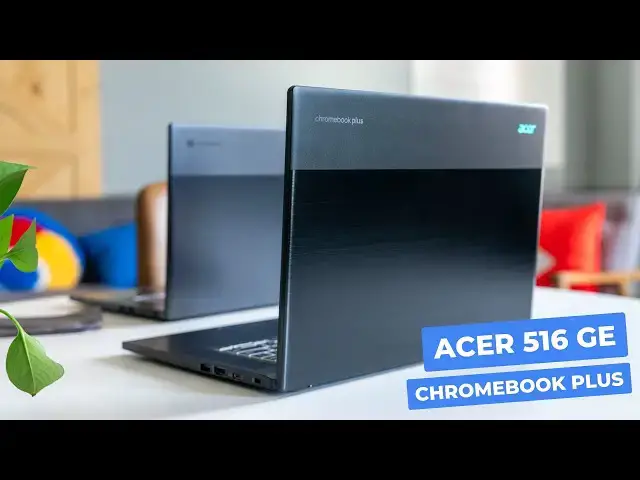
The Acer Chromebook 516 GE has been one of my favorite Chromebooks over the past couple years without a doubt. And in every way, the new Acer Chromebook Plus 516 GE continues that legacy: even if it does so by being a bit too much like its predecessor. Is it a worthy upgrade? Let's dive in and see.
📰 Read more: https://chromeunboxed.com/acer-chromebook-plus-516-ge-review-worth-the-upgrade-video/
👉 Buy the Acer Chromebook Plus 516 GE: https://howl.me/cmKzqSFoToy
👉 Buy the Acer Chromebook 516 GE: https://howl.me/ck3Eo4NUdeU
📧 Subscribe to our newsletter: http://bit.ly/2WjCDm7
・・・・・・・
☕ Fueled by Fresh Roasted Coffee! Buy the special edition Chrome Unboxed bag here: https://chromeunboxed.com/coffee
Subscribe to the channel: http://bit.ly/2xFuj6L
Follow us:
Show More Show Less View Video Transcript
0:00
Believe it or not, these are actually two different Chromebooks
0:03
And the one up here on top is the original Acer Chromebook 516 GE that I've loved for a couple years
0:09
And the one below it is the new Acer Chromebook plus 516 GE
0:14
That is about as iterative of an update as you can get
0:18
So let's talk about it. But before we get into comparing these two Chromebooks
0:26
I did want to mention really quickly. If you haven't heard about it, are growing and just frankly awesome Chrome Unbox Plus community
0:35
It's this place you can go and talk about Chromebooks, about Google products with a bunch of like-minded people
0:41
It's been a great community over the last few months as it started to really pick up steam
0:46
It's two bucks a month. You get ad-free access to the website. You get access to this community
0:51
which, again, is just a great collection of people. You can add-free feed of our podcast
0:57
And we do giveaways in there. doing AMAs with the Chrome OS team. There's all kinds of stuff for two bucks a month. You just
1:05
really can't beat it. It's something you really need to go check out. And if you'd like to learn more
1:09
about that, just head over to chrome unboxed.com forward slash join and you can learn more today
1:16
All right. So I'm not going to talk that much actually about this older one. Again, if you didn't know
1:23
any better and I just quickly showed them to you, you might be forgiven for not knowing which one is which
1:28
But as you can see, as you look a little closer, from the outside, they did change the color
1:33
They didn't change the chassis. I don't think the materials changed at all
1:37
As a matter of fact, if I flip them over kind of upside down, you can see the fan ports are the same, the feet are the same, the screws, in the same position, the hinges, all that stuff
1:47
Acer really did go for the iterative play here. Same is true of your port selection around the edges
1:52
It's all the same as the first version of this Chromebook, and even the two-tone
1:58
finish as I kind of hold this up there. This is kind of a dark gray versus now the pretty much
2:04
all blacked out version. I do like the new one better, but as you can see, I wiped this down
2:09
right before we started this video and you probably, I don't know Joe, can you pick that up
2:14
Big smudgies up here. The original one wasn't like the most fingerprint safe device I've ever used
2:20
This one is very fingerprinty. Now, it's nice because without too much effort, they wipe right off
2:26
So, you know, I don't mind something being fingerprinty if it wipes off easy. It's when it gets fingerprinted and then you can't even get the thing off
2:32
I get the fingerprints off of there. It gets really frustrating. But all around, I'll talk about the ports real quick
2:38
Again, they're the exact same thing. USB type C, an Ethernet port here on the side, headphone microphone jack
2:45
And then around the other side, we've got a full-size USB, or a full-sized H-DMI, USB-Type A, 3.0 or 3.1, I think
2:54
another USB Type C can even lock So same situation that you had again on the first version and you going to just hear me say that a lot And the reason I wanted to point this out in this we call this a review
3:09
is we're not going to get into the weeds with this device, to be honest with you. If you want to see, like, all the way down, you know, see every spec and all that kind of stuff
3:17
I'm going to refer you to the description. There's a link in there that will take you to the original 516 GE review
3:25
In there, we talk about all the very, very specific stuff. I'll mention some of it in passing, obviously, today
3:29
The more important part is, as you're going to buy this device, there's going to be a period of time where both of them are available
3:35
and then eventually you may be watching this video, and only the new one is available
3:39
And I just want to make it very clear to anyone that's thinking about buying one or the other
3:44
and they think, oh, I want Chromebook Plus, or I want the latest processor
3:48
or I want whatever upgrades I'm going to show you that are in this one, that these upgrades are very, very, very minor
3:55
They're almost not discernible in some ways that if I were to hand them to you
4:01
you could be able to tell me which one's faster than the other, which speakers sound better than the other
4:05
which keyboard feels better than the other. They're so similar, so, so, so similar that if for right now
4:11
as we're filming this, this one, the old one is on clearance, the original
4:17
and it's like 100 bucks cheaper, even when they're both on sale, than the new one is
4:21
100% go by the first one. the first one has all the Chrome
4:26
Chromebook Plus upgrades and all that stuff. There's just no reason really at this point to upgrade
4:32
I think down the road, the processor in this new version, could
4:37
show itself to be an asset for some people. Once there are more AI things
4:43
some of these core ultra chips that have some cores that are dedicated for AI tasks
4:47
some of those things might actually help out. For right now at the moment
4:51
like as we're filming this, as much as I've loved using this new Chromebook Plus version of the 516 GE
4:58
I could just as easily go back to the original version and not really feel like I'm missing anything
5:03
So I just wanted to make that clear right off the bat that in no way, shape, or form are I saying
5:08
you 100% need to go buy the new one because it's so much better. It's very iterative
5:14
And so let's talk to a couple of the things that Acer did improve, even if they only improved them just a little bit
5:20
So on that similarity front, let's talk about the process. because that's the only real big upgrade
5:24
We're still using the same 8 gig of DDR4 RAM in here
5:29
same 256 gig, NVME solid-state storage, all that kind of stuff's all the same
5:35
The screen is the same. So I would wager it's the exact same panel, 350 plus Nits
5:42
Quad HD, 16 by 10, 16 inches. It's one of my favorite parts of this device
5:46
and it's predecessor. I love the screen. It's gorgeous to look at 120 hertz
5:51
It makes everything so smooth. It just it a beautiful screen I love using it Absolutely love it And then you know the internal chassis the layout the size where the speakers are where the track pad is all of it All that stuff is the exact same It just completely blacked out now versus the not quite blacked out version of the original
6:08
However, up top, the cameras have the same specs. They're 1080P acer cameras that have, you know, all the adjustments that should be there for Chromebook Plus to be Chromebook Plus certified and all that stuff
6:21
And so they do a decent job, both of them, of dealing with, like, harsh lighting situations
6:25
which is kind of what we're in right now. And I would say the new camera does look a little sharper to me
6:30
But other than that, they're both 1080p cameras. And so there's not a whole lot of difference there either
6:35
even though I really do feel like the new one does have a little bit better of a camera
6:39
And that's a good thing because the original camera wasn't all that great. And this one isn't amazing, but I feel like it is a step in the right direction
6:47
But as we moved down to the keyboard, this is one of the things that I was really looking forward to
6:50
and one of the things I wish they would fix with the original 516 GE. It's still backlit
6:54
it's still multi-zone, different colors and all that kind of stuff. But now the back lighting is actually brighter
7:01
So in the initial review we did at the 516 GE, I complained about the fact that under most lighting
7:06
I couldn't even see the colors. So, RGB's fun, but you had almost be in a dark scenario to see it
7:11
Now I'm sitting under this really bright light, this studio light. I can see the blue coming up out of the keyboard
7:16
It's a really nice look. And putting it next to the old 516 GE on the same color at the same brightness level
7:22
I can't really see those keys. I can't see the blue very much in those. I can definitely see it here
7:27
So I do like that update. Even though the keyframe, I think, is the exact same keyframe from the first one
7:32
I don't think anything changed there. It feels the same to type on. I do appreciate the fact that the RGB is definitely brighter
7:38
So you can actually, you know, enjoy it whenever you use it. And then flanking that keyboard are, again, a set of upward firing speakers that have the same speaker grills
7:46
They're in the same spot. All that good stuff. And I think they sound a little bit better
7:50
But this is one of those differences that's so minor and so iterative that it's
7:54
very hard to tell any difference. So rather than just tell you that, let me, let me actually
7:59
open these things up and, and kind of give you an example of what I'm talking about. Okay, so here's
8:04
the original 516 GE. I'm just going to crank this up. It's going to be really loud because both of them
8:08
are very loud. But I'm going to let you listen to a couple seconds of spoken word and then a couple
8:13
seconds of just the track underneath. It's a whole story. We'll kind of cover as we're unboxing it
8:18
It's pretty full. Let's just dive in. Okay. Here's that. the exact same spot in the exact same video
8:27
We'll kind of cover as we're unboxing it. So let's just dive in
8:34
I'm assuming this microphone picked all that up. They're very similar. I feel like the new one is a tiny bit louder
8:43
I mean, just a tiny bit and a very tiny bit fuller. But I didn't hate the speakers on the original
8:49
I did kind of wish these got a big upgrade, and I feel like it was a very, very incremental upgrade
8:53
And then once we move down past that you got an ocean glass track pad I like the fact that they trimmed it out with the kind of like silver around it It just got a nice look to it But again it feels performs is basically the exact same trackpad And that just the story of this Chromebook when it comes down to it And that not a bad
9:11
thing. I think more and more companies need to iterate. I wish they would have iterated just a
9:15
scosh more on this one. I do like the chassis change. I love the fact that you can see your back
9:21
lighting on the keys. I do wish that the processor inside was a bit more of a process
9:26
performance bump. Again, down the road, if there's a lot of AI stuff running, this one will
9:32
handle that stuff better. It's got cores to do AI tasks. But for right now, with basic Chromebook
9:37
stuff, I've run benchmarks and all that stuff, they're neck and neck. I mean, they're just right
9:42
there with one another. So you've got the 12th gen Core I5, 1240P in the original. This one's got the
9:48
the new one's got the Core Ultra 5-120, I think, in it. They're both fast. They're both very
9:54
performant. So at the end of the day, which one should you buy? And I go back to what I said earlier
10:00
If the original is still available and it's still wildly on sale at clearance, that is the one
10:05
you need to buy. You're going to be happier with your purchase because anytime that you can get
10:09
the same kind of performance and the same kind of features for less money, you're always just going
10:13
to be happier. You're going to nitpick things way less. If you go and spend the full 650, which I think
10:18
650 is a killer price for either one of these devices any day of the week. I love the fact that
10:24
Acer got these devices down at that 64999 price point. I think it's great
10:29
But they go on sale a lot. So the most we've seen the new one on sale for is $549.99
10:35
But we've seen the old one go on sale for $450 and even $400
10:39
And if there's some around as we move into the fall, you can bet those older ones are
10:45
definitely going to drop into that like $3.99 territory. And so at that point, there's just no way I can tell you to go buy the new one
10:50
There's not, there are not enough upsides that make it that much better than its
10:54
predecessor. But there's going to come a time where some of you watching this are going to go
10:58
hey, I can't find the old 516 GE. Is it worth buying the new one? Or, you know, is it outdated now
11:03
or something? Absolutely not. It's still a fantastic device. It's one that I have absolutely loved
11:09
I looked forward to getting it to be able to review the new one because I use the old one constantly
11:13
I love both of these Chromebooks. I think they are great Chromebooks. I think there are great
11:18
Chromebooks at their full MSRP. And so absolutely, I would say, if you love a black Chromebook or something
11:24
and that's more important to you than anything. Sure, spend the money that's going to make you happy. But either one of these devices is a fantastic purchase
11:30
It's something you're going to love. It's a device you're going to really enjoy. I can absolutely guarantee you that
11:35
But that's it for this one. If you enjoyed this video, give us a thumbs up. Head down there, hit that subscribe button
11:41
and be sure to ring the notification icon as well. If you'd like to be alerted when we make future videos
11:45
just like this one. Until next time, we'll see you
#Laptops & Notebooks
#Consumer Electronics