

Support our independent tech coverage. Chrome Unboxed is written by real people, for real people—not search algorithms. Join Chrome Unboxed Plus for just $2 a month to get an ad-free experience, access to our private Discord, and more. Learn more about membership here.
START FREE TRIAL (MONTHLY)START FREE TRIAL (ANNUAL)
Google’s once-experimental research assistant is growing up fast. What started out as a clever Google Labs project to help users parse their own notes and documents has quickly evolved into an indispensable knowledge partner for millions of researchers, students, and professionals.
If you’ve been using NotebookLM to organize your thoughts or generate audio overviews, things are about to get significantly more capable. According to a new announcement on The Keyword, Google is rolling out a massive across-the-board upgrade to NotebookLM that introduces advanced agentic capabilities, secure cloud computing skills, and a deeper reasoning engine.
Upgraded chat running on Gemini 3.5
The biggest structural change is happening under the hood. NotebookLM is being upgraded to run on Gemini 3.5 and Antigravity. This shift delivers a much more thoughtful chat experience, providing higher accuracy, better source groundedness, and much clearer visibility into the AI’s actual thinking process as it synthesizes your data.
To handle complex analysis, Google is now equipping each individual notebook with a secure cloud computer. This allows NotebookLM to actively write and run code in the background to analyze your sources. With more than 100 curated software skills baked in, the system can perform heavy-duty data slicing that simply wasn’t possible in previous versions.
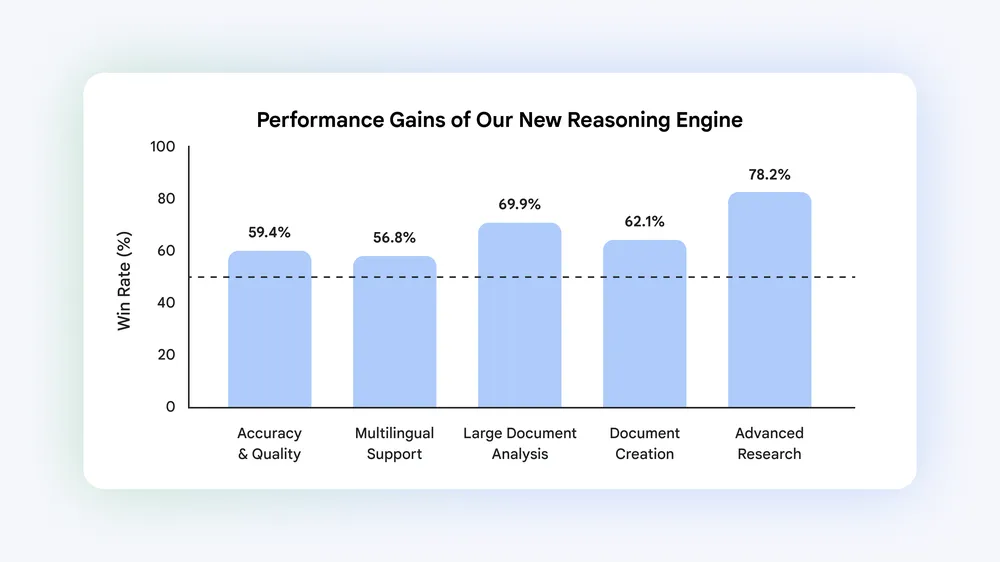
In Google’s internal side-by-side evaluations, this new reasoning engine achieved a 65% win rate over the prior system. More specifically, it saw a 69.9% win rate when analyzing massive documents and an exceptional 78.2% win rate when performing advanced web research and source discovery.
Charts, spreadsheets, and data visualizations
NotebookLM is also breaking out of the standard text-box constraints by adding a studio panel capable of generating and exporting a massive variety of new document formats.
Instead of just summarizing a document into a few paragraphs, you can now provide detailed instructions to guide the output. NotebookLM will compile the context from your sources and generate fully formatted, downloadable assets that you can even edit directly after they are created. The new supported formats include:
- Documents & Presentations: PDFs, Word docs (.docx), Markdown, and Microsoft PowerPoint (.pptx) slides.
- Data & Spreadsheets: Microsoft Excel (.xlsx) files, detailed budget spreadsheets, and structured .csv or .json files.
- Visuals & Charts: Data visualizations exported as .png or .svg files, and images powered by Nano Banana.
Effortless project onboarding
Historically, NotebookLM worked best if you already had a curated bucket of PDFs or text documents ready to upload. If you didn’t have your sources organized, starting a project felt a bit like staring at a blank page.
Google is removing that friction by allowing you to start a notebook with nothing more than loose ideas and questions. The chat interface can now actively guide you through building your repository from scratch. If you need primary sources in other languages or want to track down related works by an author, NotebookLM can now leverage Google Search to discover high-quality web sources and add them straight to your notebook for you.
The update is rolling out globally on the web starting today. It is available to all users with a Google AI Ultra subscription, as well as Workspace business customers with AI Ultra Access and AI Expanded Access tiers. If you’ve been looking for a reason to move your research workflow to the next level, your dashboard just got a whole lot smarter.
SUBSCRIBE TO UPSTREAM
Get Chrome Unboxed delivered straight to your inbox
Upstream is our flagship, curated newsletter with the top stories, most click-worthy deals, giveaways, and trending articles from Chrome Unboxed sent directly to your inbox a few times a week. Join 31,000+ subscribers.

