


Support our independent tech coverage. Chrome Unboxed is written by real people, for real people—not search algorithms. Join Chrome Unboxed Plus for just $2 a month to get an ad-free experience, access to our private Discord, and more. Learn more about membership here.
START FREE TRIAL (MONTHLY)START FREE TRIAL (ANNUAL)
The Pixelbook, by pretty much any standard, is a brilliant piece of hardware. It is slim, light, fast, and has superior construction. I’d put it up against any other laptop hardware and guarantee it stands toe-to-toe with it.
The outer workings of the device can be checked out in their fullness in our Pixelbook review, but it goes without saying that regardless of whether or not you agree with Google making the Pixelbook, this device is a top-notch piece of kit.
But, what we know about the device and how it was made literally only goes skin-deep. Without any official teardowns online, we have only been able to guess at what is going on underneath the surface. Sure, we know it is firm and crazy-thin, lacks a fan, and has a very precisely-tuned keyboard and fantastic battery: but how is this accomplished.
We Aren’t Internal Hardware Experts
It needs to be said that I don’t know a ton about the technicalities around motherboards and laptop internals. Sure, I know about processors, RAM, storage options, etc., but I don’t know all the engineering specifics that go into designing and building a motherboard.
I don’t understand voltage regulation or heat dispersion in any way that would help me build anything remotely advanced.
What I do know, however, is that as technology moves forward, things get smaller. What once took city blocks to contain can now be housed in something the size of a fingernail. Our phones are thinner, our laptops lighter, and all of it is more powerful than ever before. And we’ll continue to see more power in smaller spaces as time marches on.
Even so, every time I see something that once was large become smaller while at the same time becoming stronger/faster/more powerful, I’m still astonished.
This particular phenomenon is exactly what we are seeing in the Pixelbook’s motherboard.
Take a look at the pics below which are shared with permission from Google. First, you can see the internals of the Pixelbook. Next, you’ll see the entire motherboard being held like a candy bar. Just look at that.
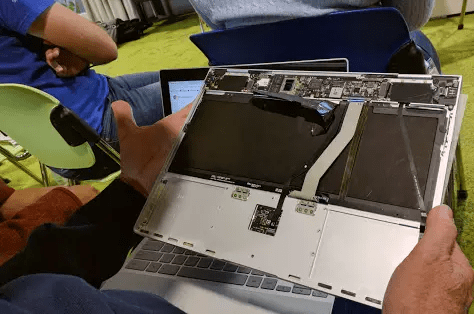

All that is happening with the Pixelbook is contained in that very, very tiny motherboard. Display adapters, inputs, voltage, battery, processors, RAM, storage…all in what seems to be an impossibly small space. Basically, the entire motherboard is contained in an area above the keyboard. The rest of the chassis is for the battery, trackpad, and keyboard.
Upon seeing the photos, and chatting with a fellow Chromie, Gabriel said, “That is amazing.”
Jim Dantin, one of the Top Contributors for the Google Pixelbook and Chromebook Central Forums (Google’s official forums for Pixelbooks and Chromebooks) and a retired engineer with extensive electronics and computer hardware skills simply replied:
No, not amazing. F-ing amazing.
Again, I don’t fully comprehend the engineering that must take place to build something so powerful in such a small footprint. Jim does and was blown away. That tells me this is no small accomplishment.
What I do know is what I stated above: technology moves forward and makes things more powerful and smaller. As more powerful hardware fits in ever-decreasing footprints, it is increasingly impressive. I may not know the ins and outs of what it takes to put together this kind of hardware, but I can fully appreciate the engineering prowess it takes to make something so powerful in that size package.
The Pixelbook has plenty of detractors and naysayers, but I think one thing we can all agree on is that this Chromebook is a shining example of what is possible from great hardware. We can agree that the Pixelbook is the epitome of tech and engineering. We can all appreciate great build quality and stunning design. Regardless of what you think about the OS or the price, the Pixelbook is an engineering feat.

