• Skip to main content
  • Skip to primary sidebar
  • Deals
  • Features
  • Guides
  • Chromebooks
  • Videos
  • Podcast
  • More +
    • Reviews
    • Unboxing
    • Upcoming Devices
    • Chromebook Plus
    • Chrome
    • ChromeOS
    • Chrome OS Flex
  • Search
  • Sign Up
  • Log In
Chrome Unboxed – The Latest Chrome OS News

Chrome Unboxed - The Latest Chrome OS News

A Space for All Things Chrome, Google, and More!

  • Deals
  • Features
  • Guides
  • Chromebooks
  • Videos
  • Podcast
  • More +
    • Reviews
    • Unboxing
    • Upcoming Devices
    • Chromebook Plus
    • Chrome
    • ChromeOS
    • Chrome OS Flex
  • Search
  • Sign Up
  • Log In

More Material Design Comes to Chromebooks

November 10, 2017 By Robby Payne View Comments

Slowly but surely, the Material Design language that is present in most parts of Android is starting to become the norm for Chromebooks as well. The main browser, settings, notifications and system tray have all adapted the material treatment over the past few months.

Most recently, the Chrome Flags page has received the same treatment.

Xremove ads

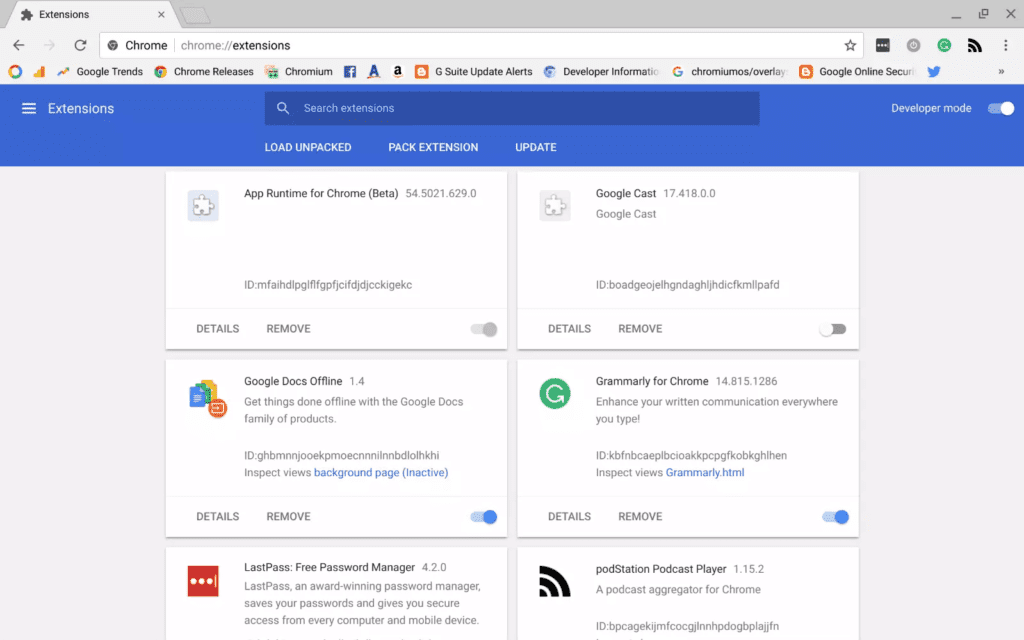
It seems that the Chrome Extensions management page is also getting the Material Design treatment now.

You can see in the picture below the new layout and design of the extensions page. It now falls completely in line with the new settings and flags pages and gives the entire underpinning of Chrome OS a bit more cohesiveness.
Featured Videos

Xremove ads

Instead of the stark, boring layout that is currently on offer, we are now getting a nice card interface with the more standard Android toggle switches.

In those cards are also a quick summary of the extension and a clear way to remove them if desired. Versus the current layout, this just feels so much better and in line with the settings menus of Chrome OS.

Xremove ads

Granted, this is a small change and you’ll only deal with it from time to time, but it is really nice to see even the less-used portions of the OS getting redesigned. It is a sign that Chrome OS is coming into its own with a design language that persists throughout the user experience.

As Android and Chrome OS continue to come together on Chromebooks, this more unified look helps users navigate uncharted waters a bit easier. It is a welcome update, for sure.

Shop Chromebooks On Amazon

Xremove ads

Filed Under: ChromeOS, News

About Robby Payne

As the founder of Chrome Unboxed, Robby has been reviewing Chromebooks for over a decade. His passion for ChromeOS and the devices it runs on drives his relentless pursuit to find the best Chromebooks, best services, and best tips for those looking to adopt ChromeOS and those who've already made the switch.

Primary Sidebar

Xremove ads

Deals

The best Chromebook deals today

By Robby Payne
December 15, 2025

Save $220 on the powerful, versatile Acer Chromebook Plus Spin 714

By Robby Payne
December 10, 2025

The Google Pixel 9a just hit its lowest price ever at $150 off

By Joseph Humphrey
December 8, 2025

At $349, this Lenovo Chromebook Plus is one of the best value laptops you can buy

By Joseph Humphrey
December 3, 2025

The elusive 8GB Lenovo Chromebook Duet 11 is finally back in stock and down to $279

By Robby Payne
December 2, 2025

More Deals

Xremove ads

Reviews

My review after 6 weeks with the Lenovo Chromebook Plus 14 [VIDEO]

By Robby Payne
August 11, 2025

One week with the best small Android tablet you can buy, and I’m sold

By Robby Payne
May 9, 2025

Best Chromebooks of 2024 [VIDEO]

By Robby Payne
November 28, 2024

Samsung Galaxy Chromebook Plus Review: Samsung is back! [VIDEO]

By Robby Payne
October 28, 2024

Lenovo Chromebook Duet 11″ Review [VIDEO]

By Robby Payne
October 19, 2024

More Reviews

Xremove ads

Guides

This Chromebook trackpad shortcut is definitely not new, but is blowing my mind

By Robby Payne
March 11, 2024

How to reduce broadcast delay on YouTube TV to stop live spoilers

By Robby Payne
December 8, 2023

Windows PC keyboard and Chromebook

How to use a Windows keyboard with a Chromebook

By Joseph Humphrey
December 8, 2023

How reset and revert your Chromebook to the previous version of Chrome OS

By Robby Payne
November 29, 2023

My Chromebook Plus features disappeared: here’s how I fixed it

By Robby Payne
November 24, 2023

More Guides

TWITTER · FACEBOOK · INSTAGRAM · YOUTUBE · EMAIL · ABOUT

Copyright © 2025 · Chrome Unboxed · Chrome is a registered trademark of Google Inc.
We are participants in various affiliate advertising programs designed to provide a means for us to earn fees by linking to affiliated sites.

PRIVACY POLICY