


Support our independent tech coverage. Chrome Unboxed is written by real people, for real people—not search algorithms. Join Chrome Unboxed Plus for just $2 a month to get an ad-free experience, access to our private Discord, and more. Learn more about membership here.
START FREE TRIAL (MONTHLY)START FREE TRIAL (ANNUAL)
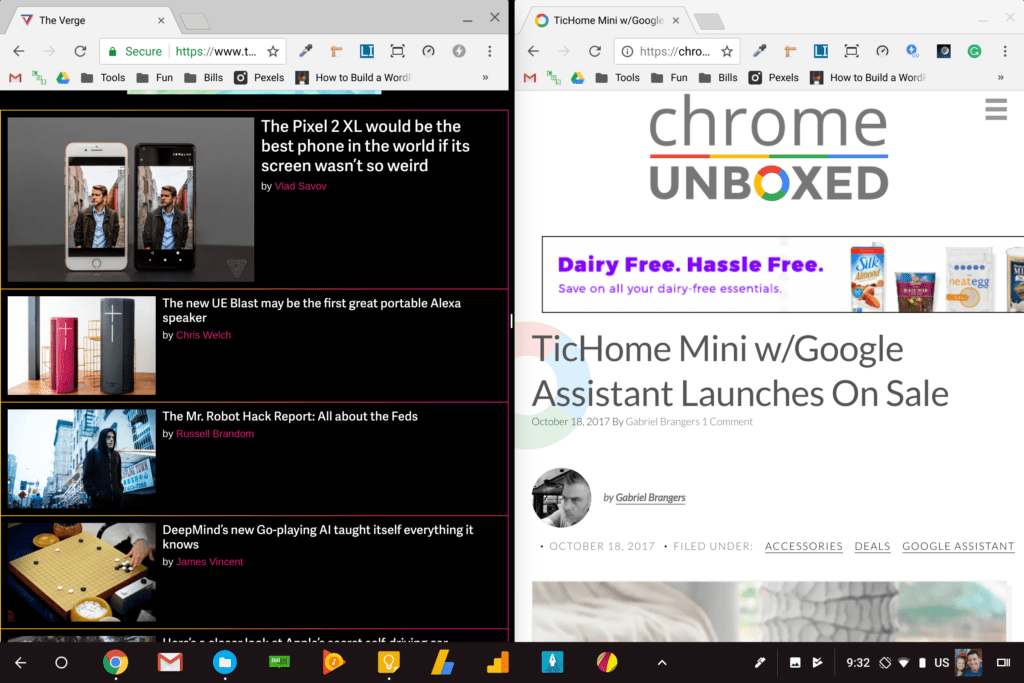 Just two days ago I stumbled across a commit in the Chromium repositories that signaled continuing work on a much-needed Chrome OS feature: split-screen apps in tablet mode.
You see, along with apps running in the background for Chromebooks, this simple feature isn’t just a desired attribute: it is expected by the type of customers that Google expects to buy the Pixelbook.
Between Windows and iOS, customers have become pretty used to split-screen apps on tablets and devices in tablet mode. For the larger screen tablets like the Surface, iPad Pro, Chromebook Pro and Pixelbook, all that screen real estate feels wasted when apps are always forced to take up the entire screen.
It looks like the Chromium team is nearing a solution for this on Chromebooks, though, and it already works quite well.
What It Does
The split-screen implementation isn’t new, but instead is familiar and works like you’d expect. Once in tablet mode, you simply need to hit your multitask button down in the bottom right of the screen and you’ll see all your open windows at once. Just grab one and you’ll be prompted to drag it to either side of the screen to snap it into place.
Next, hit that same button again and choose your other app you’d like snapped to the other side of the screen.
From there, you’ll have control over the size of the respective sides of the display by dragging a small black bar to resize both at once. One really nice feature here is the fact that you can freely drag the divider bar as much or little as you’d like. There aren’t preset sizes to deal with. When you are done, drag the bar all the way to one edge and the app left over will resume its full-screen state.
Some Caveats Apply For Now
So, the big issue right now is the fact that I wasn’t able to get it to play nice with Android apps. That’s guaranteed to be a temporary issue and as this rolls out to stable, that will be fixed.
Keep in mind, however, just like on your Android phone, developers have to support split screen (resizable) apps before they will work like this. Even when Google gets this all ironed out, if an app developer hasn’t bothered to update for Android 7.0+, this will still not work with that particular app.
Another interesting issue sure to get fixed up soon is the behavior when rotated into portrait mode. The apps end up stacked top to bottom, but when you follow the instructions above and go to place your apps, the instructional bars still appear on the left and right. Again, this will likely be fixed soon, but keep this in mind if you go exploring. You simply need to drag the app to the top or bottom of the screen and the snapping happens just as you’d expect.

We’re clearly still in the development stages of this whole thing, but it is encouraging to actually see it in action in the dev channel. For what its worth, Clayton Proctor commented on an earlier article about this feature and states that he has the feature working in the Beta channel on the Samsung Chromebook Plus. His comment was what caused us to actually give it a spin, so big thanks to Clayton!
Either way, it seems this feature is making its way to the Stable channel soon, and we are excited to see it become a mainstay of the Chromebook experience. Who knows, it may be a feature that launches alongside the Pixelbook later this month. That would make a lot of sense, wouldn’t it?

