


Support our independent tech coverage. Chrome Unboxed is written by real people, for real people—not search algorithms. Join Chrome Unboxed Plus for just $2 a month to get an ad-free experience, access to our private Discord, and more. Learn more about membership here.
START FREE TRIAL (MONTHLY)START FREE TRIAL (ANNUAL)
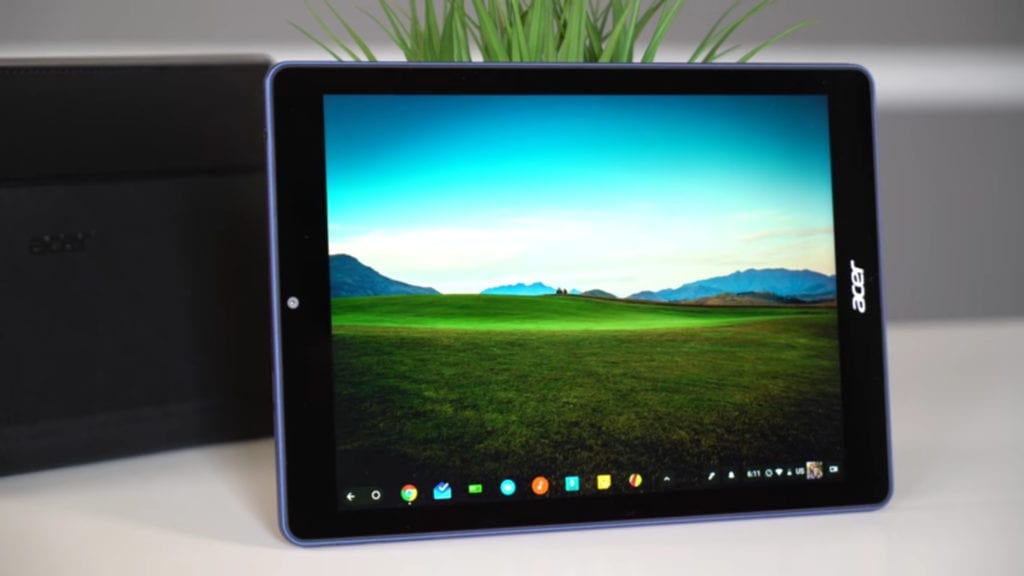 We’ve known for some time the day would come where we would review the world’s first Chrome OS-powered tablet. We weren’t exactly sure who would make it or what it would look like in the end, but we knew it was coming. With both convertibles and detachables making it to market before it, the Acer Chromebook Tab 10 fills in the only real remaining hardware gap in the Chrome OS ecosystem: the tablet.
Though it isn’t the best tablet I’ve ever used, this offering from Acer really gives me hope for the future of Chrome OS tablets. Sure, I’d love for the naming to change as Chromebook Tab feels like a bit of a misnomer, but Acer has done some really good work with this first stab at a Chrome-powered tablet. Is it perfect? Not even close, but it is an encouraging look at what we could see in future.
Build
Overall, the build quality here is pretty good. There’s less to talk about with a tablet, but some things remain the same. It is sturdy, feels good in the hand, and is mainly glass and textured plastic on the back.
The cameras are where you’d expect and the buttons are nice and clicky, but there’s little else to really talk about with this device. It is roughly the size of a standard iPad but a bit thicker. It is light enough to wield in one hand and really makes consuming content feel natural and simple.
Put it this way, if you’ve seen a standard iPad, you can get a good feel for how big this thing is. The build is a bit less premium but still feels good.
Screen
With a bright, crisp screen, the Acer Chromebook impresses pretty well with its display. As the screen is the main point of interaction on a tablet, this is a very good thing. Having an inferior display would not just be a bummer, but a basic deal-breaker for most. With a Chromebook, a great keyboard and mouse can lessen the blow of a sub-par screen. With a tablet, the screen is basically everything, and Acer did well.
Colors pop, viewing angles are great, and the screen is bright. Not quite Pixelbook bright, but it is nice to look at. At 1536×2048 pixels, this device and it’s 9.7-inch diagonal measure are identical to the standard iPad.
This is likely not a coincidence. When people think of tablets, they think of iPads. Acer made a wise move mimicking the iPad in this way, and they really pulled it off well.
Ports and Speakers
Again, the tablet form factor simplifies things. The Chromebook Tab 10 has one port: a single USB Type-C. With that one port, you can do quite a few things. Display out, data transfer, charging or audio can all be had with the single port, but you’ll need a dongle to split it up if you want to do any of those simultaneously.
Again, it is a tablet, so we need to think about it as such. The primary use case of this device will be consumption, not production. I’m not saying you can’t get work done on it. I managed to work an entire day on it with a wireless keyboard and mouse, but I don’t see most people using it this way. Instead, I’d imagine it will find itself in the same position as tablets before it: in a lap on the couch. In that position, it feels shockingly natural scrolling websites, web apps and Android apps with general ease.
Flanked with front-facing stereo speakers, the content consumption is quite enjoyable. Additionally, you can simply plug in earphones if you want a more immersive experience at home or on a flight. As far as media storage, you also get a microSD card slot to expand the storage on offer.
Performance & Internals
So far, everything looks amazing for this tablet, right? Well, once we get into the guts of this one, the news isn’t quite as good. Inside we’re met with 4GB of RAM, 32GB of storage, and the OP1 processor.
Yep, that is the same OP1 processor in the Samsung Chromebook Plus and ASUS Chromebook 101. It’s the same processor that has struggled with most tasks since early 2017. The same processor that I’ve hated on a bit before.
In the Chromebook Tab 10, however, it feels a bit less sluggish, and here’s why: we’re trained on tablets and phones to do basically one thing at a time. Open one app, read one website, do one task before moving on to the next.
When used this way, the OP1 keeps up much better and you can almost forget you are using a low-powered SoC. Switching apps reminds you pretty quickly, but that is a decent concession for the price and battery longevity we have going on with this processor. I was easily getting 10 hours of battery off and on, so I’m really happy with that. Again, going back to the iPad, people have come to expect marathon battery from tablets, and the Acer holds up well here.
With all this in mind, however, don’t expect to make this your all-in-one device. I’d love to say that when using it as a desktop replacement (remember, Chrome OS is a desktop OS first) everything works fine. That’s just not the case, however, as the processor just isn’t up for multitasking on any level. Add to that the fact that this device is locked in Chrome OS’ tablet mode (obviously) and extended displays have quite a few issues as well.
To put it simply, use this as a tablet and you’ll likely be pleasantly surprised. Try to push it as a Chromebook replacement and you’ll be let down.
Extras
There are a couple of things that this tablet offers that are interesting enough to mention. The first is the camera setup. A front and back camera on a Chrome OS device is pretty unique, at least for now, and that is about all I can say about it. As I’ve said in the past, the camera software on Chrome OS is so horrendous, it matters very little what cameras you attach to the outside. Photo capture take seconds – SECONDS – to happen, picture quality is laughable, and the overall experience is simply pointless.
Come on, Google. You can do better than this.
The other notable extra is the included stylus that is garaged right in the tablet. One of the comparisons this device cannot avoid is to an iPad, and this is a place where it wins. You can argue which pen is better, but you can’t argue about which one is free, included in the box, needs no charge, and can be stored inside the device.
Those things make the whole pen/tablet experience better on this device than any other tablet aside from a Galaxy Note Tablet, and that is worth noting.
Wrap Up
So, is this thing worth hunting down and buying? That depends on what you are after. This device is aimed at education and the classroom, so you’ll have to really scour a bit to find it. Once you do, you’ll need to decide if you are looking for a consumption tablet or something you can get a bit productive on.
If it is consumption only, it is hard to recommend this over the similarly priced iPad. They are both $329, but the iPad has many more iPad-targeted apps and a more-polished UI in general. If you are watching movies and playing games, I have to say the iPad wins.
However, if the pen input is important or you want to be able to tackle a few web-related tasks, I’d say the Acer wins out. With an included, stowable pen, Acer has made a great package for artists or those wanting to be able to jot notes on the go without any additional purchases. Also remember you get a full desktop version of Chrome to take advantage of any web-driven content you come across.
Like I said, you simply have to decide what you want. I like this little tablet, but I’m even more excited to think there will be more powerful versions to come down the road. Who knows, with a Qualcomm Snapdragon 845, a tablet like this could become the ultimate all-in-one device for someone like me. Time will tell, but I think Acer has made a fantastic first step with the Chromebook Tab 10, and I look forward to what is coming.

