


Support our independent tech coverage. Chrome Unboxed is written by real people, for real people—not search algorithms. Join Chrome Unboxed Plus for just $2 a month to get an ad-free experience, access to our private Discord, and more. Learn more about membership here.
START FREE TRIAL (MONTHLY)START FREE TRIAL (ANNUAL)
 Yeah, you read that right. We have some interesting stuff happening in the world of Chromebooks right now, and this development is right at the top of the heap.
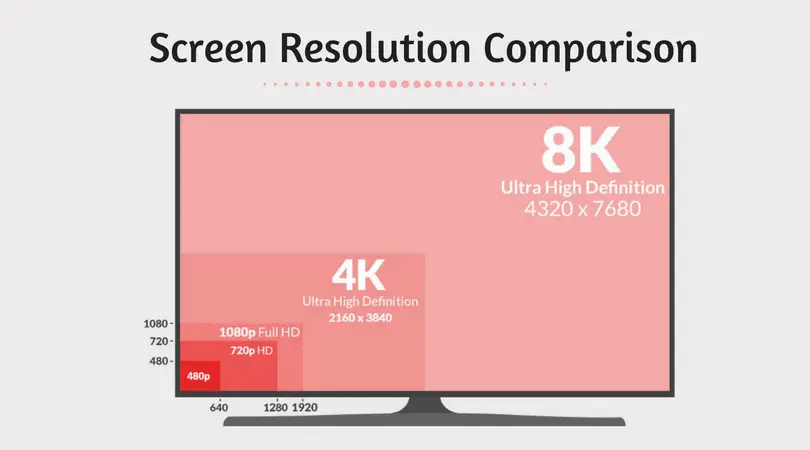
In the event that we have some readers who haven’t really cared enough about marketing speak to figure out what 4K is, let’s cover that very quickly. 4K (or UHD – Ultra High Definition) is simply marketing language for a display with a pixel layout of 3840×2160.
For reference, FHD screens (Full High Definition or 1080p) have a resolution of 1920×1080. We also have HD and QHD. HD being 720p (or 1280×720) and QHD (Quad HD) coming in at 2560×1440.
If you are relatively quick at math, you are seeing a theme here. QHD packs in twice the pixels both vertically and horizontally when compared with HD. In the same way, 4K does this with 1080p, FHD screens. For every 4K display you see, you are looking at the equivalent resolution of 4 1080p screens. Two on top, two on bottom. Many times, all these pixels are packed into a screen with the same physical size of a 1080p screen, so pixel density becomes insanely high. Below there is a great visual reference.
Now About Those Chromebooks
Now that we have all that out of the way, let’s get to this commit. The issue being solved here has to do with the boot logo being a bit off. As part of the fix, there is a line at the end of the comment that reads:
As an added bonus, this logo is not only much rounder but also higher resolution, making sure it will continue to look crisp and pretty on our secret upcoming 4K Chromebooks.
I have to admit, that’s a bit cheeky. It almost feels like it was put there on purpose to see if we’d find it. If that’s the case: well played.
Anyway, the idea that 4K-equipped Chromebooks are on the way is pretty exciting for a few reasons.
First, it is a continuation of a pattern that shows manufacturers are interested in bringing premium hardware to the Chrome OS ecosystem. Beneficial or not, 4K screens are clearly considered a premium feature on Windows laptops. Much like glass trackpads, backlit keys, thin form factors and QHD screens (in the Pixels, Pixelbook, and Samsung Pro/Plus), Chromebooks had to evolve a bit to start seeing these higher-end features.
4K displays are the natural progression of this trend. If the industry is pushing 4K displays as their top-tier offerings, the brightest, most color-accurate displays will end up being 4K. It is simply the nature of things. I, for one, am glad that Chromebooks will get to be in on this evolving trend.
Second, with the evolution of display scaling we reported on yesterday, Chrome OS will be well-suited to handle these higher-res displays. The more pixels you have on screen, the easier it is to scale through many display size variations. The Pixelbook, for example, has 4 workable resolutions depending on your needs. All of them look tack-sharp and are easy to move through with the CTRL+SHIFT+(+/-). Lower-res displays can’t scale through multiple resolutions with as well.
Is This Necessary?
The question that still lingers for me is the question of necessity. With the beauty, sharpness, and clarity of the existing QHD screens, what benefit comes of adding so many more pixels? If, to my naked eye, there are no visible pixels on my Pixelbook, how is a 4K display going to make this experience better?
Performance and battery life suffer with 4K displays, though. You can see this across the board on Windows laptops and it is just the nature of the beast. More pixels to push means the processor works harder and kills more battery. Sure, faster processors and bigger batteries compensate for this, but is there a good reason?
Right now, I’m having a hard time seeing it. Again, I’m excited because this is a further shift into the high-end territory, but I’m not sold on the necessity of it all. Maybe you have different thoughts? We’d love to hear it in the comments.

