


Support our independent tech coverage. Chrome Unboxed is written by real people, for real people—not search algorithms. Join Chrome Unboxed Plus for just $2 a month to get an ad-free experience, access to our private Discord, and more. Learn more about membership here.
START FREE TRIAL (MONTHLY)START FREE TRIAL (ANNUAL)
Lenovo has just dropped their new 2026 portfolio of Chromebooks designed specifically for the classroom. While these might not be the flashy consumer devices we usually talk about, they are still important laptops within the ChromeOS ecosystem because they are what millions of students will be using every day. And this year, Lenovo is doubling down on two things that give school IT directors nightmares: broken devices and fleet management.
The new rugged workhorses
First up are the refreshed Lenovo Chromebook 100e Gen 5 and 500e 2-in-1 Gen 5. These are the bread-and-butter student devices, and they have been updated with durability in mind. Both models feature the new MediaTek Kompanio 540 processor (or an option for Intel N-series chips), which should provide a nice efficiency bump for all-day battery life.
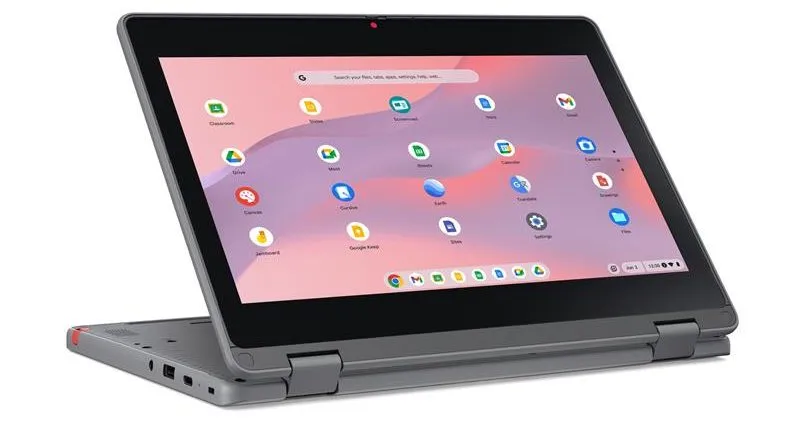
But the big story here is the chassis. Lenovo has redesigned these to be more repairable than ever, featuring what they call “Customer Replaceable Unit” (CRU) components. Basically, they are making it easier for school tech teams to swap out parts on-site without voiding warranties or sending units away for weeks. Combined with the usual MIL-SPEC durability standards against drops and spills, these things look ready to survive the chaos of a K-12 backpack.
Chromebook Plus models for teachers
Lenovo is also bringing the “Plus” branding to educators with two distinct models that cater to different needs. First up is the Lenovo Chromebook Plus i 14 that’s powered by the Intel Core 3 Processor N355. It features a spacious 16:10 display (with over 87% screen-to-body ratio), a crisp 5MP webcam with a physical privacy shutter, and Waves MAXX Audio. This model also adds CRU (Customer Replaceable Unit) components and sustainability features, making it a dream for both teachers and IT departments.
If you need more screen real estate, there is the Lenovo Chromebook Plus i 15. It steps up to an Intel Core i3 processor and a 15-inch 2K IPS display. Ideally suited for administrators or teachers who live in spreadsheets, the Chromebook Plus i 15 also includes a full numeric keypad, a larger touchpad, and a fingerprint reader. Despite the larger screen, it still pushes up to 11 hours of battery life, ensuring it can last through a full day of lectures and meetings without needing a wall outlet.
Better fleet management
Finally, for the IT admins out there, Lenovo is bringing ChromeOS support to its Lenovo Device Orchestration (LDO) platform. This allows schools to manage their entire fleet—whether it’s ChromeOS, Windows, or Android—from a single panel. You can now check battery health, utilization data, and security status for every Chromebook in the district without jumping between different dashboards.
Availability for all these new devices is slated for the first half of 2026, so schools should have plenty of time to evaluate them before the next buying season kicks in.
SUBSCRIBE TO UPSTREAM
Get Chrome Unboxed delivered straight to your inbox
Upstream is our flagship, curated newsletter with the top stories, most click-worthy deals, giveaways, and trending articles from Chrome Unboxed sent directly to your inbox a few times a week. Join 31,000+ subscribers.

