

Support our independent tech coverage. Chrome Unboxed is written by real people, for real people—not search algorithms. Join Chrome Unboxed Plus for just $2 a month to get an ad-free experience, access to our private Discord, and more. Learn more about membership here.
START FREE TRIAL (MONTHLY)START FREE TRIAL (ANNUAL)
Thanks to a pretty cool find by @cajl_jbmm over on X (formerly Twitter), we’ve been made aware of a small-but-important new feature on the way for Chromebooks. While adding keyboard backlight controls in the main settings app doesn’t sound super important, it makes a lot of sense from a standard UI viewpoint.
At the moment, if you want to adjust your keyboard backlight, there are actually no toggles or sliders to do this unless you are aware of the keyboard shortcut or your Chromebook has keyboard backlight buttons included on the keyboard. Since quite a few folks might not know the shortcut (it is ALT + Screen Brightness Up/Down) off the top of their heads and likely don’t have a handy keyboard backlight key on their Chromebook keyboard, adjusting your keyboard’s brightness is considerably less straightforward than it should be.
But a new addition is coming to the Settings app in ChromeOS that will soon introduce a simple slider for keyboard brightness in – you guessed it – the keyboard settings. Once you enable the flag (#enable-keyboard-backlight-control-in-settings currently in the Developer Channel), you’ll have a new spot in your keyboard settings to simply adjust your keyboard’s backlight level. Simple, right?

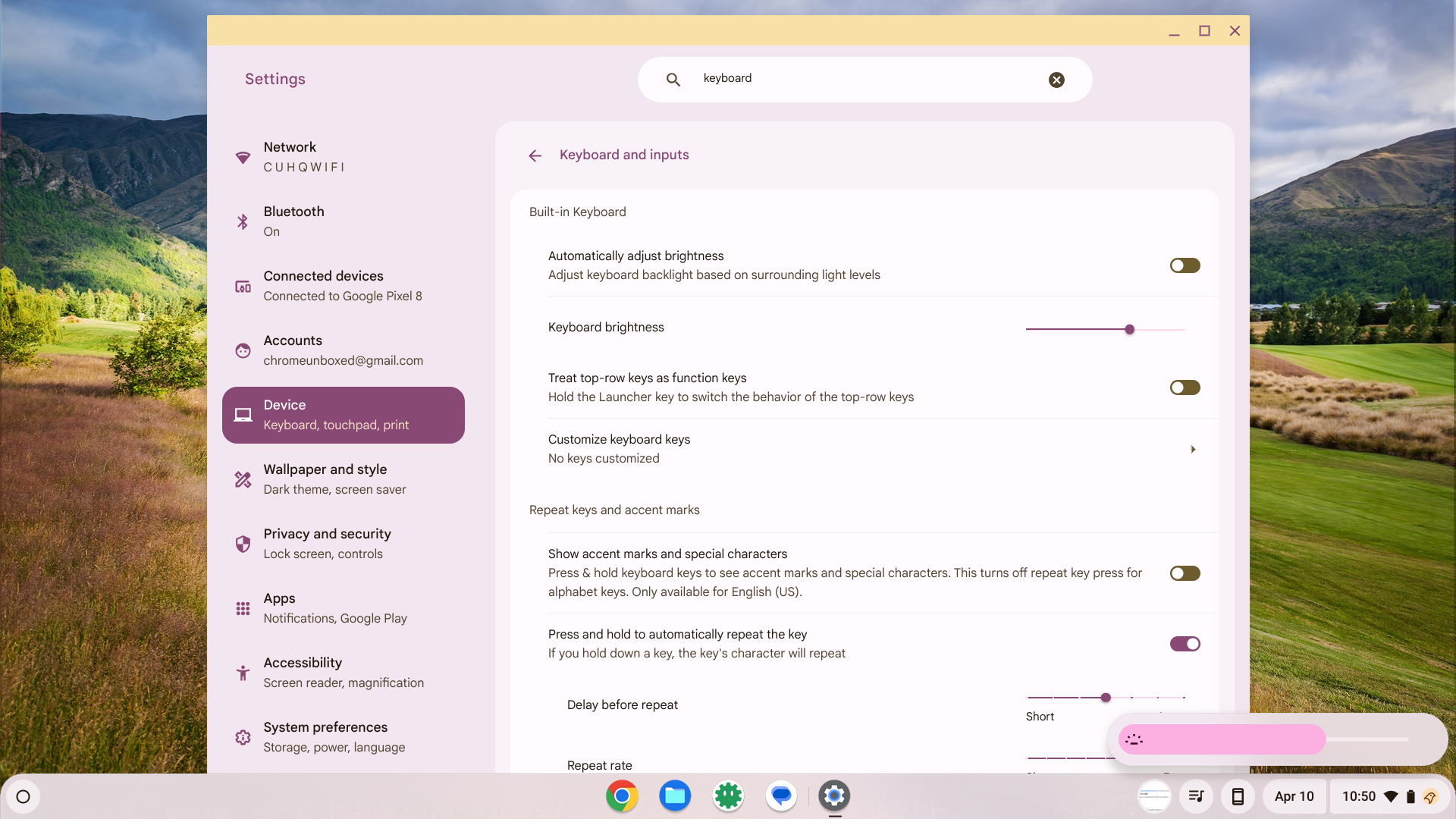
It’s a setting that realistically should have been here all along, but was overlooked for years simply because no one complained too much about it. I suppose it would be a bit like hiding the screen brightness behind a keyboard shortcut and not surfacing the ability to adjust it anywhere else. That would be a bit strange, and after considering it, this omission is as well.
I’m glad to see the ChromeOS team taking care of small creature comforts like this, and though it seems like a small thing to seasoned Chromebook vets, I think about all the people who will pick up a Chromebook for the first time in 2024 and am glad little issues like this are getting resolved as we get new updates to the OS on a 4-week basis.
SUBSCRIBE TO UPSTREAM
Get Chrome Unboxed delivered straight to your inbox
Upstream is our flagship, curated newsletter with the top stories, most click-worthy deals, giveaways, and trending articles from Chrome Unboxed sent directly to your inbox a few times a week. Join 31,000+ subscribers.

