
• Skip to main content
  • Skip to primary sidebar
  • Deals
  • Features
  • Guides
  • Chromebooks
  • Videos
  • Podcast
  • More +
    • Reviews
    • Unboxing
    • Upcoming Devices
    • Chromebook Plus
    • Chrome
    • ChromeOS
    • Chrome OS Flex
  • Search
  • Sign Up
  • Log In
Chrome Unboxed – The Latest Chrome OS News

Chrome Unboxed - The Latest Chrome OS News

A Space for All Things Chrome, Google, and More!

  • Deals
  • Features
  • Guides
  • Chromebooks
  • Videos
  • Podcast
  • More +
    • Reviews
    • Unboxing
    • Upcoming Devices
    • Chromebook Plus
    • Chrome
    • ChromeOS
    • Chrome OS Flex
  • Search
  • Sign Up
  • Log In

New Gmail feature lets you schedule meetings easier with “offer times you’re free”

July 12, 2023 By Robby Payne View Comments

Support our independent tech coverage. Chrome Unboxed is written by real people, for real people—not search algorithms. Join Chrome Unboxed Plus for just $2 a month to get an ad-free experience, access to our private Discord, and more. Learn more about membership here.
START FREE TRIAL (MONTHLY)START FREE TRIAL (ANNUAL)

Google is once again adding useful features to Gmail that make the things we do inside email just a bit easier and more streamlined. This time around, they are integrating a new feature that streamlines the process of scheduling meetings. It’s a slick-looking approach for all Gmail users, simplifying the process of finding mutually-convenient meeting times when coordinating with external contacts like clients, partners, or even colleagues within your organization.

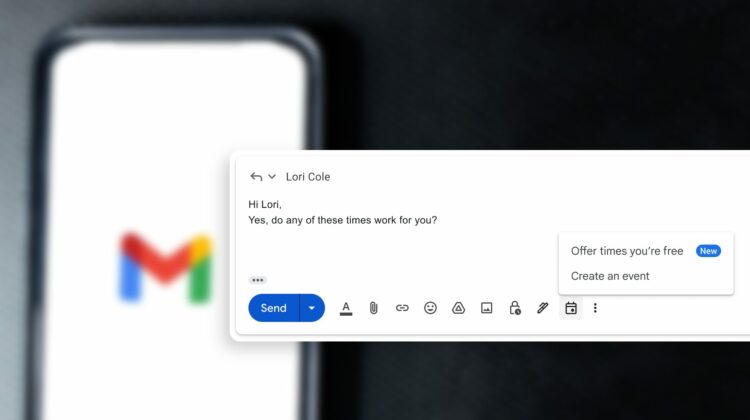
The new feature enables users to negotiate times and schedule meetings right within Gmail, making the process quicker and more efficient for everyone involved. A new calendar icon should soon be appearing for users in the Gmail composition window and these new calendar-related actions are consolidated in this section, giving users two options:

Xremove ads
  • Offer times you’re free
    • This opens your calendar in a side panel, allowing you to select and insert proposed meeting times directly into your email, removing the need to toggle between Gmail and your calendar. Once you send the email, the recipient can review the proposed times and choose one that suits them. The selected time automatically generates an email with a calendar invite.
  • Create an event
    • This feature is a quick way to schedule a meeting and communicate event details. By clicking on this, you open up a calendar event creation panel with pre-filled recipients and title from your email. The event summary is automatically inserted into the email body, making sharing information straightforward and simple.
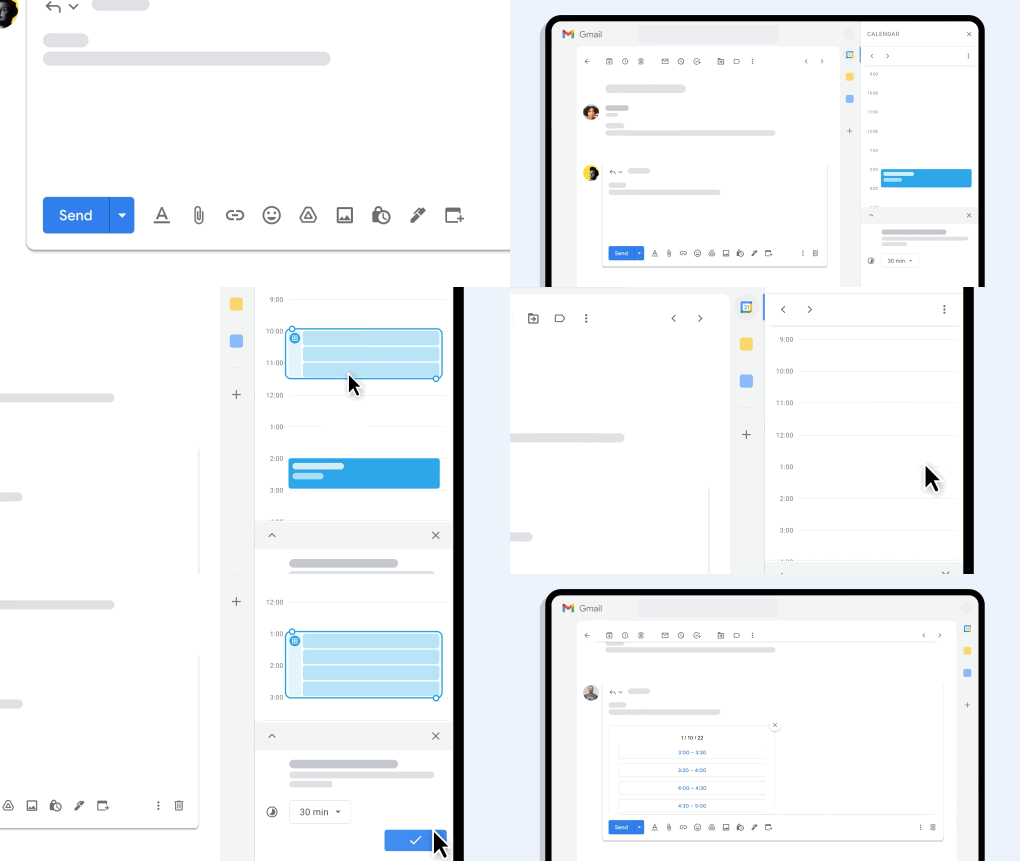
There are a few additional details to note. When offering times, you can only suggest timings from your primary calendar and only for 1:1 meetings. If the recipient list includes multiple people, only the first person to book will be added to the event. And when creating events, you have the flexibility to create them on any primary or secondary calendars you manage, which is a very nice touch.

Rollout pace and availability

The good news for admins is there’s no real setup for these features. For end users, this will be ON by default. The feature rollout will begin on July 11, 2023 for Rapid Release domains and July 31, 2023 for Scheduled Release domains. This will be a gradual rollout, taking up to 15 days for feature visibility and will be available to all Google Workspace customers and users with personal Google Accounts, too.

Featured Videos

Xremove ads

SUBSCRIBE TO UPSTREAM

Get Chrome Unboxed delivered straight to your inbox

Upstream is our flagship, curated newsletter with the top stories, most click-worthy deals, giveaways, and trending articles from Chrome Unboxed sent directly to your inbox a few times a week. Join 31,000+ subscribers.

SUBSCRIBE HERE!

Filed Under: Enterprise, New & Upcoming Features, Workspace

About Robby Payne

As the founder of Chrome Unboxed, Robby has been reviewing Chromebooks for over a decade. His passion for ChromeOS and the devices it runs on drives his relentless pursuit to find the best Chromebooks, best services, and best tips for those looking to adopt ChromeOS and those who've already made the switch.

Primary Sidebar

Xremove ads

Deals

The Acer Chromebook Plus Spin 714 hits a new all-time low at $270 off

By Robby Payne
March 25, 2026

The best Chromebook deals today

By Robby Payne
March 24, 2026

You can score $40 off Google’s battery-powered Nest Doorbell right now

By Joseph Humphrey
March 20, 2026

The touchscreen Lenovo Chromebook Slim 3 is a steal at under $200

By Robby Payne
March 16, 2026

Google TV Streamer and Remote held in front of a wall-mounted TV

The premium Google TV Streamer 4K is back down to $80

By Joseph Humphrey
March 16, 2026

More Deals

Xremove ads

Reviews

Acer Chromebook Plus Spin 514 Review: Kompanio Ultra power in a convertible

By Robby Payne
December 24, 2025

My review after 6 weeks with the Lenovo Chromebook Plus 14 [VIDEO]

By Robby Payne
August 11, 2025

One week with the best small Android tablet you can buy, and I’m sold

By Robby Payne
May 9, 2025

Best Chromebooks of 2024 [VIDEO]

By Robby Payne
November 28, 2024

Samsung Galaxy Chromebook Plus Review: Samsung is back! [VIDEO]

By Robby Payne
October 28, 2024

More Reviews

Xremove ads

Guides

This Chromebook trackpad shortcut is definitely not new, but is blowing my mind

By Robby Payne
March 11, 2024

How to reduce broadcast delay on YouTube TV to stop live spoilers

By Robby Payne
December 8, 2023

Windows PC keyboard and Chromebook

How to use a Windows keyboard with a Chromebook

By Joseph Humphrey
December 8, 2023

How reset and revert your Chromebook to the previous version of Chrome OS

By Robby Payne
November 29, 2023

My Chromebook Plus features disappeared: here’s how I fixed it

By Robby Payne
November 24, 2023

More Guides

TWITTER · FACEBOOK · INSTAGRAM · YOUTUBE · EMAIL · ABOUT

Copyright © 2026 · Chrome Unboxed · Chrome is a registered trademark of Google Inc.
We are participants in various affiliate advertising programs designed to provide a means for us to earn fees by linking to affiliated sites.

PRIVACY POLICY