

Support our independent tech coverage. Chrome Unboxed is written by real people, for real people—not search algorithms. Join Chrome Unboxed Plus for just $2 a month to get an ad-free experience, access to our private Discord, and more. Learn more about membership here.
START FREE TRIAL (MONTHLY)START FREE TRIAL (ANNUAL)
In a really great find by the folks at 9to5 Google, it appears Google is set to bring the Pixel Camera’s Super Res Zoom feature over to ChromeOS. If you are thinking to yourself, “Why bring Pixel Camera features to a Chromebook with its crummy overall camera experience?” You aren’t alone. When I first saw the headline, that was my exact question, but I think there’s more to this than just getting cool, zoomed in photos. Let me explain.
The state of Chromebook cameras
Chromebook cameras are basic utility and nothing more. While I hoped at one time or another that we’d have some tablets with decent cameras and a passable photo/video experience, that reality has never come. Whether its shoddy hardware, sub-par software, or a combination of the two, Chromebook cameras are basically good for video chats and a document scan here or there. That’s about all you’d ever want to do with them.
Super Res Zoom on a Chromebook?
So that begs the question, then, of why in the world Google would be working (of all things) on the zooming capabilities of Chromebooks. Why not get the main camera in a good spot, first? Why not make sure the 5MP and 8MP shooters on the backs of existing tablets could actually capture usable photos and videos before thinking about adding a zoom feature to a setup that struggles to simply produce a usable image in the first place?
And then, after looking at the code changes in the Chromium Gerrit a bit more, the reason dawned on me. But before we get into that, here are a couple of the code changes related to this new change that spell out exactly what is being added.
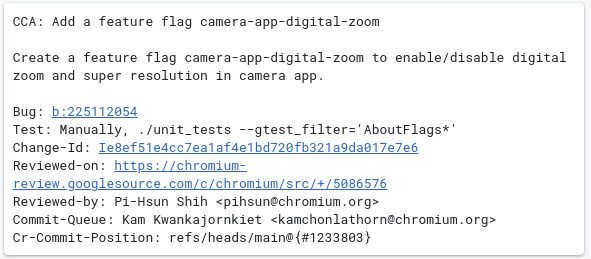

Clearly, digital zooming (there are no Chromebooks with optical zoom) is what we’re dealing with, here. Taking the often blurry, soft and grainy images you get from a Chromebook camera, digitally zooming (a.k.a. – cropping) only makes all those characteristics that much worse. If you want to be able to zoom in a bit on a subject, you’re going to need some machine learning to clean up that image a bit. Enter Super Res Zoom.
Not only could these algorithms clean up zoomed-in photos from a Chromebook, they could also help standard photos look better, too. If you think about what Google’s camera smarts can do after capture, you can see how those same smarts could help zoomed and non-zoomed photos alike from a fleet of devices that sorely need improved photo clarity across the board. Take a look at what Google’s ML models are capable of with this:


Tested on upcoming Chromebook tablets
While there’s nothing in these changes that would indicate this is only for a few Chromebooks, the testing on baseboard ‘Geralt’ makes me wonder exactly what a more specific use case might be. There are changes in the repositories with this feature that are being done specifically on this baseboard, and if you’ve been following along, you know this code name refers to the upcoming MediaTek MT8188-based Chromebook tablets we hope to see later in 2024.

Along with these changes, there’s been a wildy-high amount of camera work that has already been done for the ‘Geralt’ board, making me wonder if we might finally get a Chromebook tablet that has a camera meant for actual use in the real world. Don’t get me wrong: you shouldn’t run around taking photos with your tablet all the time. But having the option here and there sure would be nice.
At the moment, even if a Chromebook tablet was the only device in my possession at one of my daughter’s volleyball games or at my son’s golf match, I seriously wouldn’t even bother. The captured media would be mostly unusable, and it’s been this way for many years. If this work on ‘Geralt’ actually changes this, I’ll be elated. It would be really nice to have a Chromebook camera that I can use for something other than just a video chat. We’ll be keeping an eye on it.
SUBSCRIBE TO UPSTREAM
Get Chrome Unboxed delivered straight to your inbox
Upstream is our flagship, curated newsletter with the top stories, most click-worthy deals, giveaways, and trending articles from Chrome Unboxed sent directly to your inbox a few times a week. Join 31,000+ subscribers.

