
• Skip to main content
  • Skip to primary sidebar
  • Deals
  • Features
  • Guides
  • Chromebooks
  • Videos
  • Podcast
  • More +
    • Reviews
    • Unboxing
    • Upcoming Devices
    • Chromebook Plus
    • Chrome
    • ChromeOS
    • Chrome OS Flex
  • Search
  • Sign Up
  • Log In
Chrome Unboxed – The Latest Chrome OS News

Chrome Unboxed - The Latest Chrome OS News

A Space for All Things Chrome, Google, and More!

  • Deals
  • Features
  • Guides
  • Chromebooks
  • Videos
  • Podcast
  • More +
    • Reviews
    • Unboxing
    • Upcoming Devices
    • Chromebook Plus
    • Chrome
    • ChromeOS
    • Chrome OS Flex
  • Search
  • Sign Up
  • Log In

New Chromebook feature will allow mouse movement with keyboard keys

February 27, 2024 By Robby Payne View Comments

Accessibility features on Chromebooks have continued to grow and evolve for years at this point, and it seems that growth is only set to continue. With great features like the powerful magnifier, speech-to-text dictation, ChromeVox screen reader, and system wide auto captions, Chromebooks are a great tool for a wide range of users with physical impairments that make standard computing a bit of a chore.

Another great ChromeOS feature

Adding to the list of established accessibility features, it seems s For those who have trouble operating a mouse or trackpad, this could come in very, very handy.
Xremove ads
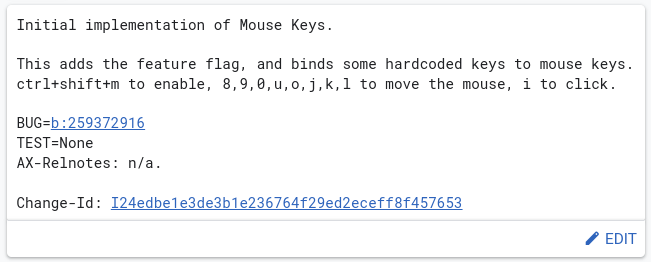
via the Chromium Gerrit

This new commit that was only added on February 22nd looks to give Chromebooks the option to use a handful of keyboard keys to move the mouse on-screen. Like a directional pad on a game controller, this new feature will allow users to move the mouse cursor without having to engage the trackpad or an external mouse.

Check out Today’s Best Chomebook Deals

From the looks of it, the keys that make a quasi-square (8,9,0,u,o,j,k,l) will be the 8 directions of movement with the “i” key at the center that will act as the mouse click. The entire experience will be called up with a quick shortcut (CTRL + SHIFT + M) for use when needed. Ideally, the moment the user no longer needs this, the same shortcut will return the keys mentioned above to their standard operation.

Featured Videos

Xremove ads

It’s a solid addition to the long list of ChromeOS accessibility features and one I’d love to weigh in on a bit if anyone from the ChromeOS team is reading this. For Chromebooks that have a numeric keypad included, that area should become the default “mouse keys” area since those keys are aligned perfectly for the 8-way directional task of moving a mouse on the screen: just my two cents. Either way, this is going to be a really cool, really useful addition once it lands.

Join Chrome Unboxed Plus

Introducing Chrome Unboxed Plus – our revamped membership community. Join today at just $2 / month to get access to our private Discord, exclusive giveaways, AMAs, an ad-free website, ad-free podcast experience and more.

Plus Monthly

$2/mo. after 7-day free trial

Xremove ads

Pay monthly to support our independent coverage and get access to exclusive benefits.

Start free trial

Plus Annual

$20/yr. after 7-day free trial

Pay yearly to support our independent coverage and get access to exclusive benefits.

Xremove ads
Start free trial

Our newsletters are also a great way to get connected. Subscribe here!

Click here to learn more and for membership FAQ

Filed Under: Chromebooks, ChromeOS, New & Upcoming Features

About Robby Payne

As the founder of Chrome Unboxed, Robby has been reviewing Chromebooks for over a decade. His passion for ChromeOS and the devices it runs on drives his relentless pursuit to find the best Chromebooks, best services, and best tips for those looking to adopt ChromeOS and those who've already made the switch.

Primary Sidebar

Xremove ads

Deals

The best Chromebook deals today

By Robby Payne
December 15, 2025

Save $220 on the powerful, versatile Acer Chromebook Plus Spin 714

By Robby Payne
December 10, 2025

The Google Pixel 9a just hit its lowest price ever at $150 off

By Joseph Humphrey
December 8, 2025

At $349, this Lenovo Chromebook Plus is one of the best value laptops you can buy

By Joseph Humphrey
December 3, 2025

The elusive 8GB Lenovo Chromebook Duet 11 is finally back in stock and down to $279

By Robby Payne
December 2, 2025

More Deals

Xremove ads

Reviews

My review after 6 weeks with the Lenovo Chromebook Plus 14 [VIDEO]

By Robby Payne
August 11, 2025

One week with the best small Android tablet you can buy, and I’m sold

By Robby Payne
May 9, 2025

Best Chromebooks of 2024 [VIDEO]

By Robby Payne
November 28, 2024

Samsung Galaxy Chromebook Plus Review: Samsung is back! [VIDEO]

By Robby Payne
October 28, 2024

Lenovo Chromebook Duet 11″ Review [VIDEO]

By Robby Payne
October 19, 2024

More Reviews

Xremove ads

Guides

This Chromebook trackpad shortcut is definitely not new, but is blowing my mind

By Robby Payne
March 11, 2024

How to reduce broadcast delay on YouTube TV to stop live spoilers

By Robby Payne
December 8, 2023

Windows PC keyboard and Chromebook

How to use a Windows keyboard with a Chromebook

By Joseph Humphrey
December 8, 2023

How reset and revert your Chromebook to the previous version of Chrome OS

By Robby Payne
November 29, 2023

My Chromebook Plus features disappeared: here’s how I fixed it

By Robby Payne
November 24, 2023

More Guides

TWITTER · FACEBOOK · INSTAGRAM · YOUTUBE · EMAIL · ABOUT

Copyright © 2025 · Chrome Unboxed · Chrome is a registered trademark of Google Inc.
We are participants in various affiliate advertising programs designed to provide a means for us to earn fees by linking to affiliated sites.

PRIVACY POLICY