


Support our independent tech coverage. Chrome Unboxed is written by real people, for real people—not search algorithms. Join Chrome Unboxed Plus for just $2 a month to get an ad-free experience, access to our private Discord, and more. Learn more about membership here.
START FREE TRIAL (MONTHLY)START FREE TRIAL (ANNUAL)
Right on schedule, version 91 of Chrome OS has been announced and should be rolling out at some point today. While there weren’t a ton of updates in this version, there are some highly-anticipated features that will make Chrome OS even more productive. We’ve checked the update server and as of the publication of this post, no devices have received Chrome OS 91 but we wanted to run down the official announcement from Google so you know what’s headed your way.
Nearby Share
Since I spend most of my time in the Canary Channel, I honestly forgot that this feature had yet to make it to the Stable version of Chrome OS. Nearby Share was designed to make file transfer between Chromebooks and Android devices a breeze. It gives users the ability to quickly and securely transfer files between users while keeping your contact information and your files safe. Under your “Connected Devices” of the Chrome OS settings, you will be able to customize your device’s name, manage data usage, and select which contacts you are visible to.
As on Android, you can go to your quick settings menu on your Chromebook and click “nearby share” to make your device visible. You will then be visible to the contacts you have chosen for five minutes. This will allow the quick transfer of images, URLs, and other files over Bluetooth, Wi-Fi, BLE, and WebRTC. The Keywork post has some great examples from a few Googlers on how the use Nearby Share. Here’s one example:
As a software engineer, I often have to troubleshoot an issue on one device using data collected from a different device. So it’s really helpful that Nearby Share works seamlessly across Chromebooks and Android phones.
– Kyle Horimoto, engineer
The Keyword
App Notifications Badges
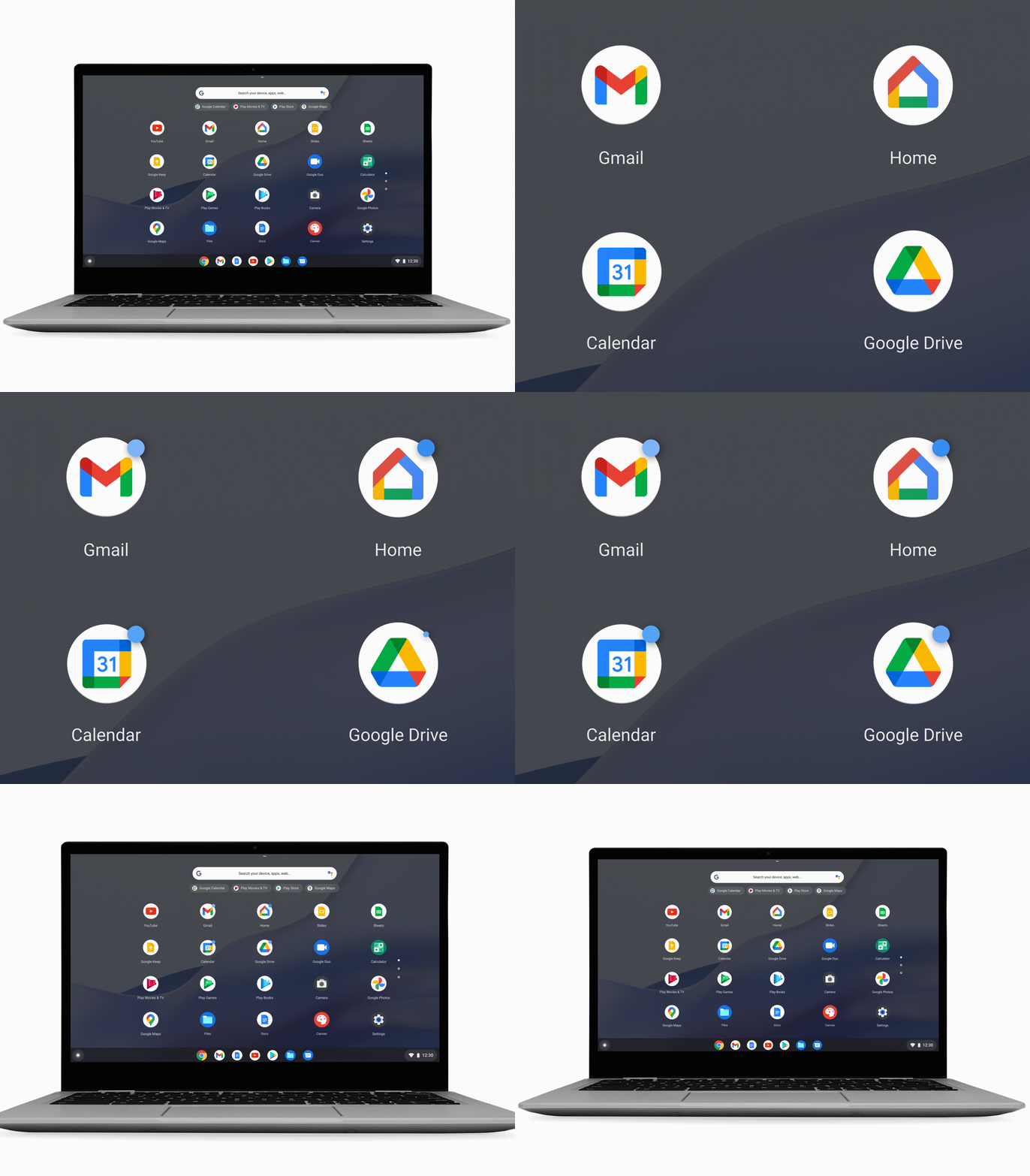
Again taking notes from Android, Chrome OS will now feature app notification badges that will appear as small blue dots at the top right of the app’s icon. These can be dismissed by opening the application or disabled entirely by heading to the Quick Settings menu and turning them off under “Notifications.” This should extend to PWAs, as well.
Available Offline
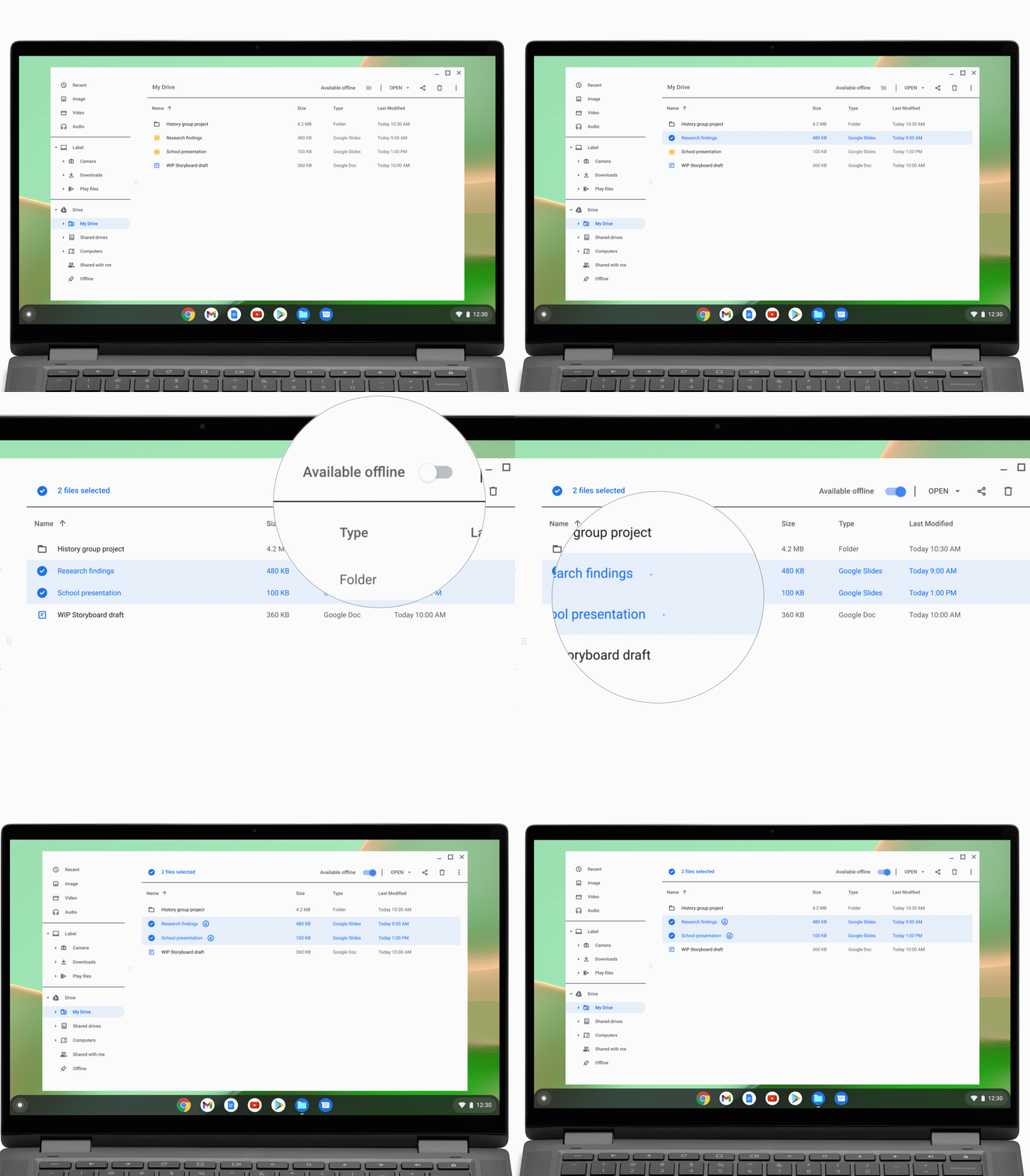
The Files App now makes it easier to save your files for offline use. When you open the Files App and click on My Drive, you can select the files you want to use offline and simply click the “available offline” toggle at the top of the app. Now you can continue your work even if you find yourself without an internet connection.
New Wallpapers
Like Nearby Share, I have used a number of these new wallpapers for some time but now, the Google-y collection from artist Leo Natsume is available in the wallpaper app. Just right-click on your screen and click “select wallpaper” to see the new offerings. You’ll find Natsume’s new additions under the “imaginary” section. They very much remind me of Google’s very unusual ride at CES a couple of years back.
We’ll be digging into this update as soon as it arrives to see what else is new that wasn’t included in the announcement. As I mentioned, the update server has yet to start pushing out the update but I suspect that we will start seeing Chrome OS 91 rolling out over the next couple of days. We’ll update you as soon as it does so you can start checking the update button and get your hands on these new features. Check out the full announcement on The Keyword.
SUBSCRIBE TO UPSTREAM
Get Chrome Unboxed delivered straight to your inbox
Upstream is our flagship, curated newsletter with the top stories, most click-worthy deals, giveaways, and trending articles from Chrome Unboxed sent directly to your inbox a few times a week. Join 31,000+ subscribers.

