


Support our independent tech coverage. Chrome Unboxed is written by real people, for real people—not search algorithms. Join Chrome Unboxed Plus for just $2 a month to get an ad-free experience, access to our private Discord, and more. Learn more about membership here.
START FREE TRIAL (MONTHLY)START FREE TRIAL (ANNUAL)
We previously wrote an introduction to ChromeOS 129 as it arrived right on the heels of both the Samsung Galaxy Chromebook Plus and Lenovo Chromebook Duet 11″ arrivals last week. At the time, we simply reported on all the stuff we knew was here and ready for users to try out. But, as is always the case with ChromeOS updates, there were plenty of other updates that we didn’t know were set to ship with this version, and the latest post in the Chromebook Help Forum helped clarify a few extra details that we didn’t cover the first time around.
In our previous post, we covered the big stuff – Quick Insert, Welcome Recap, Focus Mode, and the pinned Gemini app for all Chromebooks as well as 3 months of Google AI Premium – but we knew other things would come along. You can check out that post if you want a bit of a deeper dive into those banner features, but for this one, we’re talking about some of the quieter things that either arrived or are set to arrive soon with ChromeOS 129.
Brightness Controls and Ambient Light
ChromeOS 129 gives you direct control over both display and keyboard brightness right from the Settings app. This change may be rolling out slowly on the server side as I’ve yet to see it on my devices. However, once it does arrive, you will be able to fine-tune the lighting to your liking and even toggle the ambient light sensor on or off for manual control. This not only enhances usability but also helps manage battery life.
And for those with RGB-enabled keyboards, the Keyboard Settings page now links directly to the Personalization Hub for customizing your colors as well. I’m interested to try this out as most keyboard backlighting has a fixed number of stops. I’d assume you won’t be able to fine tune things to, say, 37% and will still be fixed to the set percentages dictated by your hardware.
Peripheral Welcome Experience
ChromeOS 129 introduces a revamped welcome experience that confirms successful connections and guides you through configuration for peripherals you attach to your device. Not only will you know for certain that things are connected properly, you’ll also be given a bit of instruction on the customization options you have once you do so.
Live Translate for Chromebook Plus
Live Translate is a feature I’m definitely looking forward to. This powerful feature translates captionable content from Live Captions into the language of your choice. Imagine seamlessly translating conversations in a video call with someone speaking a different language or watching YouTube videos with real-time translated captions.
Again, I don’t have this feature on my devices just yet, but I think this will be a massive, game-changing feature when it does arrive. Here’s hoping it shows up soon!
Select-to-Speak Shortcut
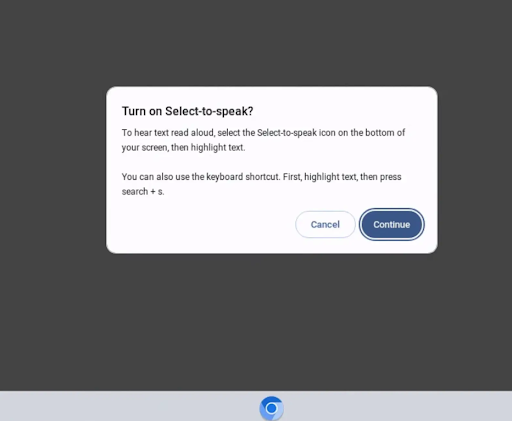
Accessibility gets a boost with the dedicated keyboard shortcut (SEARCH + S) for Select-to-Speak no longer requiring users to enable the feature in settings first; just hit the shortcut and a prompt will show up to allow you to turn it on and begin using it immediately. Truth be told, I’d love to see this happen with tons of other Accessibility features as well.
PIN Authentication and Battery Icon tweak
Security-conscious users will appreciate the addition of PIN authentication as an extra layer of protection. Google says your device PIN will act “as an authentication factor in all authentication surfaces across ChromeOS.” I’ve not had the opportunity arise where this has come up for me, but I’d love to punch in my PIN versus my password for any OS-level authentications in the future.
Finally, while it’s a small change, the updated battery icon will soon clearly display the remaining charge without any visual obstruction. As it is now, the charging icon covers most of the battery icon when plugged in, so it is very tough to glance and see how much battery remains while charging. Once again, I don’t yet have this particular update, either, but it should roll out in the coming weeks as part of the ChromeOS 129 update.
SUBSCRIBE TO UPSTREAM
Get Chrome Unboxed delivered straight to your inbox
Upstream is our flagship, curated newsletter with the top stories, most click-worthy deals, giveaways, and trending articles from Chrome Unboxed sent directly to your inbox a few times a week. Join 31,000+ subscribers.

