

Support our independent tech coverage. Chrome Unboxed is written by real people, for real people—not search algorithms. Join Chrome Unboxed Plus for just $2 a month to get an ad-free experience, access to our private Discord, and more. Learn more about membership here.
START FREE TRIAL (MONTHLY)START FREE TRIAL (ANNUAL)
The Google Home web app at home.google.com has been a fantastic addition for smart home users, finally giving us a way to view all of our camera feeds on a large desktop or laptop screen. But since its launch, it has had one massive, glaring omission: the ability to actually control the rest of our smart home devices.
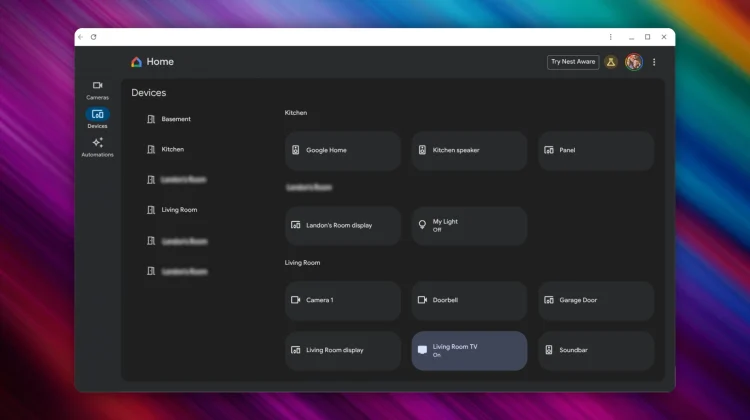
Well, that is finally changing. As reported by 9to5Google, a massive update is now rolling out to the Google Home for web Public Preview that adds a new “Devices” tab and brings controls for lights, thermostats, and more right to your browser.
Your smart home, now on your desktop
This long-awaited update adds a new “Devices” tab to the left-hand navigation rail of the web app. The interface will look very familiar to anyone who has used the Google Home app on a tablet, with a grid of all your smart home devices organized by room.
From this new dashboard, you can now finally control your core smart home gadgets. You can:
- Turn lights on or off with a simple click.
- Adjust the brightness of your lights by dragging on the tile.
- Control your Nest Thermostat’s temperature and switch between modes (Heat, Cool, etc.).
- Operate smart locks and plugs.
This is a huge leap forward, making it infinitely easier to manage your smart home when you’re sitting at your desk on a Chromebook or any other computer.
It’s still a work in progress
It’s important to note that this is still a Public Preview, and the feature set isn’t complete just yet. For instance, while you can adjust the brightness of your lights, there is no color picker available at this time.
The biggest limitation is with media devices. While your speakers, smart displays, and Chromecasts will appear in the grid, they cannot be controlled yet. Google is aware of this, displaying a message that “More device types and controls are coming soon.”
Even with these limitations, this is a fantastic and very welcome update. The ability to control our most-used devices like lights and thermostats from the web is a game-changer. You can try out the new experience for yourself by heading over to home.google.com.
SUBSCRIBE TO UPSTREAM
Get Chrome Unboxed delivered straight to your inbox
Upstream is our flagship, curated newsletter with the top stories, most click-worthy deals, giveaways, and trending articles from Chrome Unboxed sent directly to your inbox a few times a week. Join 31,000+ subscribers.

