

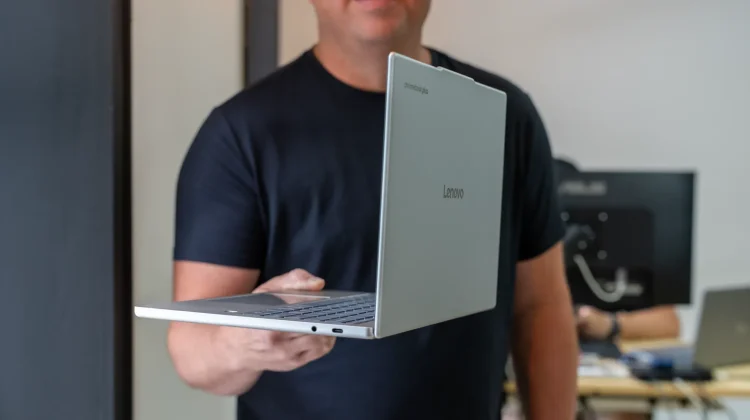
Yesterday, during a quick lunch break, I did something I’ve not done in a very, very long time: I reached first for my current Chromebook before any other media device to use for content consumption. Now that’s not to say I haven’t used Chromebooks for kicked-back YouTube viewing before – that wouldn’t even be close to true. It’s just that I don’t tend to reach for Chromebooks first for this sort of activity. And without thinking about it for a second, the Lenovo Chromebook Plus 14 was my knee-jerk, go-to device when I was ready to sit back and relax for a minute or two.
That’s just not how I think about laptops most days. Laptops – Chromebook included, obviously – tend to be lean-forward devices that are built for productivity, efficiency, and getting things done. I’ve used loads of Chromebooks that are extremely good at this sort of use case, and I’ve enjoyed them all. But this new Chromebook Plus from Lenovo just hits a bit different.
Like a tablet with an always-there keyboard
Instead of feeling like a laptop first, this device – in use, anyway – feels more like a big tablet with an always-attached keyboard/trackpad. I know that’s a seemingly silly distinction to make, but when I think about this Chromebook, that’s how it comes across. And I guess that feeling emerges from a handful of things, really.
A big part of it is the amazing screen. With its 16:10 aspect ratio, rounded corners, and gorgeous OLED colors and brightness, this screen looks fit for a big tablet. Touch interactions back this feeling up, and doing damn near anything on this panel is a delight. Again, it feels like looking at a great tablet screen all the time.
But then you have to respect the speakers, too. They are just great, and the depth of sound and surrounding audio I get from these makes me want to use this device all the time to watch shows, movies and YouTube content. I can set this in my lap, go full-screen on a YouTube video, and become completely immersed in the content.
And then there’s the SoC – the MediaTek Kompanio Ultra – that delivers an experience quite unlike any other Chromebook I’ve used. It’s the fastest Chromebook ever made, sure, but there have been very fast Chromebooks before, so it’s not just a speed thing. No, instead, it’s the combination of speed, a fanless design, what feels like eternal battery life, and the best-ever Android app experience on a Chromebook that all combine to make this processor so special in the Lenovo Chromebook Plus 14.
Take all that and put it in a highly-portable, 2.5-pound package, and it creates this hybrid sort of device that you literally have to use to fully understand. On a table with a spec sheet in front of it, this is a very nice Chromebook. But in your hands, on your desk, in your bag, and on your lap, this device simply elevates to a place I’ve not encountered with any Chromebook since I started reviewing them. It truly is something very special.
While I wish I could pluck the screen off from time to time and play a few games that I rely on gyro support for, I don’t know how often I’d do that on a screen this size. However, a few of the games I play that use more static controls have been awesome, and when you add that to the fact that I’m using more Android apps on this Chromebook than I have on any other Chromebook in the past, you can see why it falls into an almost-new category in my brain.
I wish everyone could try it out for a week – not just pick one up and look at it at a local Best Buy. While I’d encourage you to do that because it is a surprisingly great feeling device, there’s something about this one that comes to life when you live with it for a bit. So, for now, you’ll just have to trust me on this. If you want the best and most versatile Chromebook ever made, get one. Without question, you’ll love it.
Join Chrome Unboxed Plus
Introducing Chrome Unboxed Plus – our revamped membership community. Join today at just $2 / month to get access to our private Discord, exclusive giveaways, AMAs, an ad-free website, ad-free podcast experience and more.
Plus Monthly
$2/mo. after 7-day free trial
Pay monthly to support our independent coverage and get access to exclusive benefits.
Plus Annual
$20/yr. after 7-day free trial
Pay yearly to support our independent coverage and get access to exclusive benefits.
Our newsletters are also a great way to get connected. Subscribe here!
Click here to learn more and for membership FAQ

