


Support our independent tech coverage. Chrome Unboxed is written by real people, for real people—not search algorithms. Join Chrome Unboxed Plus for just $2 a month to get an ad-free experience, access to our private Discord, and more. Learn more about membership here.
START FREE TRIAL (MONTHLY)START FREE TRIAL (ANNUAL)
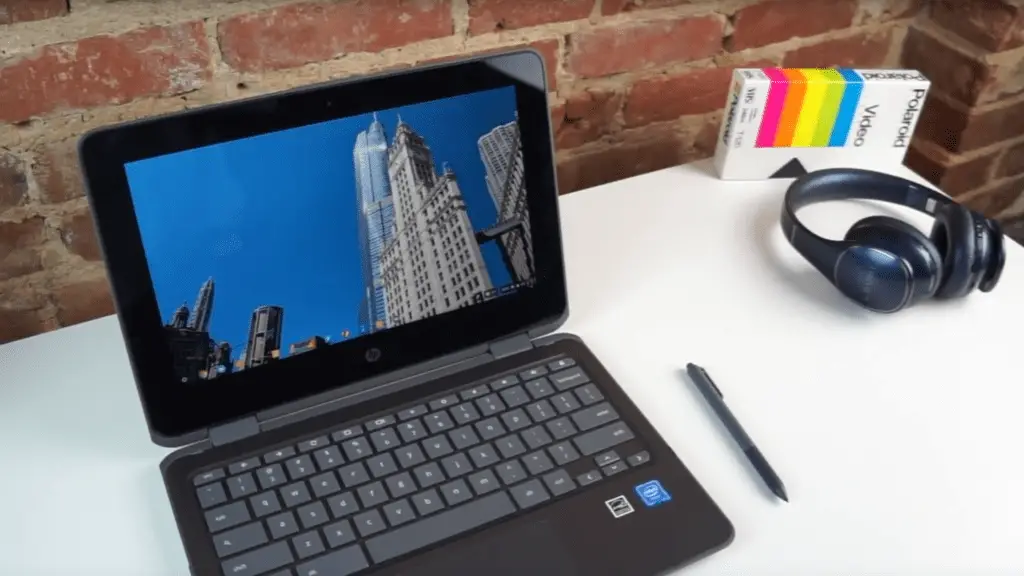 Created for both the education and consumer markets, HP’s latest Chromebook comes in combining some interesting specs and what looks like a great total package. Priced at a rather-steep $479, HP really need to deliver a pretty compelling experience at that price point to make this a device worth considering.
Keeping in mind that you can snag the Samsung Chromebook Plus for $449 (and much less a lot of times), HP needs to make sure the overall user experience is a great one.
Read on to see why we’re not sure if HP pulls it off or not.
Buy The HP Chromebook X360 on Amazon
Build Quality
Right off the bat this device feels pretty uninspired. It is cheap-feeling and not at all the best that HP is capable of delivering. Between the harsh, sharp sides around the chassis, the gigantic bezel, the very smooshy keyboard deck and the flimsy hinge, there’s little to like here.
I have to be a bit tough here as I’ve seen many Chromebooks where HP has done much, much better.
If this device was a bottom-rung, bargain-first device, I’d get it. But this is clearly not in that vein, especially when we’re talking about a device that ranges from $399-$479. The quality level of other devices in this price range are simply too much better not to mention.
HP’s own Chromebook 13 G1 is a testament to HP’s ability to make a sleek, attractive and fun-to-use device. The x360 is the opposite of all that.
Sure, its a convertible, but usable and well-built convertibles have been done before. This is not one of them.
Ports
The port selection is one of the things HP gets right here. With 4 total USB ports (two type-A, two type-C), a microSD card slot, headphone/mic jack and a Kensington lock, this device is not lacking in ways to connect.
Add to that the fact that HP put one of each port type on each side of the device and you see one of the more useful and well-thought-out features of this Chromebook.
In the classroom, this kind of setup is key as you don’t know how the charging or monitor output will need to be aligned. Well done here, HP.
Screen
The screen, though IPS (as advertised) is a rather dim 1366×768 resolution with off-angle brightness issues from all but right on.
The glossy, dim screen really makes viewing in multiple environments tricky. With the aging resolution, odd off-angle brightness drop, and the giant bezels, the screen is not the high-point of HP’s latest.
We’ve seen much worse, that is for sure. But this screen sits firmly in the mediocre category.
Inputs
Now we can get to a few more things HP did really well. First, the keyboard has great travel with good click. I really enjoyed typing on this device and enjoyed the overall feel during writing sessions.
The trackpad is equally good. The click is perfect and the smoothness lasted for long periods of time. It seems more manufacturers are finally starting to get this part right. It seems that no matter how middling the device, the trackpads are starting to find a nice amount of consistency.
Lastly, there’s a pen included in the box. The pen doesn’t stow away inside the Chromebook like in the Samsung Plus and Pro, but the fact that it doesn’t give it the ability to be a full-sized pen.
This actually feels better during longer note-taking sessions than Samsung’s much smaller pen. For me, I don’t write unless I need to, so I prefer the smaller pen that can hide away inside the device. For artists and prolific note takers, I’d imagine the opposite is true.
Either way, HP’s pen feels light and cheap, but it works pretty well on the screen. With the lower resolution of the screen, the overall inking experience is only OK. Seeing pixels very clearly takes away from the illusion of actually writing on a screen. Overall, though, the pen works well.
Additionally, the back side of the pen acts as a capacitive stylus, so in apps that use finger input as an eraser, the opposite end of the pen allows for eraser use.
Performance
The internals of this device are pretty standard, apart from the RAM:
- Apollo Lake Celeron N3350 (dual-core)
- 8GB/4GB RAM
- 32GB/64GB Storage
The device we tested has was the 8GB/64GB configuration. In this case, we didn’t feel the 8GB version had any real upside. The performance issues we saw had little or nothing to do with RAM.
The issues were with speed and performance.
We all hoped that Apollo Lake would be a nice jump over Braswell, but it didn’t really deliver. I do need to note that, in testing another Apollo Lake device, my experience has been much better. I still stand by my observations of poor performance on this HP, but I think we may see better performance as time goes on.
If nothing else, it is amazing to be able to say that about any computing device.
Overall, though, this device struggled much like Braswell devices of last year when it came to graphics or highly intensive websites. It didn’t take many tasks to really get this device to slow down quite a bit.
The Octane scores I got for this were around 9,000, but the other device I’m using right now with the same configuration is getting well over 10,000 and almost pushing 11,000. That’s an important difference and I’m feeling it in daily use. There have been a few small updates since I used the HP on a daily and we filmed the review, so there’s a chance performance could be better by now on it as well.
Battery life was as good as expected, however, easily coasting through a day with no issues. With the screen cranked up, I could see as much as 8 hours of use. That is a good thing as most users will have this screen fully maxed out at all times.
Wrap Up
So, can I recommend this device?
I’d love to, but I just cannot based on my review time. With ASUS and Acer having similar devices out at better price points and with better user experiences, it becomes hard to tell anyone to buy this.
Add the Samsung Chromebook Plus to that mix and a recommendation becomes even harder.
Don’t forget, even the Samsung Chromebook Pro comes down in price here and there, so with a small discount you could get the Pro for less than $50 more than the model we tested.
Additionally, we’ve seen the durability of Samsung’s hardware as well, so this is even more reason to question why HP’s device is even an option.
Lastly, we have a new Chromebook from Acer in the C771 that will pair up 4GB of RAM and the newer Celeron 3855U for $279 or $329 with a touchscreen and will run circles around the Apollo Lake devices. At these prices, Acer will surely have a big seller on its hands as well.
With so many other options for similar or less money, its really a no-brainer to look elswhere for your Chromebook computing needs. I hate being harsh, but some hardware needs harsh review. The HP Chromebook X360 is one of those devices. Let’s hope their next Chromebook move in a very different direction.

