

Support our independent tech coverage. Chrome Unboxed is written by real people, for real people—not search algorithms. Join Chrome Unboxed Plus for just $2 a month to get an ad-free experience, access to our private Discord, and more. Learn more about membership here.
START FREE TRIAL (MONTHLY)START FREE TRIAL (ANNUAL)
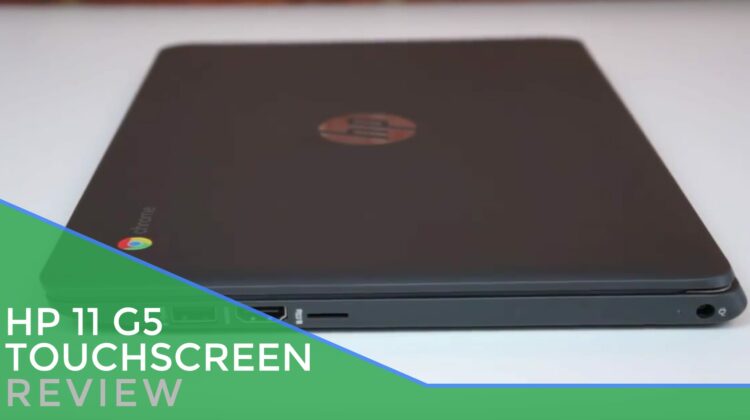
 Available since July, the HP Chromebook 11 G5 is HP’s 5 attempt at making a smaller, portable version of it’s long-standing Chromebook 14.
As it has with most previous versions (minus the 1st one), HP has put together a decent package in the Chromebook 11 with some interesting features for the price. And, for the time being, that price is almost unbeatable.
As of this review, this Chromebook can be had for $209, and that makes it one of the best deals in the entire Chromebook market.
As this device has been on the market for almost 6 months, it seems unnecessary dig too deep into all the specs and features, but we’ll list them here.
- Intel Celeron N3060 (Braswell)
- 4GB RAM
- 16GB eMMC Storage
- 1366×768 Touch Display
- 2 USB 3.0 Ports
- Full Sized HDMI Port
- 3.5mm Headphone/Mic Jack
- Micro SD Card Slot
Overall, there’s nothing out of the ordinary on that list, and this device feels and performs exactly that way. It is solid, but plastic. Portable, but not the thinnest device on the market. Well-built, but misses on some of the finer points.
Performance
Here’s the theme: nothing bad, nothing great. This Chromebook simply delivers a solid performance on a budget.
The N3060 Braswell processor and 4GB of RAM perform pretty well, especially when they don’t have to push a full HD display. Octane scores of 9,000 were acheivable and though it shares internals with the R11, it felt zippier in use. The best Octane I could get from the R11 was a mid 8,000 score, so it seems that the G5 holds a slight edge there.
Basic browsing and everyday tasks get along just fine, as well as most Android apps I tested.
I played many rounds of Modern Combat 5 online with no issues whatsoever. Framerates stayed up near 60 the entire time as well.
Battery is solid here, as well, giving 8 good hours of use with screen brightness up around 80%.
Shop HP Chromebook 11 G5 on Amazon
Screen
This model is also equipped with a touchscreen, making it an even better deal. The touch interactions were very responsive and actually felt super-smooth. With the Developer mode method, Android apps are already usable on this device, so the touchscreen was a really worthwhile add-on.
Brightness is nothing amazing, but is decent, coming in pretty close to what you get on the R11 and ASUS Flip. With a glossy screen, you’ll still struggle in sunlight. The IPS display pops, colors are good, and viewing angles are fantastic.
Color temperature is cool, giving whites a bit more pop as well.
Keyboard/Trackpad
Though you get a touchscreen, you’ll still likely find yourself using the keyboard and trackpad for the most part. It is an 11.6″ laptop after all. This part of the HP 11 G5 is hit and miss.
The keyboard is a bit too clicky, giving the keys a slight bit of travel before they are actually pressed. It also makes them loud to type on.
While not the worst keyboard I’ve ever used, it isn’t great. Travel is fine and it didn’t hinder my ability to type up a few articles, the clacky sound and slightly wobbly keys were a little off-putting.
Shop HP Chromebook 11 G5 on Amazon
The trackpad is a mixed bag as well. The surface is smooth and decently resistant to oils. It also is a decent size for a smaller Chromebook.
The click mechanism is simply too firm, though. The display at the store behaved the exact same way, so I’m inclined to think this is a build issue across all the G5s.
It simply feels like you have to push way too far down to register a click, making the whole experience feel a bit muddy and awkward. If you are a tap-to-click fan, you will be just fine here.
There’s no wiggling or floating as we’ve seen on other poorly-made trackpads, and that’s saying something. I can get over a tough click easier than a loose, floppy surface.
Speakers
Here was a nice, unexpected surprise. The speakers are bottom-firing, but situated towards the front of the laptop.
Sound was full and rich: way better than expected.
Though speakers on a Chromebook are never a selling point for me, these were a pleasant surprise as I was playing Modern Combat 5.
Wrap-Up
Overall, I’m pleased with this Chromebook. If it were $300, I’d feel differently. But, as we’ve seen before, price matters and gives devices leeway when making a purchase decision.
Should you buy one? If you find it for around $200, I’d say yes! With a great screen, touch, and decent performance, it is hard to beat at this price. It feels, looks and performs much better than you’d expect for a couple hundred dollars, and if you are in the market for a new Chromebook for the day-to-day operations, this could be your next.

