
• Skip to main content
  • Skip to primary sidebar
  • Deals
  • Features
  • Guides
  • Chromebooks
  • Videos
  • Podcast
  • More +
    • Reviews
    • Unboxing
    • Upcoming Devices
    • Chromebook Plus
    • Chrome
    • ChromeOS
    • Chrome OS Flex
  • Search
  • Sign Up
  • Log In
Chrome Unboxed – The Latest Chrome OS News

Chrome Unboxed - The Latest Chrome OS News

A Space for All Things Chrome, Google, and More!

  • Deals
  • Features
  • Guides
  • Chromebooks
  • Videos
  • Podcast
  • More +
    • Reviews
    • Unboxing
    • Upcoming Devices
    • Chromebook Plus
    • Chrome
    • ChromeOS
    • Chrome OS Flex
  • Search
  • Sign Up
  • Log In

How to reduce broadcast delay on YouTube TV to stop live spoilers

December 8, 2023 By Robby Payne View Comments

Support our independent tech coverage. Chrome Unboxed is written by real people, for real people—not search algorithms. Join Chrome Unboxed Plus for just $2 a month to get an ad-free experience, access to our private Discord, and more. Learn more about membership here.
START FREE TRIAL (MONTHLY)START FREE TRIAL (ANNUAL)

There are times when you are watching something take place that is important and truly live, and the last thing you want is to get a text or be on a phone call and have a big moment completely spoiled. This is likely only an issue with live sports, but I suppose any live event being watched simultaneously by any family or friend group in different locations is susceptible to live spoilers.

You know the feeling, and I know I’ve been on both sides of the coin. Just last week I sent a grumbling WhatsApp message to a friend group during the Titans game and immediately received a reply that I was a bit ahead of them. They were gracious and thanked me for the heads-up before the gut-wrenching play, but this scenario underscores sheer reality that live events are rarely truly live for everyone watching.

Xremove ads

YouTube TV lets you reduce broadcast delay

Introduced in just the past few days, YouTube TV now has the ability to allow users to reduce broadcast delay at the risk of adding a bit of instability to their stream. It means you’ll see events happening as close as possible to real time, and if others in your group do the same, you could be watching in that same real time together.

If you choose “Decrease for 48 hours”, the decreased broadcast delay will revert back to “Default” after the 48 hours are up. Keep in mind that the lower the broadcast delay, the less buffer the video player will have so you may be more likely to experience playback interruption. “Default” is best to minimize playback interruptions whereas “Decrease for 48 hours” is best to reduce live spoilers.

via r/YouTubeTV on Reddit

How to opt in for reduced broadcast delay on YouTube TV

Sound good? Well, the steps to enable this are quite simple, and in time for the weekend, you can get your YouTube TV account delay lowered for all the football, basketball and volleyball events happening. Just follow these quick steps:

Featured Videos

Xremove ads
  • Open the YouTube TV app on your TV or streaming device
  • Go to any playback screen on any channel
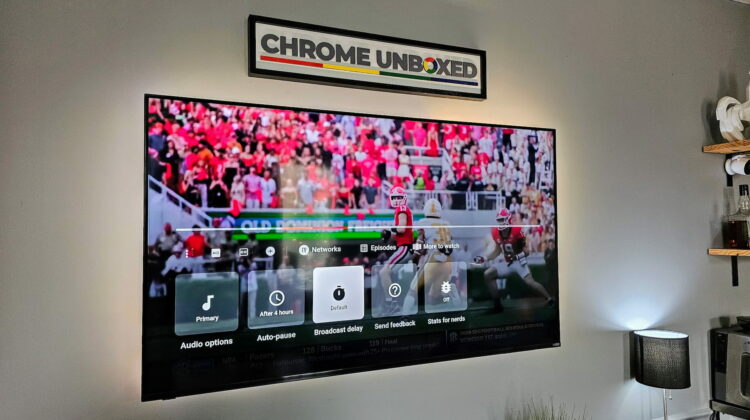
  • Select the 3-dot menu (under the timeline scrubber – see the featured image above)
  • Choose Broadcast Delay
  • Choose Decrease for 48 hours (or ‘default’ if you want to disable it)

That’s it! Again, after 48 hours, things will go back to default on their own, and that’s for good reason. Generally speaking, network stability and streaming reliability are far more important than being 10 or 15 seconds behind when watching a program. But for the times you need to be as close to live as possible, now you know how to do it.

SUBSCRIBE TO UPSTREAM

Get Chrome Unboxed delivered straight to your inbox

Upstream is our flagship, curated newsletter with the top stories, most click-worthy deals, giveaways, and trending articles from Chrome Unboxed sent directly to your inbox a few times a week. Join 31,000+ subscribers.

SUBSCRIBE HERE!

Filed Under: Guides and How-To's, New & Upcoming Features, YouTube

About Robby Payne

As the founder of Chrome Unboxed, Robby has been reviewing Chromebooks for over a decade. His passion for ChromeOS and the devices it runs on drives his relentless pursuit to find the best Chromebooks, best services, and best tips for those looking to adopt ChromeOS and those who've already made the switch.

Primary Sidebar

Xremove ads

Deals

Pixel Buds Pro 2 running

I still love the Pixel Buds Pro 2 and they are $60 off right now

By Joseph Humphrey
March 13, 2026

The Lenovo Chromebook Slim 3 is the one to get, starting at just $139 right now

By Robby Payne
March 6, 2026

The best Chromebook deals today

By Robby Payne
March 6, 2026

The fantastic $599 deal on the Samsung Galaxy Chromebook Plus has returned

By Robby Payne
February 25, 2026

There are some great Pixel 10a pre-order offers right now: Here are my 2 favorite deals

By Joseph Humphrey
February 25, 2026

More Deals

Xremove ads

Reviews

Acer Chromebook Plus Spin 514 Review: Kompanio Ultra power in a convertible

By Robby Payne
December 24, 2025

My review after 6 weeks with the Lenovo Chromebook Plus 14 [VIDEO]

By Robby Payne
August 11, 2025

One week with the best small Android tablet you can buy, and I’m sold

By Robby Payne
May 9, 2025

Best Chromebooks of 2024 [VIDEO]

By Robby Payne
November 28, 2024

Samsung Galaxy Chromebook Plus Review: Samsung is back! [VIDEO]

By Robby Payne
October 28, 2024

More Reviews

Xremove ads

Guides

This Chromebook trackpad shortcut is definitely not new, but is blowing my mind

By Robby Payne
March 11, 2024

How to reduce broadcast delay on YouTube TV to stop live spoilers

By Robby Payne
December 8, 2023

Windows PC keyboard and Chromebook

How to use a Windows keyboard with a Chromebook

By Joseph Humphrey
December 8, 2023

How reset and revert your Chromebook to the previous version of Chrome OS

By Robby Payne
November 29, 2023

My Chromebook Plus features disappeared: here’s how I fixed it

By Robby Payne
November 24, 2023

More Guides

TWITTER · FACEBOOK · INSTAGRAM · YOUTUBE · EMAIL · ABOUT

Copyright © 2026 · Chrome Unboxed · Chrome is a registered trademark of Google Inc.
We are participants in various affiliate advertising programs designed to provide a means for us to earn fees by linking to affiliated sites.

PRIVACY POLICY