


Support our independent tech coverage. Chrome Unboxed is written by real people, for real people—not search algorithms. Join Chrome Unboxed Plus for just $2 a month to get an ad-free experience, access to our private Discord, and more. Learn more about membership here.
START FREE TRIAL (MONTHLY)START FREE TRIAL (ANNUAL)
With the recent launch of ChromeOS 100, Google has made it clear that the not-so-new ARCVM container will be rolling out to more Chromebooks in the near future. Though Google created and launched the newer ARCVM method of delivering Android apps on Chromebooks back in 2021, the tech hasn’t reached the majority of Chromebooks just yet.
For reference, ARCVM is better than the older ARC++ method of putting Android apps on ChromeOS in just about every way. When you boot up a Chromebook with ARCVM, it’s hard not to notice. Android apps scale better, notifications look better, and performance across the board simply feels cleaner and more concise. This is due to a whole host of technical reasons, but what you need to know is ARCVM comes with a more-modern Android 11 in-tow and will make for a much-improved experience of Android apps on Chromebooks: both for users and developers alike.
How do you know if your Chromebook has ARCVM?
There are a few ways you can check to see if you have ARCVM on the latest build of ChromeOS. For starters, if you have Android apps on and enabled for your device, you can simply head to Settings > Apps > Google Play Store > Manage Android preferences > About device and see which version of Android you are on. If you are on Android 11, you have ARCVM. If not, you don’t. (By the way, you’ll immediately notice the proper scaling of even the Android settings menu if ARCVM is enabled.)
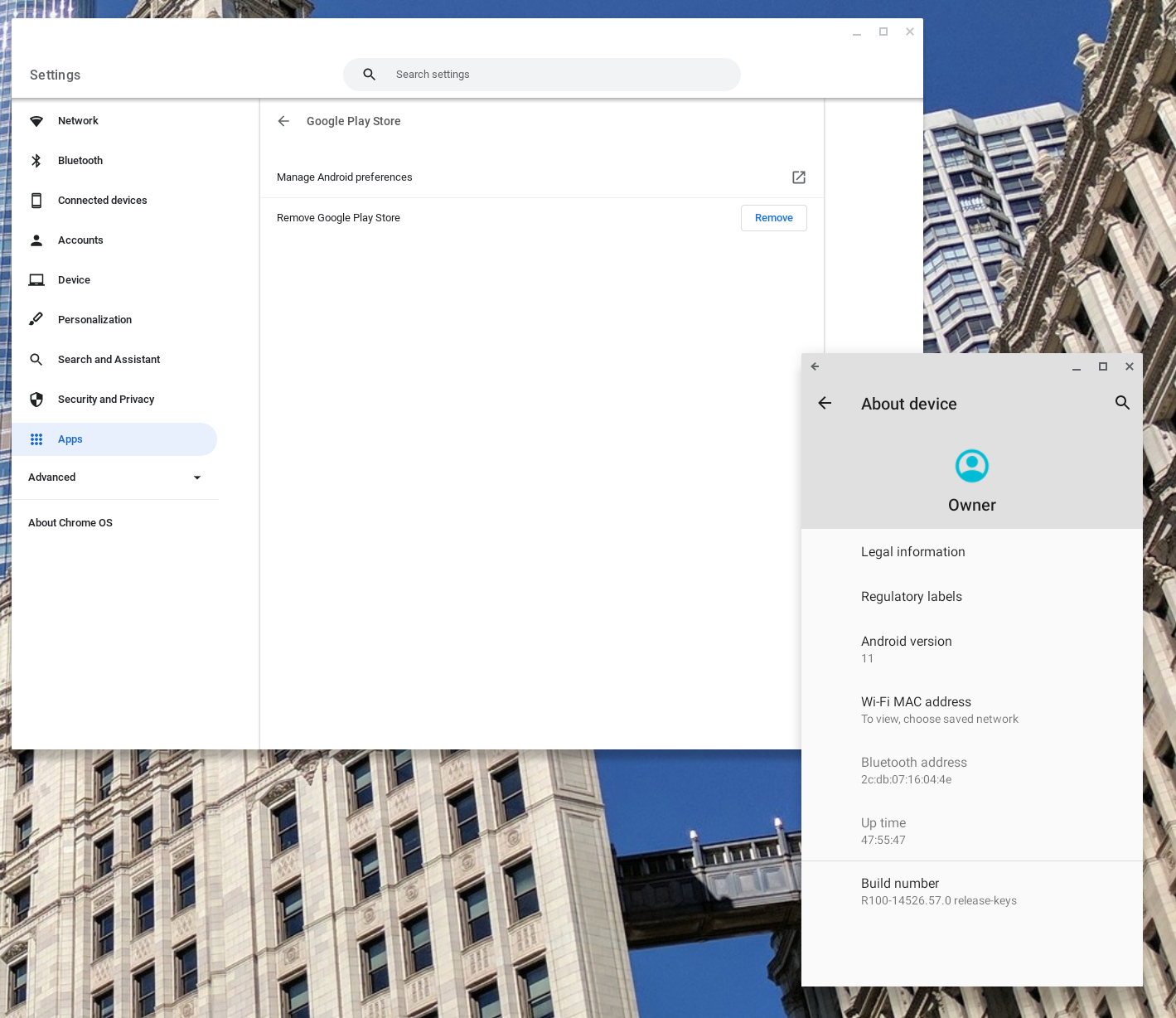
How to locate ARCVM in your Chromebook settings
A quicker way to go about this is by looking in the build details of your Chromebook. The output of this info page is tough to read, but there’s a simple way to find what you are looking for once you get there. Simply head to Settings > About Chrome OS > Additional details > Build details and click the pop-out box option. You’ll be met with a screen that has a lot of info on it, but you don’t have to worry with all that. Simply hit CTRL + F and in the search bar, type “ARCVM” to locate what you need.

Amidst all the other stuff found in this page, you should see a spot where “–arc-availability=officially-supported –enable-arcvm” is present. For devices without the new Android container, this simply won’t show up. For those with it, you will always see this clear indication that you have the newer take on Google’s method for bringing Android apps to your Chromebook.
When will other Chromebooks get ARCVM?
So, if you try these methods and realize your Chromebook is still on the older ARC++ container, what can you do? For now, nothing. However, in a recent post over at ChromeOS.dev, it seems Google is ready to push this out to more Chromebooks. There’s a commit from nearly a year ago outlining the devices set to get this update, and it is quite lengthy. For reference, the device code names listed in that commit are overarching base boards, so when you see something like ‘Trogdor’ on the list, that means we should see ARCVM for all Snapdragon 7c Chromebooks at some point.
It also needs to be noted that this list was compiled as an update to existing devices at the time. It goes without saying that new boards like ‘Brya’ (12th-gen Alder Lake Chromebooks) will all ship with ARCVM enabled out of the box. Further development of new boards with new chipsets should follow this path as well as we move forward. ARCVM needs to get manually added to most older Chromebooks, but it will be the rule moving forward with new boards, not the exception.
Hopefully this means most of us will be on the more-stable ARCVM container soon and that could pave the way for Android 12 to finally make it to Chrome OS. The existence of the older ARC++ container and the fork of some Chromebooks on ARC++ and some on ARCVM has clearly caused the Android updates to slow for ChromeOS users up to this point, but my hope is the alignment around ARCVM will get us back to the point where we get the latest, greatest version of Android for our Chromebooks right away.
SUBSCRIBE TO UPSTREAM
Get Chrome Unboxed delivered straight to your inbox
Upstream is our flagship, curated newsletter with the top stories, most click-worthy deals, giveaways, and trending articles from Chrome Unboxed sent directly to your inbox a few times a week. Join 31,000+ subscribers.

