

Support our independent tech coverage. Chrome Unboxed is written by real people, for real people—not search algorithms. Join Chrome Unboxed Plus for just $2 a month to get an ad-free experience, access to our private Discord, and more. Learn more about membership here.
START FREE TRIAL (MONTHLY)START FREE TRIAL (ANNUAL)
Casting content from one device to another has become an expected behavior with our devices for a little while now. Google’s proprietary version of this action – Google Cast – powers the well-known Chromecast devices and has been at the forefront of content casting for years at this point. But what if I told you that you could now turn your Chromebook into a functional Google Cast target? If your ears perk up at the thought, I have some good news: with a very small amount of setup, your Chromebook can receive content via cast just like a Chromecast or a smart TV.
The CastReceiver App
Google Cast typically works by transforming your source device (like a smartphone) into a remote for controlling playback on your target device (like a TV). Unlike some other casting methods, instead of mirroring the entire display, it cleverly reduces playback lag by utilizing the apps or services built into the target device to leverage playback. This method results in less strain on the device casting the content and less lag once the target device begins playback.
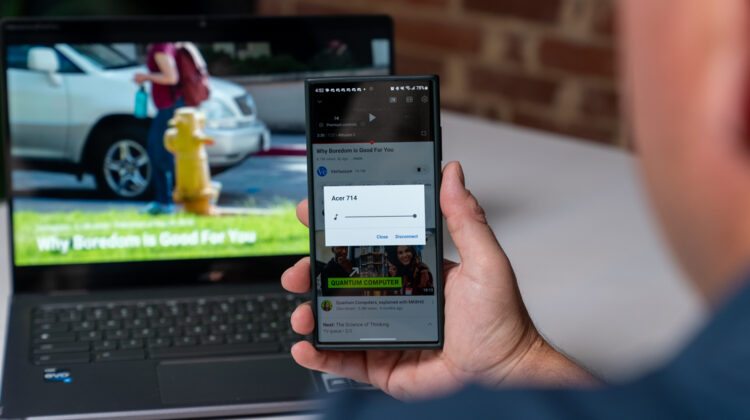
Enter the CastReceiver app. This tool allows any Android device or Chromebook to become a Cast target. That means you can cast content from one Android device to another, to a Chromebook, or even to a Windows device (leveraging Android apps). There’s been a little buzz about this since Mishaal Rahman brought this app to light, but it has been targeted around Android devices and Windows devices. I, of course, immediately wondered about it working on a Chromebook. And you know what? It works perfectly!
After installing CastReceiver on a Chromebook, it instantly became a Cast target. From YouTube videos to presentations to photos, I was able to cast directly from a phone or tablet right to my Chromebook. I still am unsure exactly how people will end up actually using this, but I know we’ve had quite a few ChromeOS users ask about doing so. Well, now you can. Let’s look at how to get it up and running.
How to Cast content to your Chromebook
- Install CastReceiver: Head to the Google Play Store on your Chromebook and search for the CastReceiver app. Install it.
- Setup: Once installed, open the app and allow the necessary permissions. Also, you can click the menu icon to change the name of your device so you can find it when you go to cast to it later.
- Start Casting: On your source device (e.g., Android phone), open any app that supports Google Cast. Look for the Cast icon and select your Chromebook from the list of available devices.
- Thats it! Whether it’s for a presentation in a meeting or watching a video, you can now cast to your Chromebook with relative ease.
A few limitations
While this app is free to test out, there is a paid version which will unlock unlimited session times for a fee of $3.99. The free trial gives you 5 minute sessions, one at a time, so if you actually intend to use CastReceiver on a regular basis, you’ll want to fork over the $4 to make that happen.
Also, not all content can be cast. DRM-protected content like those from Netflix or Amazon Prime Video are off the table due to protocol limitations. It’s unfortunate, and perhaps a limitation that will eventually be lifted; but for now you may need to test things out for your particular use case before upgrading to the full version.
With this CastReceiver app, a question we’ve fielded many times (can you cast to a Chromebook?) is finally answered with a “yes.” Who will want to use this and the ways it will help out end users is anyone’s guess, but I know there are quite a few interested in trying it for certain. And I hope those that have wanted it come up with some fascinating applications in the coming months.
SUBSCRIBE TO UPSTREAM
Get Chrome Unboxed delivered straight to your inbox
Upstream is our flagship, curated newsletter with the top stories, most click-worthy deals, giveaways, and trending articles from Chrome Unboxed sent directly to your inbox a few times a week. Join 31,000+ subscribers.

