

• Skip to main content
  • Skip to primary sidebar
  • Deals
  • Features
  • Guides
  • Chromebooks
  • Videos
  • Podcast
  • More +
    • Reviews
    • Unboxing
    • Upcoming Devices
    • Chromebook Plus
    • Chrome
    • ChromeOS
    • Chrome OS Flex
  • Search
  • Sign Up
  • Log In
Chrome Unboxed – The Latest Chrome OS News

Chrome Unboxed - The Latest Chrome OS News

A Space for All Things Chrome, Google, and More!

  • Deals
  • Features
  • Guides
  • Chromebooks
  • Videos
  • Podcast
  • More +
    • Reviews
    • Unboxing
    • Upcoming Devices
    • Chromebook Plus
    • Chrome
    • ChromeOS
    • Chrome OS Flex
  • Search
  • Sign Up
  • Log In

Google upgrades web payments and online checkout with these 3 new payment features

August 12, 2025 By Robby Payne View Comments

Support our independent tech coverage. Chrome Unboxed is written by real people, for real people—not search algorithms. Join Chrome Unboxed Plus for just $2 a month to get an ad-free experience, access to our private Discord, and more. Learn more about membership here.
START FREE TRIAL (MONTHLY)START FREE TRIAL (ANNUAL)

Chrome’s autofill feature is one of those quietly brilliant tools that saves me countless clicks and keystrokes every single day. Today, Google is making that experience even smarter and more helpful, announcing three new features designed to give online shoppers more choice, convenience, and value right at the point of purchase.

See your credit card rewards before you pay

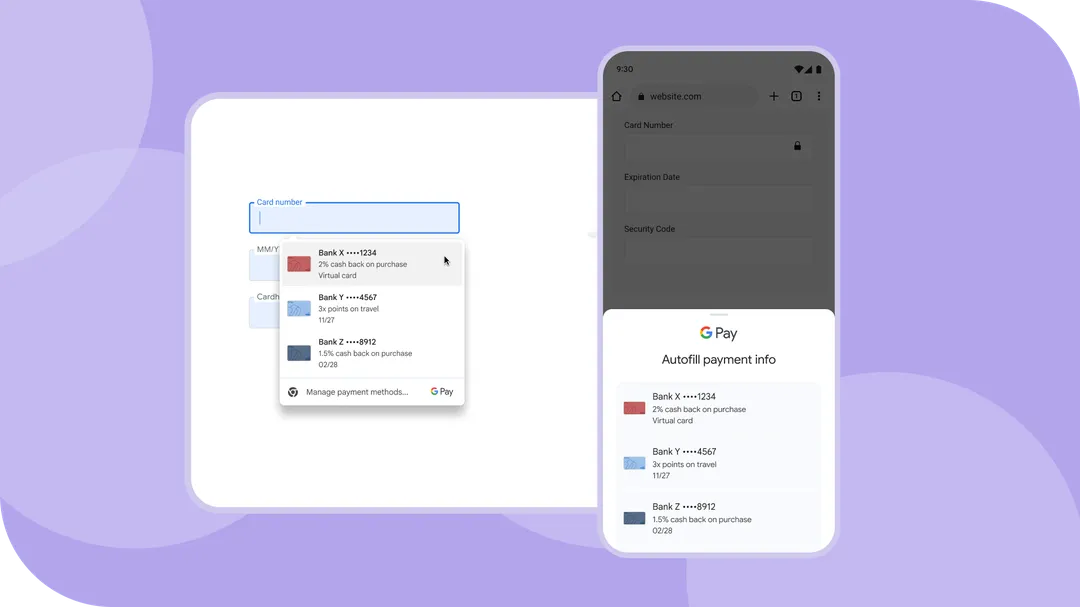
This first one is a fantastic addition for anyone who likes to maximize their credit card points or cashback. Chrome’s autofill in the U.S. is expanding to show reward details for over 100 different credit cards.
Xremove ads

This means when you’re checking out online, Chrome won’t just offer to fill in your card number; it will also give you helpful insights into which of your saved cards can score you the best benefits for that specific purchase. It’s a brilliant way to take the guesswork out of choosing the right card.

More ‘buy now, pay later’ options built right in

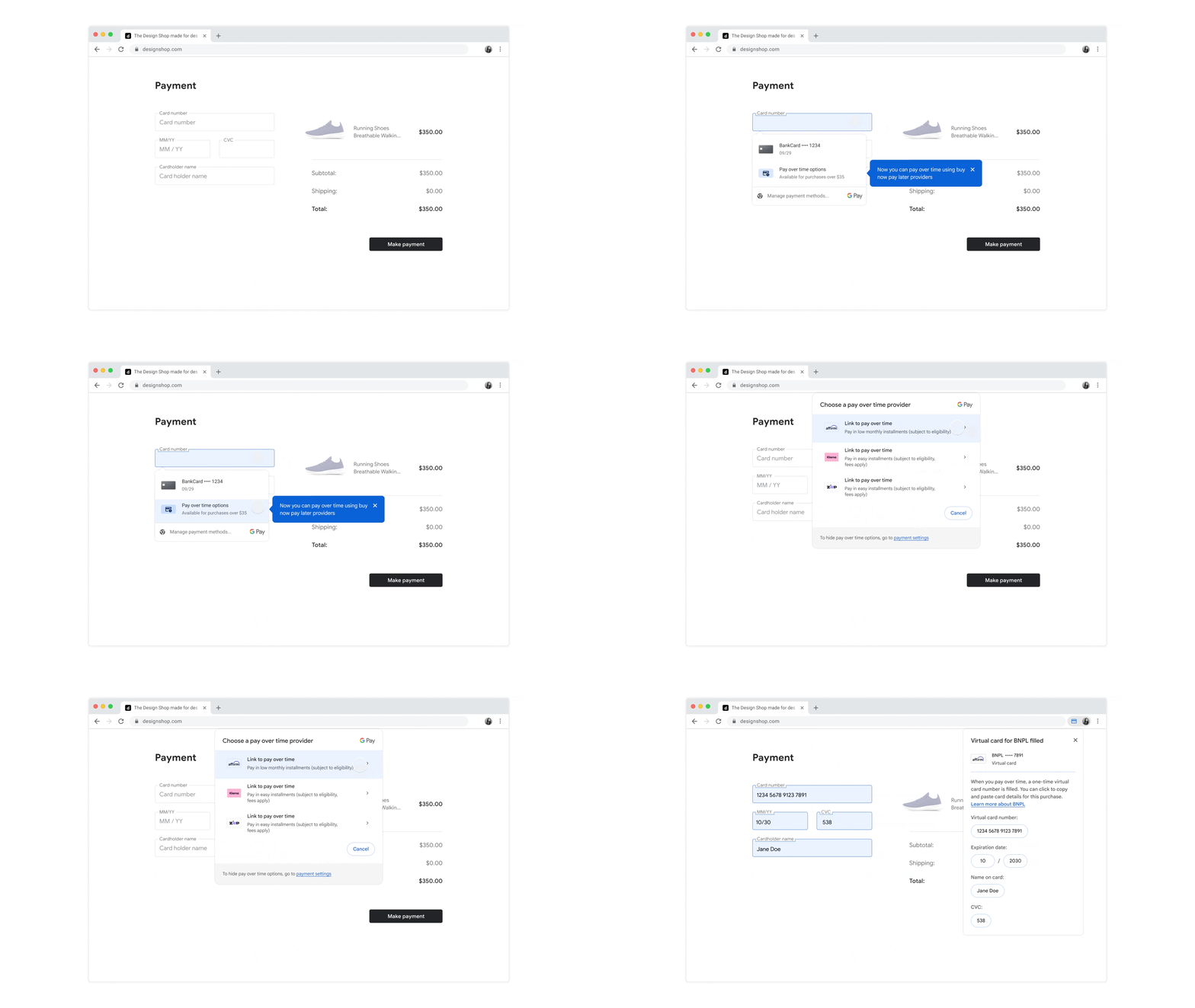
“Buy now, pay later” services have become incredibly popular, and Google is now making them easier to use directly within Chrome. The browser’s autofill feature is expanding to include these pay-over-time options, starting with Affirm and Zip for U.S. shoppers. Support for Klarna, Afterpay, and more is also coming soon. This integration will let you choose your preferred payment plan in just a few clicks, without the hassle of extra sign-ins.
Featured Videos

Xremove ads

A simpler way to send money globally

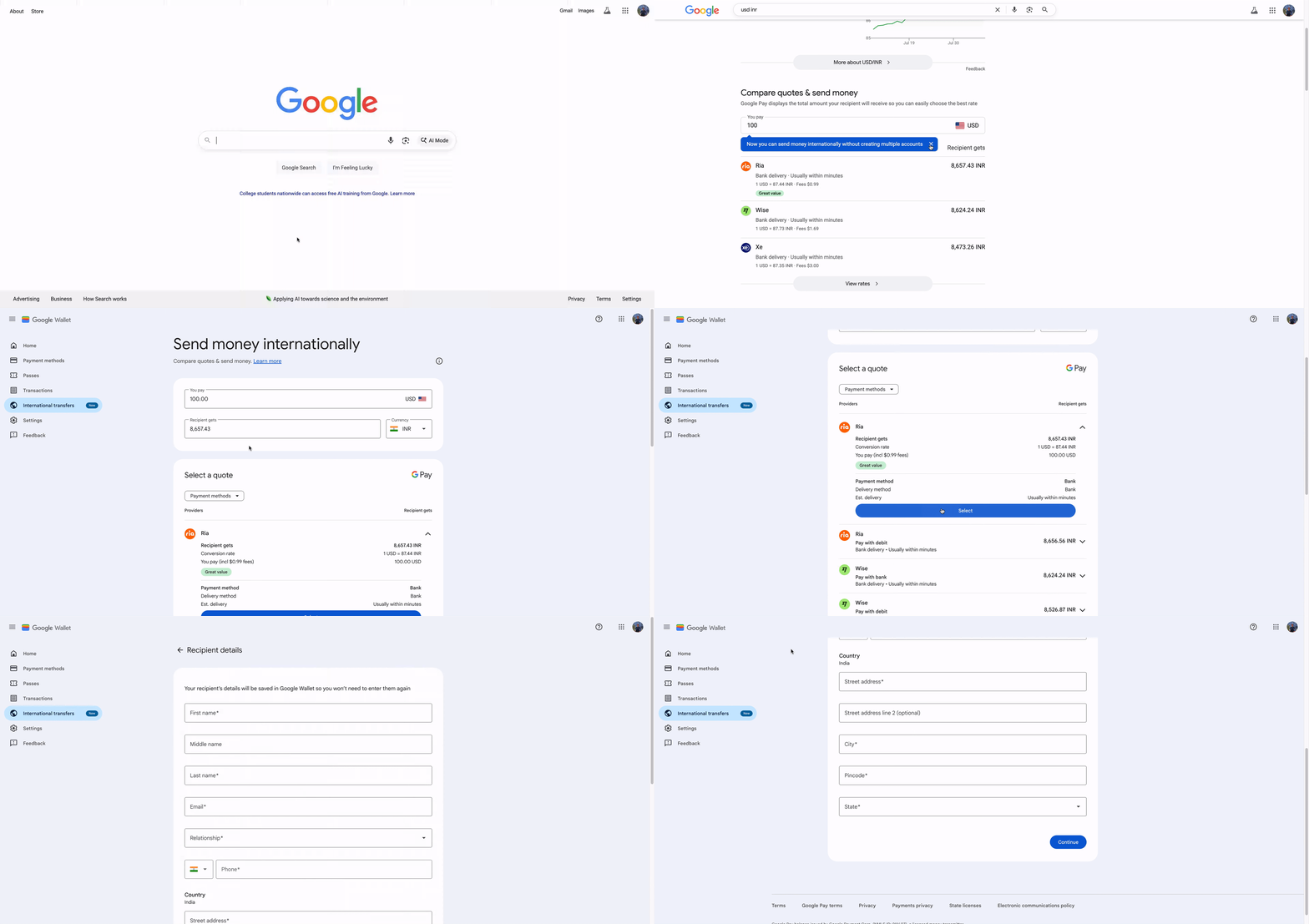
Finally, Google is testing a new, more transparent experience for international money transfers. Soon, when you use Wallet online or simply search for a currency exchange rate on Google, you’ll get straightforward information on fees and exchange rates from remittance providers like Ria Money Transfer, Xe, and Wise, and be able to send funds directly with them.
These are all great, practical updates that continue to make Chrome a more helpful and convenient tool for navigating the web. By building these financial tools directly into the browser and Search, Google is removing a little more friction from our daily online transactions.

SUBSCRIBE TO UPSTREAM

Get Chrome Unboxed delivered straight to your inbox

Upstream is our flagship, curated newsletter with the top stories, most click-worthy deals, giveaways, and trending articles from Chrome Unboxed sent directly to your inbox a few times a week. Join 31,000+ subscribers.

Xremove ads
SUBSCRIBE HERE!

Filed Under: Chrome, News

About Robby Payne

As the founder of Chrome Unboxed, Robby has been reviewing Chromebooks for over a decade. His passion for ChromeOS and the devices it runs on drives his relentless pursuit to find the best Chromebooks, best services, and best tips for those looking to adopt ChromeOS and those who've already made the switch.

Primary Sidebar

Xremove ads

Deals

The Pixel 10a just dropped to $449, but here’s why you should buy the Pixel 10 instead

By Joseph Humphrey
April 13, 2026

Save up to $200 on the two best Chromebooks on the market

By Robby Payne
April 13, 2026

The best Chromebook deals today

By Robby Payne
April 13, 2026

You can grab the battery-powered Nest Doorbell for just $129.99 right now

By Joseph Humphrey
April 11, 2026

Deal Alert: the excellent Lenovo Chromebook Plus 2-in-1 drops to $429

By Robby Payne
April 10, 2026

More Deals

Xremove ads

Reviews

Acer Chromebook Plus Spin 514 Review: Kompanio Ultra power in a convertible

By Robby Payne
December 24, 2025

My review after 6 weeks with the Lenovo Chromebook Plus 14 [VIDEO]

By Robby Payne
August 11, 2025

One week with the best small Android tablet you can buy, and I’m sold

By Robby Payne
May 9, 2025

Best Chromebooks of 2024 [VIDEO]

By Robby Payne
November 28, 2024

Samsung Galaxy Chromebook Plus Review: Samsung is back! [VIDEO]

By Robby Payne
October 28, 2024

More Reviews

Xremove ads

Guides

This Chromebook trackpad shortcut is definitely not new, but is blowing my mind

By Robby Payne
March 11, 2024

How to reduce broadcast delay on YouTube TV to stop live spoilers

By Robby Payne
December 8, 2023

Windows PC keyboard and Chromebook

How to use a Windows keyboard with a Chromebook

By Joseph Humphrey
December 8, 2023

How reset and revert your Chromebook to the previous version of Chrome OS

By Robby Payne
November 29, 2023

My Chromebook Plus features disappeared: here’s how I fixed it

By Robby Payne
November 24, 2023

More Guides

TWITTER · FACEBOOK · INSTAGRAM · YOUTUBE · EMAIL · ABOUT

Copyright © 2026 · Chrome Unboxed · Chrome is a registered trademark of Google Inc.
We are participants in various affiliate advertising programs designed to provide a means for us to earn fees by linking to affiliated sites.

PRIVACY POLICY