
• Skip to main content
  • Skip to primary sidebar
  • Deals
  • Features
  • Guides
  • Chromebooks
  • Videos
  • Podcast
  • More +
    • Reviews
    • Unboxing
    • Upcoming Devices
    • Chromebook Plus
    • Chrome
    • ChromeOS
    • Chrome OS Flex
  • Search
  • Sign Up
  • Log In
Chrome Unboxed – The Latest Chrome OS News

Chrome Unboxed - The Latest Chrome OS News

A Space for All Things Chrome, Google, and More!

  • Deals
  • Features
  • Guides
  • Chromebooks
  • Videos
  • Podcast
  • More +
    • Reviews
    • Unboxing
    • Upcoming Devices
    • Chromebook Plus
    • Chrome
    • ChromeOS
    • Chrome OS Flex
  • Search
  • Sign Up
  • Log In

Google TV spreads holiday cheer with performance updates and new features

December 13, 2023 By Joseph Humphrey View Comments

Support our independent tech coverage. Chrome Unboxed is written by real people, for real people—not search algorithms. Join Chrome Unboxed Plus for just $2 a month to get an ad-free experience, access to our private Discord, and more. Learn more about membership here.
START FREE TRIAL (MONTHLY)START FREE TRIAL (ANNUAL)

It’s been a good year for Google TV, highlighted by new features, design tweaks, free channels, and performance upgrades. As 2023 draws to a close, Google is spreading some holiday cheer with improvements to enhance your Google TV experience, including updates to the Live tab and more free channels.

One of the improvements that you might notice immediately the next time you load up Google TV is the overall TV interface speed and responsiveness. Google has sped things up by changing the way the home screen loads recommendation rows and by shrinking the size of the basic system apps. Google says these changes should make a notable improvement in navigation smoothness.

Xremove ads

Google TV has also upgraded the response speed of various home screen features, by preloading content and optimizing tab loading, enabling faster search results. These improvements should help you get your content quicker without waiting for the interface to load. Changes have also been made to the setup process, which will free up more storage on your device. This includes reducing the size of less frequently used pre-installed apps, which will free up more storage space for the apps and content you actually use.

On the Live TV side of things, Google has now added two new categories to its Live tab channel guide. The “Recents” category allows for quick access to recently viewed channels, and the “Local news” category provides easy access to free local news channels. Additionally, a new “Free live news & opinion” row in the “For you” tab offers quick navigation to news channels.

Featured Videos

Xremove ads

Google says they are also launching 14 new free channels, including the Xumo Holiday Movie Channel, DraftKings, and Speedvision, expanding its free offerings to over 115 built-in channels available without extra downloads or subscriptions.

Finally, to wrap up the year, Google TV is bringing a little holiday cheer to users’ living rooms. The interactive Advent calendar promises daily surprises until December 25th, and the “Holidays” category on the Live tab is filled with free holiday movie and music channels. Additionally, the “Best of 2023” wrap-up will highlight the year’s most popular movies, shows, and music.

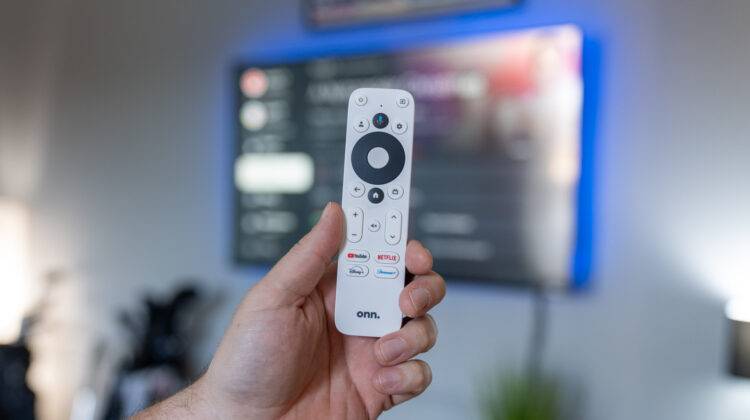
All of these updates are rolling out now, just in time for the end of the year when many of us will be enjoying downtime with family and friends on the couch, re-watching classic holiday movies, or maybe binge-watching a new show. If you don’t already own a Google TV device or if you are looking for a quick and easy gift for the techy person on your list, the Onn. 4K Streaming Box from Walmart is hard to beat. Happy streaming!

Xremove ads

SUBSCRIBE TO UPSTREAM

Get Chrome Unboxed delivered straight to your inbox

Upstream is our flagship, curated newsletter with the top stories, most click-worthy deals, giveaways, and trending articles from Chrome Unboxed sent directly to your inbox a few times a week. Join 31,000+ subscribers.

SUBSCRIBE HERE!

Filed Under: Google TV, News

About Joseph Humphrey

Joe has been a part of Chrome Unboxed since 2016 when he started helping Robby produce YouTube videos. Although normally behind the scenes, Joe has spent countless hours editing reviews and unboxings of many, many Chromebooks. Now a Partner in Unboxed Media, Joe is constantly thinking strategically about the Chromebook industry and how Chrome Unboxed can continue to innovate in the space.

Primary Sidebar

Xremove ads

Deals

The touchscreen Lenovo Chromebook Slim 3 is a steal at under $200

By Robby Payne
March 16, 2026

Google TV Streamer and Remote held in front of a wall-mounted TV

The premium Google TV Streamer 4K is back down to $80

By Joseph Humphrey
March 16, 2026

The best Chromebook deals today

By Robby Payne
March 16, 2026

Pixel Buds Pro 2 running

I still love the Pixel Buds Pro 2 and they are $60 off right now

By Joseph Humphrey
March 13, 2026

The Lenovo Chromebook Slim 3 is the one to get, starting at just $139 right now

By Robby Payne
March 6, 2026

More Deals

Xremove ads

Reviews

Acer Chromebook Plus Spin 514 Review: Kompanio Ultra power in a convertible

By Robby Payne
December 24, 2025

My review after 6 weeks with the Lenovo Chromebook Plus 14 [VIDEO]

By Robby Payne
August 11, 2025

One week with the best small Android tablet you can buy, and I’m sold

By Robby Payne
May 9, 2025

Best Chromebooks of 2024 [VIDEO]

By Robby Payne
November 28, 2024

Samsung Galaxy Chromebook Plus Review: Samsung is back! [VIDEO]

By Robby Payne
October 28, 2024

More Reviews

Xremove ads

Guides

This Chromebook trackpad shortcut is definitely not new, but is blowing my mind

By Robby Payne
March 11, 2024

How to reduce broadcast delay on YouTube TV to stop live spoilers

By Robby Payne
December 8, 2023

Windows PC keyboard and Chromebook

How to use a Windows keyboard with a Chromebook

By Joseph Humphrey
December 8, 2023

How reset and revert your Chromebook to the previous version of Chrome OS

By Robby Payne
November 29, 2023

My Chromebook Plus features disappeared: here’s how I fixed it

By Robby Payne
November 24, 2023

More Guides

TWITTER · FACEBOOK · INSTAGRAM · YOUTUBE · EMAIL · ABOUT

Copyright © 2026 · Chrome Unboxed · Chrome is a registered trademark of Google Inc.
We are participants in various affiliate advertising programs designed to provide a means for us to earn fees by linking to affiliated sites.

PRIVACY POLICY