

Support our independent tech coverage. Chrome Unboxed is written by real people, for real people—not search algorithms. Join Chrome Unboxed Plus for just $2 a month to get an ad-free experience, access to our private Discord, and more. Learn more about membership here.
START FREE TRIAL (MONTHLY)START FREE TRIAL (ANNUAL)
We’ve been keeping a close eye on Google’s experiments with generative AI directly within Search, called AI Mode. And while it’s shown promise for tackling complex queries, not everyone has been able to try it out since access has been limited by a waitlist. Well, Google just dropped the velvet rope, announcing that AI Mode no longer has a waitlist and is now instantly accessible for anyone 18+ in the U.S. enrolled in Search Labs! Alongside opening the doors wider, Google is also rolling out some key updates to make the experience more helpful and easier to use.
One of the biggest functional updates is the introduction of rich place and product cards directly within AI Mode results. Previously, AI Mode was great for getting detailed explanations or comparisons, but taking the next step required more digging. But now, if you ask about local spots (like restaurants or stores), you’ll see visual cards with helpful info like ratings, reviews, operating hours, and even live busyness data, with easy links to call or get directions.
Similarly, if you search for products, AI Mode can now surface shoppable options complete with real-time prices (including promotions), availability, images, shipping details, and even local inventory. Asking something specific, like “best Android tablet for under $600,” will now go beyond just recommendations and will give you actionable cards linking directly to retailers. Google says this is powered by its vast, constantly updated local business information and its Shopping Graph, which tracks over 45 billion product listings. This change aims to bridge the gap between getting AI-powered answers and actually doing something with that information.
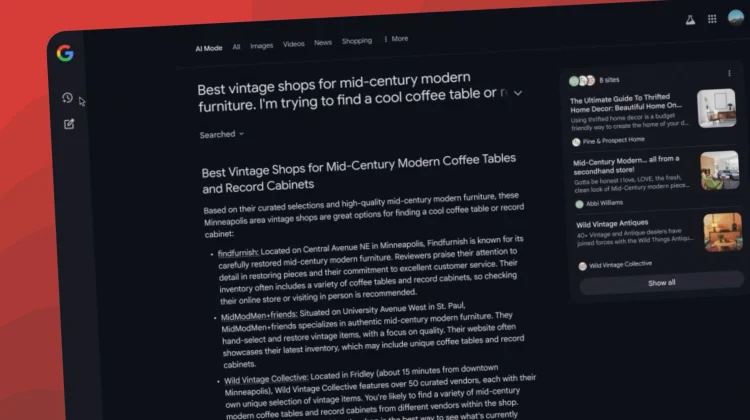
For those longer, more complex searches or projects, Google is also now making it easier to pick up where you left off, at least on desktop for now. A new left-side panel is rolling out that will show your past AI Mode searches. Clicking on a topic will bring back the information AI Mode previously generated, allowing you to easily ask follow-up questions or continue your task without starting over.
Google also announced a limited test outside of Search Labs. Over the coming weeks, a small percentage of users in the U.S. will start seeing the “AI Mode” tab appear directly within the main Google Search interface. While still an experiment, this is the first step we’ve seen towards potentially integrating this experience more broadly for everyone down the line.
How to try out AI Mode
If you’re already enrolled in Search Labs in the U.S., you should now have instant access to AI Mode and will likely see these new features rolling out soon. If you haven’t enrolled yet, now’s a great time to head over to Labs and give it a try. Google also notes that the best mobile experience, including multimodal queries (using images/voice), is available via the Google App on Android and iOS.
SUBSCRIBE TO UPSTREAM
Get Chrome Unboxed delivered straight to your inbox
Upstream is our flagship, curated newsletter with the top stories, most click-worthy deals, giveaways, and trending articles from Chrome Unboxed sent directly to your inbox a few times a week. Join 31,000+ subscribers.

