
• Skip to main content
  • Skip to primary sidebar
  • Deals
  • Features
  • Guides
  • Chromebooks
  • Videos
  • Podcast
  • More +
    • Reviews
    • Unboxing
    • Upcoming Devices
    • Chromebook Plus
    • Chrome
    • ChromeOS
    • Chrome OS Flex
  • Search
  • Sign Up
  • Log In
Chrome Unboxed – The Latest Chrome OS News

Chrome Unboxed - The Latest Chrome OS News

A Space for All Things Chrome, Google, and More!

  • Deals
  • Features
  • Guides
  • Chromebooks
  • Videos
  • Podcast
  • More +
    • Reviews
    • Unboxing
    • Upcoming Devices
    • Chromebook Plus
    • Chrome
    • ChromeOS
    • Chrome OS Flex
  • Search
  • Sign Up
  • Log In

Google Sans font is coming for the rest of your Chromebook

April 28, 2024 By Robby Payne View Comments

Support our independent tech coverage. Chrome Unboxed is written by real people, for real people—not search algorithms. Join Chrome Unboxed Plus for just $2 a month to get an ad-free experience, access to our private Discord, and more. Learn more about membership here.
START FREE TRIAL (MONTHLY)START FREE TRIAL (ANNUAL)

Over the past few months, as the Material You design language has taken over most parts of the ChromeOS UI, you may have noticed a new font being injected in many parts of your Chromebook. That font – a far more rounded and Google-y typeface than the current Roboto we’ve had for years – is called Google Sans. It’s what you see on all of Google’s front-facing products and on many of their internal websites as well.

an example of Google Sans

The Google Store, The Keyword, the Chromebook homepage, etc. all use Google Sans to varying degrees. To see it full on display, this post at The Google Store uses Google’s new-ish font in every facet of the page. From menus to headings to paragraph fonts, Google Sans is everywhere and it looks fantastic.

Xremove ads

I’ve long loved the Google Sans font since back when it was called Product Sans. There’s a fantastic look to it that is both inviting and modern, and the fact that they’ve crafted it in a way to work in headings, standard text, buttons and every other place you need a font makes it a great candidate for ChromeOS.

Check out Today’s Best Chomebook Deals

More Google Sans is on the way

Now, don’t hear me saying there’s no trace of this font on your Chromebook. Right now, actually, if you were to inspect your Files app, you’d quickly see that most of the fonts in that system app are already Google Sans. It’s also in the Quick Settings tray and in the app launcher, too. But there are places here and there where the ChromeOS team has yet to update it, and that’s where this new change will have a great affect on the look and feel of multiple places in ChromeOS in the future.
Featured Videos

Xremove ads
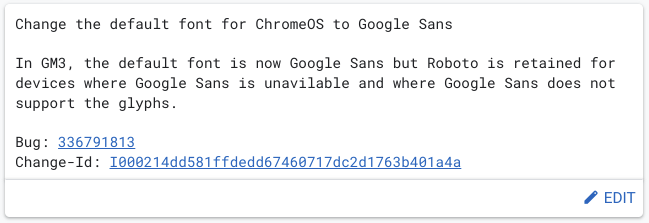
via the Chromiuim Gerrit

Thanks to a find by 9to5 Google, it looks like Google is ready to pull the trigger and make Google Sans the default font across the board for ChromeOS. To align with their recent design language, Chromebooks will now display most things via Google Sans versus the outgoing Roboto, though it looks like the latter will stick around as a backup font for when things don’t quite work with Google Sans.

It’s a change that sounds big, but will likely feel quite subtle when it arrives. As 9to5 Google notes, there are no associated feature flags for this change, so when they flip the switch, it will just be live across the board. We’ll certainly be on the lookout for it, but the fact that this change in the Chromium Gerrit is not yet merged tells me we at least won’t be seeing it until ChromeOS 125 as 124 should be landing this week. Either way, it won’t be too long before – for the vast majority, anyway – we’ll say a final goodbye to Roboto on Chromebooks and hello to Google Sans.

SUBSCRIBE TO UPSTREAM

Get Chrome Unboxed delivered straight to your inbox

Upstream is our flagship, curated newsletter with the top stories, most click-worthy deals, giveaways, and trending articles from Chrome Unboxed sent directly to your inbox a few times a week. Join 31,000+ subscribers.

Xremove ads
SUBSCRIBE HERE!

Filed Under: Chromebooks, ChromeOS, New & Upcoming Features

About Robby Payne

As the founder of Chrome Unboxed, Robby has been reviewing Chromebooks for over a decade. His passion for ChromeOS and the devices it runs on drives his relentless pursuit to find the best Chromebooks, best services, and best tips for those looking to adopt ChromeOS and those who've already made the switch.

Primary Sidebar

Xremove ads

Deals

You can grab the battery-powered Nest Doorbell for just $129.99 right now

By Joseph Humphrey
April 11, 2026

Deal Alert: the excellent Lenovo Chromebook Plus 2-in-1 drops to $429

By Robby Payne
April 10, 2026

You can save up to $50 on the 2K Nest Cam Outdoor (2nd Gen) right now

By Joseph Humphrey
April 9, 2026

The best Chromebook deals today

By Robby Payne
April 9, 2026

Massive Deal Alert: The Acer Chromebook Plus Spin 714 just hit an all-time low $499

By Robby Payne
April 1, 2026

More Deals

Xremove ads

Reviews

Acer Chromebook Plus Spin 514 Review: Kompanio Ultra power in a convertible

By Robby Payne
December 24, 2025

My review after 6 weeks with the Lenovo Chromebook Plus 14 [VIDEO]

By Robby Payne
August 11, 2025

One week with the best small Android tablet you can buy, and I’m sold

By Robby Payne
May 9, 2025

Best Chromebooks of 2024 [VIDEO]

By Robby Payne
November 28, 2024

Samsung Galaxy Chromebook Plus Review: Samsung is back! [VIDEO]

By Robby Payne
October 28, 2024

More Reviews

Xremove ads

Guides

This Chromebook trackpad shortcut is definitely not new, but is blowing my mind

By Robby Payne
March 11, 2024

How to reduce broadcast delay on YouTube TV to stop live spoilers

By Robby Payne
December 8, 2023

Windows PC keyboard and Chromebook

How to use a Windows keyboard with a Chromebook

By Joseph Humphrey
December 8, 2023

How reset and revert your Chromebook to the previous version of Chrome OS

By Robby Payne
November 29, 2023

My Chromebook Plus features disappeared: here’s how I fixed it

By Robby Payne
November 24, 2023

More Guides

TWITTER · FACEBOOK · INSTAGRAM · YOUTUBE · EMAIL · ABOUT

Copyright © 2026 · Chrome Unboxed · Chrome is a registered trademark of Google Inc.
We are participants in various affiliate advertising programs designed to provide a means for us to earn fees by linking to affiliated sites.

PRIVACY POLICY