


Support our independent tech coverage. Chrome Unboxed is written by real people, for real people—not search algorithms. Join Chrome Unboxed Plus for just $2 a month to get an ad-free experience, access to our private Discord, and more. Learn more about membership here.
START FREE TRIAL (MONTHLY)START FREE TRIAL (ANNUAL)
There are quite a few Android phones that come with a dedicated settings menu just for gaming. Samsung, OnePlus, and ASUS provide gaming layers that I’ve used over the years and each one has its perks. One of my absolute favorite features in a game mode came with OnePlus phones during the OnePlus 5 through 8T days. It allowed for messages to come through, but without all the added white space in the notification. The text scrolled up top, out of the way, and allowed you to stay in the game while still being attentive to the outside. I miss that.
Google utilized Android 12 to get in on this feature with the introduction of Game Dashboard that I’ve only seen in use on Pixel phones at this point. Admittedly, Game Dashboard is simple and lacks a few features I’d like to see, but the main stuff is there. You can set your phone to automaticlly trigger Do Not Disturb during gaming sessions, lock the screen brightness (it just does this without a real setting), and the overlay allows for both screenshots and screen recordings, too.
Though other gaming modes are a bit more robust, I appreciate having this setup on my Pixel 7 Pro while I’m gaming and tend to prefer this simple setup compared to something like the Armory Crate from ASUS that really can overwhelm you with the amount of settings and options it presents.
Game Dashboard is coming to Chromebooks
Like we see with a lot of things, this Android feature is now set to migrate over to ChromeOS in the coming months as shown by a new effort beginning over in the Chromium Repositories.
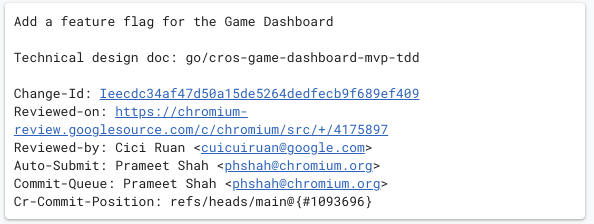

From the early commits, we can gain a bit of insight as to what Google is up to. First off, it looks like the Game Dashboard on Chromebooks will be at first limited to only Android games with additional game types coming in the future. I’d hope there will be a way to integrate it into GeForce NOW and Steam games down the road, but for now there’s no clear indicator of that.
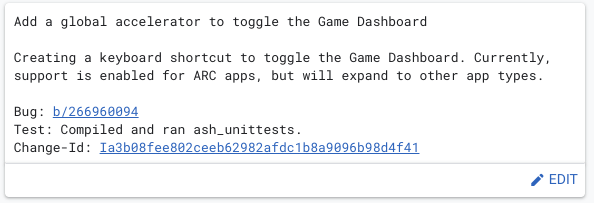
From this same commit, we can also see that the Game Dashboard will also have a keyboard shortcut to call it up. For Android phones, the shortcut resides on the screen when you swipe down to see notifications and hides itself after a few seconds. That would be a strange way to implement it on Chromebooks, so a dedicated key combo will be helpful. Additionally, it would be helpful if you could perhaps access it from the quick settings tray, but none of that is in place at the moment.
Finally, we also know that the implementation will come via some sort of action bar instead of a full-screen overlay like we see on Android phones. Even on the smaller screen of a phone, that overlay feels a bit overdone, so it would clearly be too much on a Chromebook. A small, out of the way bar makes a ton of sense, here.

Obviously, we are in the early days of this, but with the feature already on Android phones for about a year and a half at this point, I’d reckon Google knows what they are going for. I’d love to see this new Game Dashboard get the ability to customize the on-screen keyboard mapping (control overlay) that was introduced in an alpha stage with ChromeOS 105. That feature has yet to really be unleashed, and this Game Dashboard could be the vehicle for it.

For now, we’ll keep an eye on the development of this feature and I’m hopeful that it will come along quickly. With a renewed focus on gaming for Chromebooks (you can play fantastic cloud-streamed AAA titles, local games via Android, and soon have access to your Steam library too), it is encouraging to see some UI improvements aimed directly at this particular activity. While not absolute gaming machines, Chromebooks are set to become quite good for playing games, and this Game Dashboard will only help that out moving forward.
SUBSCRIBE TO UPSTREAM
Get Chrome Unboxed delivered straight to your inbox
Upstream is our flagship, curated newsletter with the top stories, most click-worthy deals, giveaways, and trending articles from Chrome Unboxed sent directly to your inbox a few times a week. Join 31,000+ subscribers.

