

• Skip to main content
  • Skip to primary sidebar
  • Deals
  • Features
  • Guides
  • Chromebooks
  • Videos
  • Podcast
  • More +
    • Reviews
    • Unboxing
    • Upcoming Devices
    • Chromebook Plus
    • Chrome
    • ChromeOS
    • Chrome OS Flex
  • Search
  • Sign Up
  • Log In
Chrome Unboxed – The Latest Chrome OS News

Chrome Unboxed - The Latest Chrome OS News

A Space for All Things Chrome, Google, and More!

  • Deals
  • Features
  • Guides
  • Chromebooks
  • Videos
  • Podcast
  • More +
    • Reviews
    • Unboxing
    • Upcoming Devices
    • Chromebook Plus
    • Chrome
    • ChromeOS
    • Chrome OS Flex
  • Search
  • Sign Up
  • Log In

Google Photos is becoming a ‘Digital Closet’ with new AI Wardrobe tools

April 29, 2026 By Robby Payne View Comments

Support our independent tech coverage. Chrome Unboxed is written by real people, for real people—not search algorithms. Join Chrome Unboxed Plus for just $2 a month to get an ad-free experience, access to our private Discord, and more. Learn more about membership here.
START FREE TRIAL (MONTHLY)START FREE TRIAL (ANNUAL)

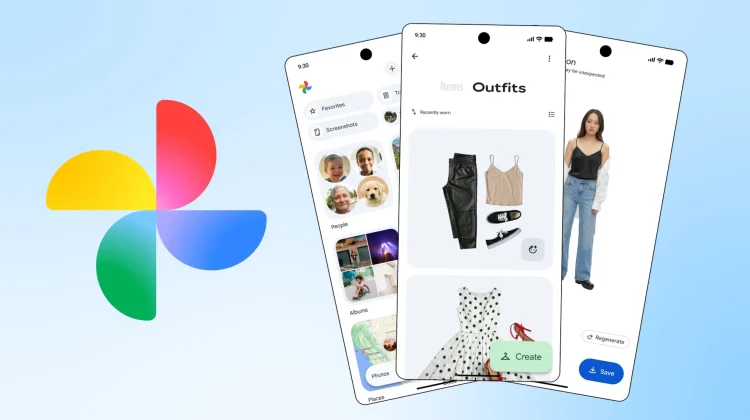
We’ve all had those days where you find yourself staring blankly into a full closet and feeling like you have nothing to wear. Usually, the problem isn’t a lack of clothes, but a lack of visibility. Google’s new Wardrobe feature aims to fix that by organizing your personal fashion history into a searchable, interactive collection.

How the ‘Digital Closet’ works

The feature uses advanced computer vision to scan your photo library, identify individual garments, and sort them into a dedicated Wardrobe collection (found under the Collections tab). Once it’s set up, you can manage your style in three major ways:

Xremove ads
  • Categorized Browsing: The AI automatically sorts your items into categories like jewelry, tops, bottoms, and outerwear. It’s perfect for scrolling through and finding that one specific sweater you haven’t seen in two years.
  • Moodboards and Outfits: You can mix and match items from different photos to build new outfits. These can be saved to custom moodboards for specific events, like “Summer Weddings” or “Trip to Italy,” and shared with friends for a second opinion.
  • Virtual Try-On: This is the real game-changer. Using a feature previously reserved for Google Shopping, you can select individual pieces from your digital closet and click “Try it on” to see a photorealistic preview of how those specific items look on you before you actually put them on.

A more personal ‘Try-On’

What makes this different from the Virtual Try-On tools we’ve seen in the past is that it uses your body and your clothes. Instead of seeing how a generic shirt looks on a professional model, Google Photos maps your actual garments onto your own frame, adjusting for fabric drape and fit.

Availability and Rollout

Google confirmed that the new Wardrobe feature will begin rolling out this summer (2026). As is often the case with Google’s mobile-first features, it will land on Android devices first, with an iOS rollout expected shortly after.

Featured Videos

Xremove ads

If you are a person who relies on Google Photos for your media management, this feature should integrate seamlessly into your workflow, giving you a desktop-class view of your entire wardrobe on a larger screen.

SUBSCRIBE TO UPSTREAM

Get Chrome Unboxed delivered straight to your inbox

Upstream is our flagship, curated newsletter with the top stories, most click-worthy deals, giveaways, and trending articles from Chrome Unboxed sent directly to your inbox a few times a week. Join 31,000+ subscribers.

SUBSCRIBE HERE!

Filed Under: AI, Gemini, New & Upcoming Features, News

About Robby Payne

As the founder of Chrome Unboxed, Robby has been reviewing Chromebooks for over a decade. His passion for ChromeOS and the devices it runs on drives his relentless pursuit to find the best Chromebooks, best services, and best tips for those looking to adopt ChromeOS and those who've already made the switch.

Primary Sidebar

Xremove ads

Deals

Save $40 on the Google Pixel Watch 4 before the Spring Sale ends

By Joseph Humphrey
April 24, 2026

The best Chromebook deals today

By Robby Payne
April 20, 2026

Deal Alert: the excellent Lenovo Chromebook Plus 2-in-1 returns to $429

By Robby Payne
April 20, 2026

Lenovo Legion Tab Gen 3 drops to $399, ahead of the much pricier Gen 5 release

By Joseph Humphrey
April 18, 2026

How to get 50% off YouTube Premium for a full year with Google One

By Robby Payne
April 16, 2026

More Deals

Xremove ads

Reviews

Lenovo Chromebook Plus 2-in-1 Review: pretty great in a vacuum

By Robby Payne
April 23, 2026

Acer Chromebook Plus Spin 514 Review: Kompanio Ultra power in a convertible

By Robby Payne
December 24, 2025

My review after 6 weeks with the Lenovo Chromebook Plus 14 [VIDEO]

By Robby Payne
August 11, 2025

One week with the best small Android tablet you can buy, and I’m sold

By Robby Payne
May 9, 2025

Best Chromebooks of 2024 [VIDEO]

By Robby Payne
November 28, 2024

More Reviews

Xremove ads

Guides

This Chromebook trackpad shortcut is definitely not new, but is blowing my mind

By Robby Payne
March 11, 2024

How to reduce broadcast delay on YouTube TV to stop live spoilers

By Robby Payne
December 8, 2023

Windows PC keyboard and Chromebook

How to use a Windows keyboard with a Chromebook

By Joseph Humphrey
December 8, 2023

How reset and revert your Chromebook to the previous version of Chrome OS

By Robby Payne
November 29, 2023

My Chromebook Plus features disappeared: here’s how I fixed it

By Robby Payne
November 24, 2023

More Guides

TWITTER · FACEBOOK · INSTAGRAM · YOUTUBE · EMAIL · ABOUT

Copyright © 2026 · Chrome Unboxed · Chrome is a registered trademark of Google Inc.
We are participants in various affiliate advertising programs designed to provide a means for us to earn fees by linking to affiliated sites.

PRIVACY POLICY