


- Contents
Support our independent tech coverage. Chrome Unboxed is written by real people, for real people—not search algorithms. Join Chrome Unboxed Plus for just $2 a month to get an ad-free experience, access to our private Discord, and more. Learn more about membership here.
START FREE TRIAL (MONTHLY)START FREE TRIAL (ANNUAL)
For years, Google has been on the front lines, working with mobile carriers and smartphone manufacturers to enhance and adopt RCS (Rich Communication Services) – the new standard for texting. RCS replaces the outdated SMS and MMS protocols, offering users a richer, more secure messaging experience with features like typing indicators, read receipts, threaded replies, high-quality media sharing, improved group chats, and end-to-end encryption.
We even have Apple finally deciding to add this protocol to iMessage, set to happen at some point in 2024 to make Messaging between Android and iPhone far less terrible than it currently is. And now, Google is celebrating over 1 billion RCS users by rolling out some fun, interactive new features for their in-house RCS messaging app: Google Message.
7 New Features to celebrate 1 billion RCS users
1. Photomoji
Transform your favorite photos into custom emojis using Google AI. Create personalized reactions from your images and share them in your chats. These creations are saved for future use, adding a unique touch to your conversations.
2. Voice Moods
Convey your emotions through voice messages with added visual effects. Choose from nine different emotions to add more personality to your voice notes. Improved audio quality ensures your messages are heard clearly and vividly.
3. Screen Effects
Animate your messages with vibrant effects. Typing specific phrases like “it’s snowing” or “I love you” triggers a visual feast, turning your words into stunning displays of color and motion.
4. Custom Bubbles
Personalize your chat bubbles with a variety of colors and backgrounds. This feature allows you to differentiate your conversations, adding a distinct visual flair to each chat.
5. Reaction Effects
Bring more expression to your chats with animated reactions. Responding with an emoji like thumbs up triggers a playful animation around the message bubble, adding an extra layer of fun to your conversations.
6. Animated Emoji
Elevate your emoji game with animations that add a burst of life to your messages. Express your feelings more vividly with these captivating visual effects.
7. Profiles
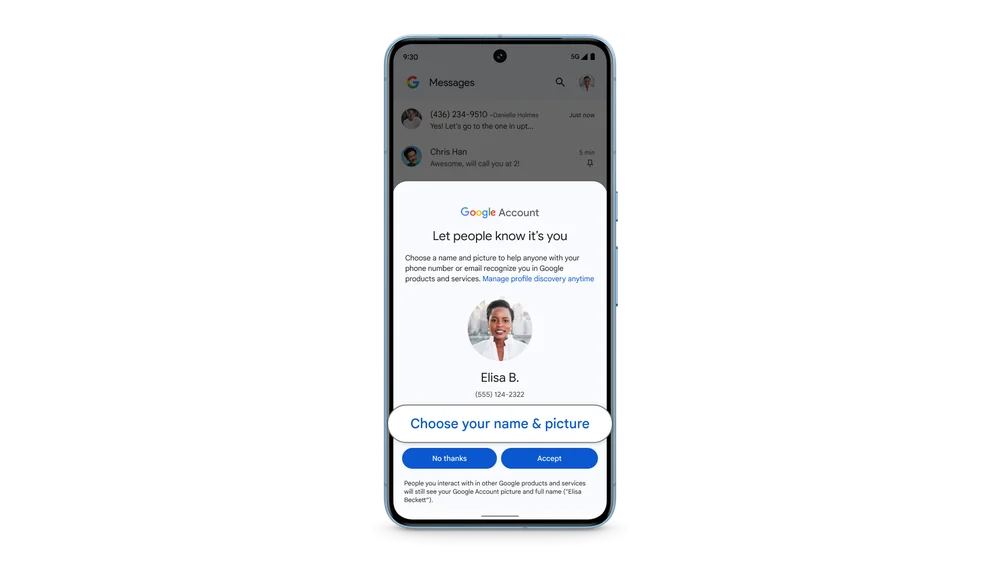
Customize your profile name and picture linked to your phone number, enhancing your identity across Google services. This feature is especially useful in group chats, helping you recognize participants easily.
I’m so close to switching
For the moment, these new features are rolling out to the Beta testers of Google Messages. You can sign up for it pretty easy by following Google’s support page instructions, and after your app updates, you’ll have these new features. They haven’t yet arrived for me, so I haven’t been able to test any of them out to see if these are one-way features. I’d assume if you opt-in to the Beta, get the update, and send a message with one of these new effects, the recipient will experience it with or without the update. But again, I’ve not tested to be certain.
Soon enough, however, these features will all be part of the Google Messages experience, and additions like these are the type of thing that make me want to use this app more than I do. When Google’s own Allo and Hangouts were retired, I finally threw in the towel and went with WhatsApp and have been using it ever since. But I’d love to be a Google Messages guy at some point in the future. Perhaps when Apple does roll RCS into iMessage and I can have a great chat experience across platforms with Google Messages, I’ll be ready to make the move. Until then, I’ll be continuing to watch the evolution of this app/service from Google with hopeful anticipation.
SUBSCRIBE TO UPSTREAM
Get Chrome Unboxed delivered straight to your inbox
Upstream is our flagship, curated newsletter with the top stories, most click-worthy deals, giveaways, and trending articles from Chrome Unboxed sent directly to your inbox a few times a week. Join 31,000+ subscribers.

