
• Skip to main content
  • Skip to primary sidebar
  • Deals
  • Features
  • Guides
  • Chromebooks
  • Videos
  • Podcast
  • More +
    • Reviews
    • Unboxing
    • Upcoming Devices
    • Chromebook Plus
    • Chrome
    • ChromeOS
    • Chrome OS Flex
  • Search
  • Sign Up
  • Log In
Chrome Unboxed – The Latest Chrome OS News

Chrome Unboxed - The Latest Chrome OS News

A Space for All Things Chrome, Google, and More!

  • Deals
  • Features
  • Guides
  • Chromebooks
  • Videos
  • Podcast
  • More +
    • Reviews
    • Unboxing
    • Upcoming Devices
    • Chromebook Plus
    • Chrome
    • ChromeOS
    • Chrome OS Flex
  • Search
  • Sign Up
  • Log In

Why I’m switching to the Google Keep Android app on my Chromebook

December 12, 2022 By Robby Payne View Comments

Google Keep has been a long-standing service that I and many others like me have learned to lean on daily. Perhaps not up there with Google’s big apps like Gmail, Photos, and Drive, Google Keep has still managed to carve out its own place in the larger ecosystem and it makes for a fantastic tool across many tasks.

From jotting down notes to creating lists to using it as a digital clipboard across devices, Google Keep has proven that a simpler approach is sometimes exactly what is called for. Though it has changed bit by bit over the years, the Google Keep I use today is quite similar to the one that launched years ago, and I’m glad Google hasn’t clouded the waters with needless features and bloat.

Xremove ads

A worthwhile addition

A new addition was made recently to the Android app version of Keep, however, that makes me quite envious when using my desktop PWA version: a split-panel view. I know it is simple, but a simple app tends to get simple, useful updates and this latest one is most definitely useful.
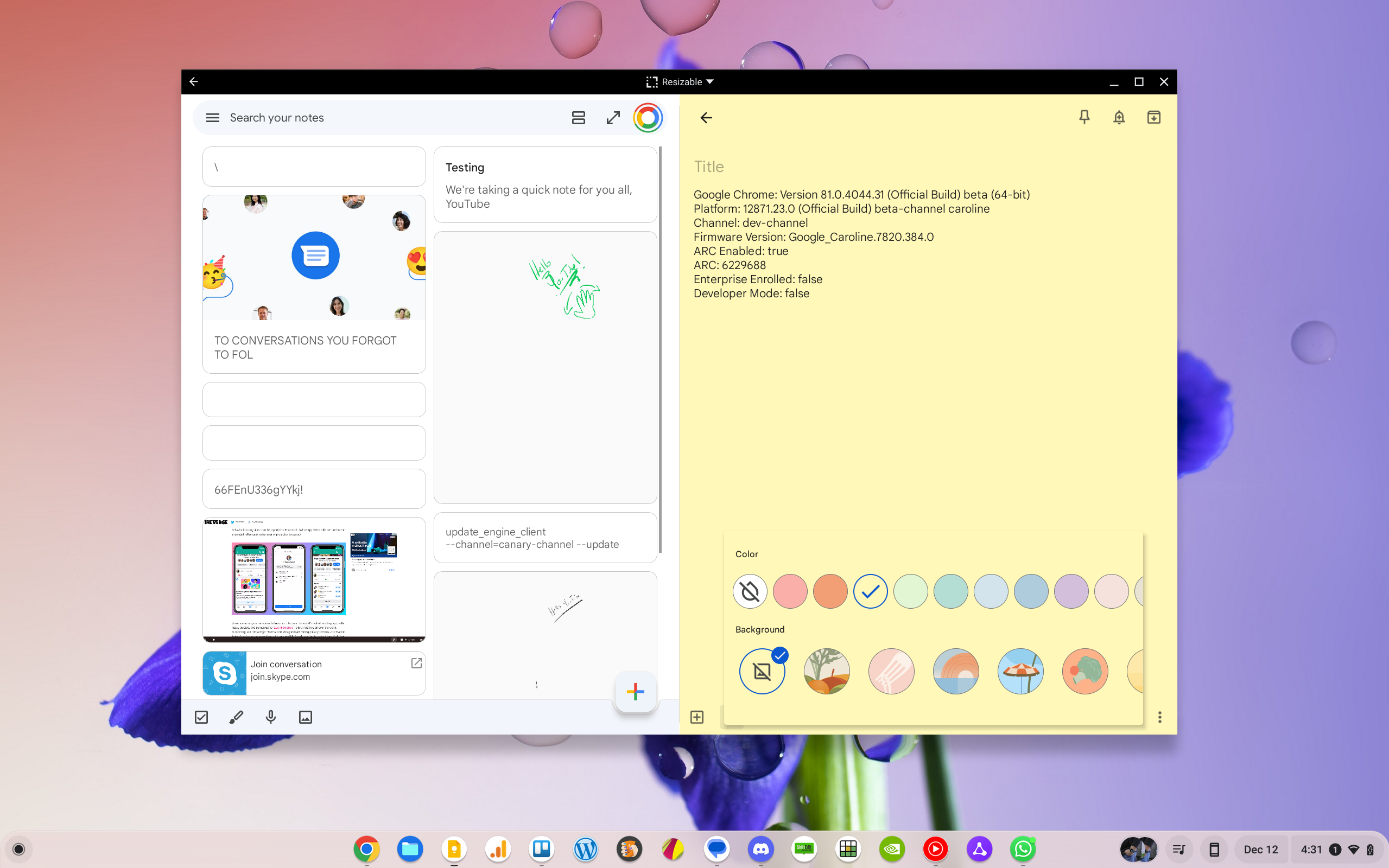
Split-panel view in Google Keep

With the split-panel view, Keep becomes even easier to navigate, allowing me to click a note on the left side and see/edit that note on the right. This allows me to be engaged in a note while scrolling other unopened notes at the same time.

Featured Videos

Xremove ads

I recently took this for a spin on my Chromebook, and after using it for a few minutes, I was sold. While I love the simplicity of Google Keep, this update adds better functionality while not getting in the way. Oh, and it can be turned off with a single click, too, so there’s no worries about being forced into the 2-panel view if you don’t want it.

But I feel like most people coming from messaging apps and email will immediatley feel comfortable with the change and decide that this is the better way to triage notes in Keep. I know that I have, and this now makes 2 Android apps that I’m ready to adopt into my daily workflow as replacements of the PWAs I’ve been using for years. The updates to the Keep and WhatsApp Android apps are very useful and could be leveraged in the PWA if the developers choose to do so, but until that happens, I think I’m sticking with the Android versions.

Join Chrome Unboxed Plus

Introducing Chrome Unboxed Plus – our revamped membership community. Join today at just $2 / month to get access to our private Discord, exclusive giveaways, AMAs, an ad-free website, ad-free podcast experience and more.

Xremove ads

Plus Monthly

$2/mo. after 7-day free trial

Pay monthly to support our independent coverage and get access to exclusive benefits.

Start free trial

Plus Annual

$20/yr. after 7-day free trial

Xremove ads

Pay yearly to support our independent coverage and get access to exclusive benefits.

Start free trial

Our newsletters are also a great way to get connected. Subscribe here!

Click here to learn more and for membership FAQ

Filed Under: Apps

About Robby Payne

As the founder of Chrome Unboxed, Robby has been reviewing Chromebooks for over a decade. His passion for ChromeOS and the devices it runs on drives his relentless pursuit to find the best Chromebooks, best services, and best tips for those looking to adopt ChromeOS and those who've already made the switch.

Primary Sidebar

Xremove ads

Deals

The best Chromebook deals today

By Robby Payne
December 29, 2025

The Acer Chromebook Plus Spin 514 hits an all-time low price of $499

By Robby Payne
December 23, 2025

Save $220 on the powerful, versatile Acer Chromebook Plus Spin 714

By Robby Payne
December 10, 2025

The Google Pixel 9a just hit its lowest price ever at $150 off

By Joseph Humphrey
December 8, 2025

At $349, this Lenovo Chromebook Plus is one of the best value laptops you can buy

By Joseph Humphrey
December 3, 2025

More Deals

Xremove ads

Reviews

Acer Chromebook Plus Spin 514 Review: Kompanio Ultra power in a convertible

By Robby Payne
December 24, 2025

My review after 6 weeks with the Lenovo Chromebook Plus 14 [VIDEO]

By Robby Payne
August 11, 2025

One week with the best small Android tablet you can buy, and I’m sold

By Robby Payne
May 9, 2025

Best Chromebooks of 2024 [VIDEO]

By Robby Payne
November 28, 2024

Samsung Galaxy Chromebook Plus Review: Samsung is back! [VIDEO]

By Robby Payne
October 28, 2024

More Reviews

Xremove ads

Guides

This Chromebook trackpad shortcut is definitely not new, but is blowing my mind

By Robby Payne
March 11, 2024

How to reduce broadcast delay on YouTube TV to stop live spoilers

By Robby Payne
December 8, 2023

Windows PC keyboard and Chromebook

How to use a Windows keyboard with a Chromebook

By Joseph Humphrey
December 8, 2023

How reset and revert your Chromebook to the previous version of Chrome OS

By Robby Payne
November 29, 2023

My Chromebook Plus features disappeared: here’s how I fixed it

By Robby Payne
November 24, 2023

More Guides

TWITTER · FACEBOOK · INSTAGRAM · YOUTUBE · EMAIL · ABOUT

Copyright © 2025 · Chrome Unboxed · Chrome is a registered trademark of Google Inc.
We are participants in various affiliate advertising programs designed to provide a means for us to earn fees by linking to affiliated sites.

PRIVACY POLICY