
• Skip to main content
  • Skip to primary sidebar
  • Deals
  • Features
  • Guides
  • Chromebooks
  • Videos
  • Podcast
  • More +
    • Reviews
    • Unboxing
    • Upcoming Devices
    • Chromebook Plus
    • Chrome
    • ChromeOS
    • Chrome OS Flex
  • Search
  • Sign Up
  • Log In
Chrome Unboxed – The Latest Chrome OS News

Chrome Unboxed - The Latest Chrome OS News

A Space for All Things Chrome, Google, and More!

  • Deals
  • Features
  • Guides
  • Chromebooks
  • Videos
  • Podcast
  • More +
    • Reviews
    • Unboxing
    • Upcoming Devices
    • Chromebook Plus
    • Chrome
    • ChromeOS
    • Chrome OS Flex
  • Search
  • Sign Up
  • Log In

Google just dropped a new AI dictation app on iOS, and it looks like Android is coming soon

April 6, 2026 By Joseph Humphrey View Comments

Support our independent tech coverage. Chrome Unboxed is written by real people, for real people—not search algorithms. Join Chrome Unboxed Plus for just $2 a month to get an ad-free experience, access to our private Discord, and more. Learn more about membership here.
START FREE TRIAL (MONTHLY)START FREE TRIAL (ANNUAL)

Google just released a brand new offline-first dictation app called Google AI Edge Eloquent. It is currently available on iOS and is designed to take on the growing market of AI-powered transcription services like Wispr Flow. It offers a surprisingly robust set of features completely for free and it looks like it’s coming to Android soon, too.

Once you download the app’s Gemma-based models, you can start dictating entirely on your device. The app shows a live transcription as you speak, and when you hit pause, it automatically filters out filler words like “um” and “ah” to polish your text. From there, you have options below the transcript to transform the text into formats like key points, formal, short, or long.

Xremove ads
Check out Today’s Best Chomebook Deals

You can keep the app strictly offline for local-only processing, but there is also a cloud mode that utilizes Gemini models for heavier text cleanup. The app even allows you to import specific keywords, names, and jargon from your Gmail account or manually add your own custom words so it never mishears your frequent vocabulary. It also keeps a detailed history of your transcription sessions, showing your words-per-minute speed and total word count.

The Android version is likely coming soon

While the app is currently only available on Apple devices, there is a lot of evidence pointing to an Android version being right around the corner. Interestingly, the App Store description heavily references an upcoming Android release and its seamless system integration. According to the description, Android users will be able to set Eloquent as their default keyboard for system-wide access across any text field, and it mentions a floating button feature that will allow for easy access to transcription from anywhere.

Featured Videos

Xremove ads

Also, while I was researching this article, I noticed there was a prominent “Download for Android” button sitting right at the top of the page. It was inactive, but it was a clear sign that a Google Play Store launch was imminent.
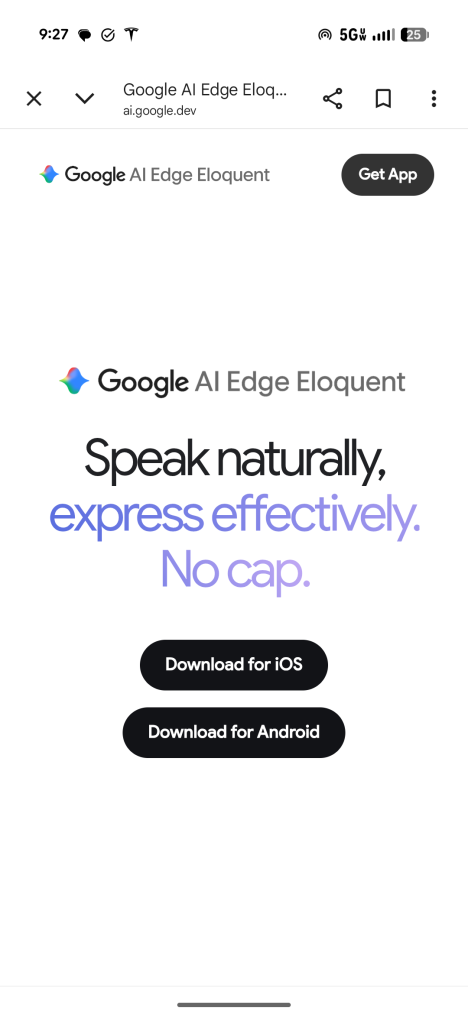
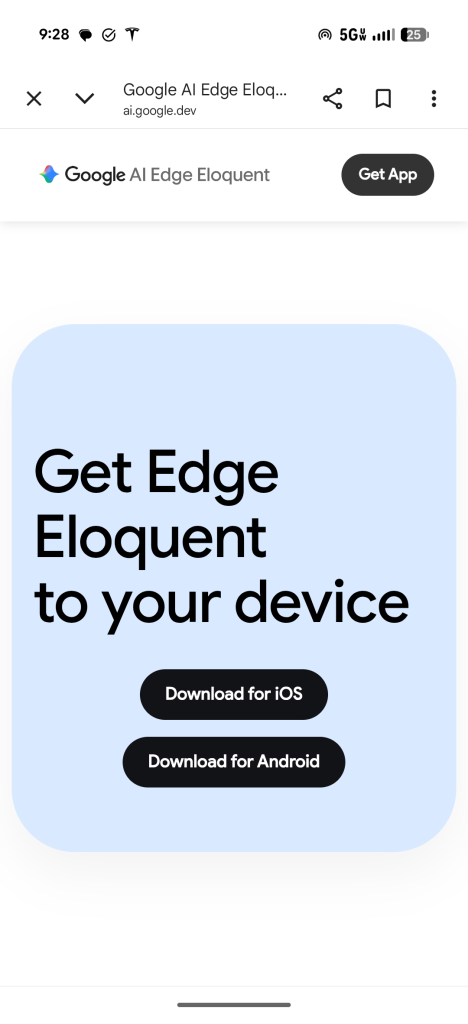
That button has now completely vanished from the site. It seems whoever handles the site for this experimental app realized the button was pushed live a bit too early and quickly pulled it down. So, I would bet the Android version is coming soon!

SUBSCRIBE TO UPSTREAM

Get Chrome Unboxed delivered straight to your inbox

Upstream is our flagship, curated newsletter with the top stories, most click-worthy deals, giveaways, and trending articles from Chrome Unboxed sent directly to your inbox a few times a week. Join 31,000+ subscribers.

Xremove ads
SUBSCRIBE HERE!

Filed Under: Android, Apps, News

About Joseph Humphrey

Joe has been a part of Chrome Unboxed since 2016 when he started helping Robby produce YouTube videos. Although normally behind the scenes, Joe has spent countless hours editing reviews and unboxings of many, many Chromebooks. Now a Partner in Unboxed Media, Joe is constantly thinking strategically about the Chromebook industry and how Chrome Unboxed can continue to innovate in the space.

Primary Sidebar

Xremove ads

Deals

Massive Deal Alert: The Acer Chromebook Plus Spin 714 just hit an all-time low $499

By Robby Payne
April 1, 2026

The best Chromebook deals today

By Robby Payne
March 30, 2026

The Acer Chromebook Plus Spin 714 hits a new all-time low at $270 off

By Robby Payne
March 25, 2026

You can score $40 off Google’s battery-powered Nest Doorbell right now

By Joseph Humphrey
March 20, 2026

The touchscreen Lenovo Chromebook Slim 3 is a steal at under $200

By Robby Payne
March 16, 2026

More Deals

Xremove ads

Reviews

Acer Chromebook Plus Spin 514 Review: Kompanio Ultra power in a convertible

By Robby Payne
December 24, 2025

My review after 6 weeks with the Lenovo Chromebook Plus 14 [VIDEO]

By Robby Payne
August 11, 2025

One week with the best small Android tablet you can buy, and I’m sold

By Robby Payne
May 9, 2025

Best Chromebooks of 2024 [VIDEO]

By Robby Payne
November 28, 2024

Samsung Galaxy Chromebook Plus Review: Samsung is back! [VIDEO]

By Robby Payne
October 28, 2024

More Reviews

Xremove ads

Guides

This Chromebook trackpad shortcut is definitely not new, but is blowing my mind

By Robby Payne
March 11, 2024

How to reduce broadcast delay on YouTube TV to stop live spoilers

By Robby Payne
December 8, 2023

Windows PC keyboard and Chromebook

How to use a Windows keyboard with a Chromebook

By Joseph Humphrey
December 8, 2023

How reset and revert your Chromebook to the previous version of Chrome OS

By Robby Payne
November 29, 2023

My Chromebook Plus features disappeared: here’s how I fixed it

By Robby Payne
November 24, 2023

More Guides

TWITTER · FACEBOOK · INSTAGRAM · YOUTUBE · EMAIL · ABOUT

Copyright © 2026 · Chrome Unboxed · Chrome is a registered trademark of Google Inc.
We are participants in various affiliate advertising programs designed to provide a means for us to earn fees by linking to affiliated sites.

PRIVACY POLICY